We use cookies to improve security, personalize the user experience, enhance our marketing activities (including cooperating with our marketing partners) and for other business use.
Click "here" to read our Cookie Policy. By clicking "Accept" you agree to the use of cookies. Read less
Read more
Accept
Loading
Form preview
  • US Legal Forms
  • Form Library
  • More Forms
  • More Multi-State Forms
  • Lausd Human Resources Single Subject Credential Application

Get Lausd Human Resources Single Subject Credential Application

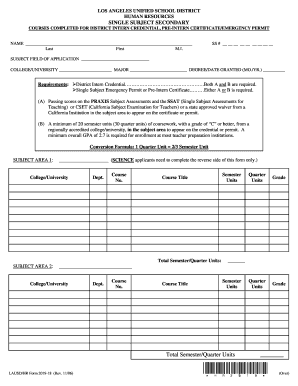
Last First M.I. SS # SUBJECT FIELD OF APPLICATION COLLEGE/UNIVERSITY MAJOR DEGREE/DATE GRANTED (MO./YR.) Requirements: District Intern Credential .Both A and B are required. Single Subject Emergency Permit or Pre-Intern Certificate Either A or B is required. (A) P.

How it works

  1. Open form

    Open form follow the instructions

  2. Easily sign form

    Easily sign the form with your finger

  3. Share form

    Send filled & signed form or save

How to fill out and sign LAUSD Human Resources Single Subject Credential Application online?

Get your online template and fill it in using progressive features. Enjoy smart fillable fields and interactivity.Follow the simple instructions below:

The times of terrifying complicated legal and tax forms are over. With US Legal Forms submitting legal documents is anxiety-free. The best editor is already close at hand offering you a range of useful instruments for filling out a LAUSD Human Resources Single Subject Credential Application. These tips, combined with the editor will help you with the whole process.

  1. Hit the orange Get Form option to start editing and enhancing.
  2. Switch on the Wizard mode in the top toolbar to obtain extra suggestions.
  3. Fill each fillable area.
  4. Be sure the details you add to the LAUSD Human Resources Single Subject Credential Application is up-to-date and correct.
  5. Add the date to the record with the Date option.
  6. Select the Sign icon and make a signature. You will find three available options; typing, drawing, or uploading one.
  7. Double-check every area has been filled in properly.
  8. Click Done in the top right corne to export the sample. There are several choices for getting the doc. An attachment in an email or through the mail as a hard copy, as an instant download.

We make completing any LAUSD Human Resources Single Subject Credential Application much easier. Use it now!

Tips on how to fill out, edit and sign LAUSD Human Resources Single Subject Credential Application online

How to fill out and sign LAUSD Human Resources Single Subject Credential Application online?

Get your online template and fill it in using progressive features. Enjoy smart fillable fields and interactivity.Follow the simple instructions below:

The times of terrifying complicated legal and tax forms are over. With US Legal Forms submitting legal documents is anxiety-free. The best editor is already close at hand offering you a range of useful instruments for filling out a LAUSD Human Resources Single Subject Credential Application. These tips, combined with the editor will help you with the whole process.

  1. Hit the orange Get Form option to start editing and enhancing.
  2. Switch on the Wizard mode in the top toolbar to obtain extra suggestions.
  3. Fill each fillable area.
  4. Be sure the details you add to the LAUSD Human Resources Single Subject Credential Application is up-to-date and correct.
  5. Add the date to the record with the Date option.
  6. Select the Sign icon and make a signature. You will find three available options; typing, drawing, or uploading one.
  7. Double-check every area has been filled in properly.
  8. Click Done in the top right corne to export the sample. There are several choices for getting the doc. An attachment in an email or through the mail as a hard copy, as an instant download.

We make completing any LAUSD Human Resources Single Subject Credential Application much easier. Use it now!

How to edit LAUSD Human Resources Single Subject Credential Application: customize forms online

Find the correct LAUSD Human Resources Single Subject Credential Application template and modify it on the spot. Simplify your paperwork with a smart document editing solution for online forms.

Your day-to-day workflow with documents and forms can be more efficient when you have everything you need in one place. For example, you can find, get, and modify LAUSD Human Resources Single Subject Credential Application in a single browser tab. If you need a particular LAUSD Human Resources Single Subject Credential Application, it is simple to find it with the help of the smart search engine and access it right away. You don’t have to download it or search for a third-party editor to modify it and add your information. All the tools for efficient work go in a single packaged solution.

This modifying solution allows you to personalize, fill, and sign your LAUSD Human Resources Single Subject Credential Application form right on the spot. Once you see an appropriate template, click on it to go to the modifying mode. Once you open the form in the editor, you have all the needed instruments at your fingertips. It is easy to fill in the dedicated fields and remove them if needed with the help of a simple yet multifunctional toolbar. Apply all the modifications right away, and sign the form without leaving the tab by merely clicking the signature field. After that, you can send or print your file if required.

Make more custom edits with available instruments.

  • Annotate your file with the Sticky note tool by placing a note at any spot within the document.
  • Add necessary graphic components, if needed, with the Circle, Check, or Cross instruments.
  • Modify or add text anywhere in the document using Texts and Text box instruments. Add content with the Initials or Date tool.
  • Modify the template text with the Highlight and Blackout, or Erase instruments.
  • Add custom graphic components with the Arrow and Line, or Draw tools.

Discover new options in efficient and easy paperwork. Find the LAUSD Human Resources Single Subject Credential Application you need in minutes and fill it in in the same tab. Clear the mess in your paperwork once and for all with the help of online forms.

Get form

Experience a faster way to fill out and sign forms on the web. Access the most extensive library of templates available.
Get form

Related content

Single Subject Teaching Credential Requirements...
Applicants will have five years during which to use passing examination scores toward...
Learn more
Credential Programs
LACOE offers opportunities for educators to pursue credential programs in administration...
Learn more
Kinsey, Sex and Fraud - Daum
It calls for reevaluation of the greatest single human sexuality research project ever...
Learn more

Related links form

HE-696 HOME OCCUPATION PERMIT APPLICATION Request For Deposit And Account Transfer In Case Of Death Pulse Sign-up Form Feed Jackson Fall Festival Food Booth Reservation Form

Questions & Answers

Get answers to your most pressing questions about US Legal Forms API.

Contact support

LAUSD receives approximately $13,000 per student in funding, which covers various educational services. This includes teacher salaries, resources for classrooms, and student support programs. Understanding this financial aspect is beneficial, especially if you are preparing your LAUSD Human Resources Single Subject Credential Application and want to be informed on how the district allocates its funds.

As of now, specific details regarding LAUSD's budget and potential raises in 2025 are not finalized. However, the district continuously evaluates its financial standing to ensure teacher compensation remains competitive. If you are closely monitoring this to support your LAUSD Human Resources Single Subject Credential Application, staying updated with official announcements or district meetings can provide crucial information.

To obtain a single subject teaching credential in California, you must complete several steps. First, you need a bachelor's degree with a major relevant to the subject you wish to teach. Additionally, you must complete a teacher preparation program that includes both coursework and student teaching. Lastly, you will need to pass the required exams, which are crucial for the LAUSD Human Resources Single Subject Credential Application.

The $5,000 stipend for LAUSD is an incentive for new teachers who complete their single subject credential requirements. This financial support aims to attract qualified educators to schools in high-need areas. By applying through the LAUSD Human Resources Single Subject Credential Application, you can learn how to qualify for this stipend and enhance your teaching journey. It’s a great opportunity for those entering this rewarding profession.

Yes, you can take the CBEST without a degree. However, passing the California Basic Educational Skills Test (CBEST) is required to apply for your single subject credential later. The LAUSD Human Resources Single Subject Credential Application suggests that you prepare adequately for the CBEST, as it assesses your reading, writing, and math skills essential for teaching. Having a solid grasp of these fundamentals will support your teaching career.

The process for obtaining a single subject credential in California typically takes several months. Candidates must complete their educational requirements and submit the LAUSD Human Resources Single Subject Credential Application. Once your application is submitted, it may take additional time for processing, including background checks and review of documents. Planning ahead can help you navigate this timeline effectively.

In West Virginia, you typically need a teaching degree to secure a teaching position. However, there are alternative pathways available for individuals without traditional teaching degrees, such as emergency permits. If you are interested, these options may allow you to enter the classroom while pursuing further qualifications. The LAUSD Human Resources Single Subject Credential Application can provide insight into credentialing in California, which may differ from West Virginia's requirements.

The process for securing a single subject teaching credential includes completing a teacher preparation program and passing specific exams required by your state. You should also gather all necessary documentation before starting your LAUSD Human Resources Single Subject Credential Application. This process ensures you meet the qualification standards required to teach in your subject area. Be sure to check for any updates or changes in requirements that may affect your application.

To obtain a single subject teaching credential in California, you must complete an accredited teacher preparation program. This program typically includes coursework in pedagogy and a student teaching component. After finishing your program, you will need to pass necessary exams, such as the California Subject Examinations for Teachers (CSET). Finally, you can submit your LAUSD Human Resources Single Subject Credential Application to officially receive your credential.

You can contact LAUSD Human Resources through various methods. Besides calling their main phone line, you can also reach out via email or visit their website for more details. Whether you have questions about the LAUSD Human Resources Single Subject Credential Application or need assistance, their team is prepared to support you effectively. Don't hesitate to connect with them for your HR needs.

Get This Form Now!

Use professional pre-built templates to fill in and sign documents online faster. Get access to thousands of forms.
Get form
If you believe that this page should be taken down, please follow our DMCA take down processhere.

Industry-leading security and compliance

US Legal Forms protects your data by complying with industry-specific security standards.
  • In businnes since 1997
    25+ years providing professional legal documents.
  • Accredited business
    Guarantees that a business meets BBB accreditation standards in the US and Canada.
  • Secured by Braintree
    Validated Level 1 PCI DSS compliant payment gateway that accepts most major credit and debit card brands from across the globe.
Get LAUSD Human Resources Single Subject Credential Application
Get form
Form Packages
Adoption
Bankruptcy
Contractors
Divorce
Home Sales
Employment
Identity Theft
Incorporation
Landlord Tenant
Living Trust
Name Change
Personal Planning
Small Business
Wills & Estates
Packages A-Z
Form Categories
Affidavits
Bankruptcy
Bill of Sale
Corporate - LLC
Divorce
Employment
Identity Theft
Internet Technology
Landlord Tenant
Living Wills
Name Change
Power of Attorney
Real Estate
Small Estates
Wills
All Forms
Forms A-Z
Form Library
Customer Service
Terms of Service
Privacy Notice
Legal Hub
Content Takedown Policy
Bug Bounty Program
About Us
Help Portal
Legal Resources
Blog
Affiliates
Contact Us
Delete My Account
Site Map
Industries
Forms in Spanish
Localized Forms
State-specific Forms
Forms Kit
Legal Guides
Real Estate Handbook
All Guides
Prepared for You
Notarize
Incorporation services
Our Customers
For Consumers
For Small Business
For Attorneys
Our Sites
US Legal Forms
USLegal
FormsPass
pdfFiller
signNow
airSlate WorkFlow
DocHub
Instapage
Social Media
Call us now toll free:
+1 833 426 79 33
As seen in:
  • USA Today logo picture
  • CBC News logo picture
  • LA Times logo picture
  • The Washington Post logo picture
  • AP logo picture
  • Forbes logo picture
© Copyright 1997-2025
airSlate Legal Forms, Inc.
3720 Flowood Dr, Flowood, Mississippi 39232
Form Packages
Adoption
Bankruptcy
Contractors
Divorce
Home Sales
Employment
Identity Theft
Incorporation
Landlord Tenant
Living Trust
Name Change
Personal Planning
Small Business
Wills & Estates
Packages A-Z
Form Categories
Affidavits
Bankruptcy
Bill of Sale
Corporate - LLC
Divorce
Employment
Identity Theft
Internet Technology
Landlord Tenant
Living Wills
Name Change
Power of Attorney
Real Estate
Small Estates
Wills
All Forms
Forms A-Z
Form Library
Customer Service
Terms of Service
Privacy Notice
Legal Hub
Content Takedown Policy
Bug Bounty Program
About Us
Help Portal
Legal Resources
Blog
Affiliates
Contact Us
Delete My Account
Site Map
Industries
Forms in Spanish
Localized Forms
State-specific Forms
Forms Kit
Legal Guides
Real Estate Handbook
All Guides
Prepared for You
Notarize
Incorporation services
Our Customers
For Consumers
For Small Business
For Attorneys
Our Sites
US Legal Forms
USLegal
FormsPass
pdfFiller
signNow
airSlate WorkFlow
DocHub
Instapage
Social Media
Call us now toll free:
+1 833 426 79 33
As seen in:
  • USA Today logo picture
  • CBC News logo picture
  • LA Times logo picture
  • The Washington Post logo picture
  • AP logo picture
  • Forbes logo picture
© Copyright 1997-2025
airSlate Legal Forms, Inc.
3720 Flowood Dr, Flowood, Mississippi 39232