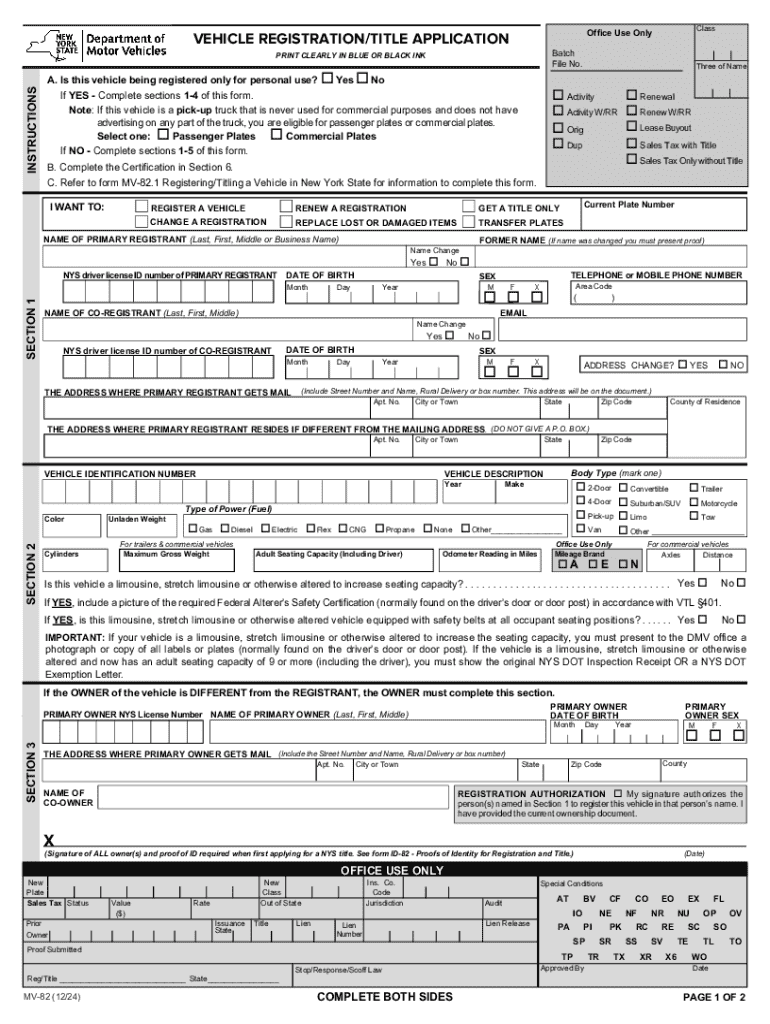
Batch File No. INSTRUCTIONS PRINT CLEARLY IN BLUE OR BLACK INK A. Is this vehicle being registered only for personal use? o Yes o No If YES - Complete sections 1-4 of this form. Note: If this vehicle.
Loading

Open form follow the instructions

Easily sign the form with your finger

Send filled & signed form or save
How to fill out and sign MV-82: VEHICLE REGISTRATION/TITLE APPLICATION (PDF) online?
Get your online template and fill it in using progressive features. Enjoy smart fillable fields and interactivity.Follow the simple instructions below:
The preparing of legal paperwork can be expensive and time-ingesting. However, with our pre-built online templates, things get simpler. Now, creating a MV-82: VEHICLE REGISTRATION/TITLE APPLICATION (PDF) takes a maximum of 5 minutes. Our state-specific browser-based blanks and simple guidelines eradicate human-prone errors.
Adhere to our easy steps to get your MV-82: VEHICLE REGISTRATION/TITLE APPLICATION (PDF) well prepared rapidly:
- Pick the web sample in the library.
- Complete all required information in the necessary fillable areas. The easy-to-use drag&drop graphical user interface makes it simple to include or move areas.
- Make sure everything is completed correctly, without any typos or lacking blocks.
- Apply your electronic signature to the page.
- Click on Done to confirm the changes.
- Save the document or print your copy.
- Submit immediately to the recipient.
Take advantage of the fast search and powerful cloud editor to create a precise MV-82: VEHICLE REGISTRATION/TITLE APPLICATION (PDF). Remove the routine and produce papers online!
Tips on how to fill out, edit and sign MV-82: VEHICLE REGISTRATION/TITLE APPLICATION (PDF) online
How to fill and sign MV-82: VEHICLE REGISTRATION/TITLE APPLICATION (PDF)
Get your online template and fill it in using progressive features. Enjoy smart fillable fields and interactivity.Follow the simple instructions below:
The preparing of legal paperwork can be expensive and time-ingesting. However, with our pre-built online templates, things get simpler. Now, creating a MV-82: VEHICLE REGISTRATION/TITLE APPLICATION (PDF) takes a maximum of 5 minutes. Our state-specific browser-based blanks and simple guidelines eradicate human-prone errors.
Adhere to our easy steps to get your MV-82: VEHICLE REGISTRATION/TITLE APPLICATION (PDF) well prepared rapidly:
- Pick the web sample in the library.
- Complete all required information in the necessary fillable areas. The easy-to-use drag&drop graphical user interface makes it simple to include or move areas.
- Make sure everything is completed correctly, without any typos or lacking blocks.
- Apply your electronic signature to the page.
- Click on Done to confirm the changes.
- Save the document or print your copy.
- Submit immediately to the recipient.
Take advantage of the fast search and powerful cloud editor to create a precise MV-82: VEHICLE REGISTRATION/TITLE APPLICATION (PDF). Remove the routine and produce papers online!
How to edit MV-82: VEHICLE REGISTRATION/TITLE APPLICATION (PDF)
Finishing papers is more comfortable with smart online tools. Eliminate paperwork with easily downloadable MV-82: VEHICLE REGISTRATION/TITLE APPLICATION (PDF) templates you can modify online and print.
Preparing documents and forms must be more accessible, whether it is a daily element of one’s profession or occasional work. When a person must file a MV-82: VEHICLE REGISTRATION/TITLE APPLICATION (PDF), studying regulations and guides on how to complete a form correctly and what it should include might take a lot of time and effort. Nevertheless, if you find the right MV-82: VEHICLE REGISTRATION/TITLE APPLICATION (PDF) template, completing a document will stop being a challenge with a smart editor at hand.
Discover a broader selection of functions you can add to your document flow routine. No need to print, fill out, and annotate forms manually. With a smart modifying platform, all of the essential document processing functions will always be at hand. If you want to make your work process with MV-82: VEHICLE REGISTRATION/TITLE APPLICATION (PDF) forms more efficient, find the template in the catalog, select it, and see a less complicated method to fill it in.
- If you need to add text in a random part of the form or insert a text field, use the Text and Text field instruments and expand the text in the form as much as you require.
- Take advantage of the Highlight instrument to stress the important aspects of the form. If you need to cover or remove some text parts, use the Blackout or Erase tools.
- Customize the form by adding default graphic components to it. Use the Circle, Check, and Cross tools to add these elements to the forms, if required.
- If you need additional annotations, use the Sticky note tool and put as many notes on the forms page as required.
- If the form needs your initials or date, the editor has tools for that too. Minimize the chance of errors by using the Initials and Date instruments.
- It is also possible to add custom graphic components to the form. Use the Arrow, Line, and Draw tools to customize the file.
The more tools you are familiar with, the simpler it is to work with MV-82: VEHICLE REGISTRATION/TITLE APPLICATION (PDF). Try the solution that offers everything necessary to find and modify forms in a single tab of your browser and forget about manual paperwork.
How to fill and sign MV-82: VEHICLE REGISTRATION/TITLE APPLICATION (PDF)
Get your online template and fill it in using progressive features. Enjoy smart fillable fields and interactivity.Follow the simple instructions below:
The preparing of legal paperwork can be expensive and time-ingesting. However, with our pre-built online templates, things get simpler. Now, creating a MV-82: VEHICLE REGISTRATION/TITLE APPLICATION (PDF) takes a maximum of 5 minutes. Our state-specific browser-based blanks and simple guidelines eradicate human-prone errors.
Adhere to our easy steps to get your MV-82: VEHICLE REGISTRATION/TITLE APPLICATION (PDF) well prepared rapidly:
- Pick the web sample in the library.
- Complete all required information in the necessary fillable areas. The easy-to-use drag&drop graphical user interface makes it simple to include or move areas.
- Make sure everything is completed correctly, without any typos or lacking blocks.
- Apply your electronic signature to the page.
- Click on Done to confirm the changes.
- Save the document or print your copy.
- Submit immediately to the recipient.
Take advantage of the fast search and powerful cloud editor to create a precise MV-82: VEHICLE REGISTRATION/TITLE APPLICATION (PDF). Remove the routine and produce papers online!
Experience a faster way to fill out and sign forms on the web. Access the most extensive library of templates available.
Related content
MV-82: Vehicle Registration/Title Application (PDF). English. Use this form to register a...
To apply for registration, you must complete a Vehicle Registration/Title Application...
registration is permanent and not subject to renewal. - Enter the date the registration...
Get answers to your most pressing questions about US Legal Forms API.
How to fill out DMV MV-82?
Filling out the DMV MV-82 form requires careful attention to detail. Begin with accurate data about your vehicle, personal identification, and the purpose of the application. It's essential to provide complete and clear information in each field to avoid unnecessary delays. USLegalForms offers resources that can guide you through this process smoothly.
What is the MV-82 form for ny DMV?
The MV-82 form for the NY DMV is crucial for individuals looking to register a vehicle or apply for a title. It captures essential vehicle and owner information and facilitates the legal recognition of your vehicle. Having this form properly completed streamlines the registration process. Access it as a MV-82: VEHICLE REGISTRATION/TITLE APPLICATION (PDF) on the New York DMV's official site.
How do I get a copy of my Utah vehicle registration?
To obtain a copy of your Utah vehicle registration, you can visit the Utah DMV website or go to a local DMV office. You will need to provide specific details such as your license plate number or VIN to access your record. Alternatively, you can explore online services that facilitate this process. For similar requests in New York, consider using the MV-82: VEHICLE REGISTRATION/TITLE APPLICATION (PDF).
What's the most common mistake when filling out DMV forms?
The most common mistake when filling out DMV forms, including the MV-82, is providing incorrect or incomplete information. Users often overlook vital details, such as vehicle identification numbers. This can lead to delays in processing your application. To minimize errors, use USLegalForms as your guide to ensure all required fields are filled correctly.
How to fill out mv-82 form?
To fill out the MV-82 form, start by providing accurate information about your vehicle, including make, model, and VIN. Next, include your personal information and any relevant details regarding the owner. Make sure to double-check all entries to avoid mistakes. After completing the MV-82: VEHICLE REGISTRATION/TITLE APPLICATION (PDF), submit it to your local DMV.
What is a mv-82 form ny DMV?
The MV-82 form is the Vehicle Registration and Title Application used by the New York DMV. It allows you to register a new vehicle, transfer ownership, or apply for a title. This form is essential for ensuring your vehicle is legally recognized. You can easily find it as a PDF on official DMV resources.
How to remove lien from car title in NY?
To remove a lien from your car title in NY, you must obtain a lien release from the lienholder. Once you have this document, complete the MV-82: VEHICLE REGISTRATION/TITLE APPLICATION (PDF) and submit it along with the lien release to the DMV. This process ensures that your title is updated to reflect the removal of the lien, allowing you full ownership.
Can I download DMV forms?
Yes, you can download DMV forms, including the MV-82: VEHICLE REGISTRATION/TITLE APPLICATION (PDF), directly from the official DMV website. This option allows you to fill out the necessary information at your convenience. Once completed, you can print and submit the form to your local DMV office.
How to fill out a title and registration application?
To fill out a title and registration application, such as the MV-82: VEHICLE REGISTRATION/TITLE APPLICATION (PDF), collect all necessary documents before starting. Carefully read the application instructions to understand each required field. Fill out the application clearly, making sure to double-check your entries for accuracy. Utilizing platforms like US Legal Forms can simplify this process, providing templates and assistance to ensure you meet all requirements.
How to properly fill out a certificate of title?
Filling out a certificate of title requires attention to detail. Begin by entering the vehicle's identification number, owner’s name, and address accurately. Ensure that signatures are in the correct spots and that you complete all required fields for a smooth transaction. If you need more guidance, you can find resources on platforms like US Legal Forms that support you in completing your title correctly.
Use professional pre-built templates to fill in and sign documents online faster. Get access to thousands of forms.
If you believe that this page should be taken down, please follow our DMCA take down process here.