Loading
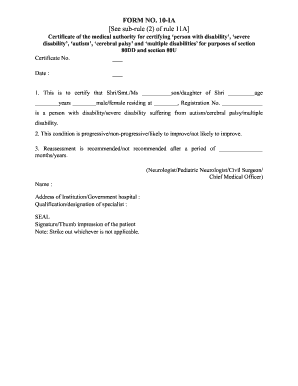
Get In Form 10-ia
How it works
-

Open form follow the instructions
-

Easily sign the form with your finger
-

Send filled & signed form or save
How to fill out the IN Form 10-IA online
Filling out the IN Form 10-IA is essential for certifying a person with a disability for various tax benefits. This guide provides clear, step-by-step instructions to help users complete the form online successfully.
Follow the steps to complete the form accurately.
- Press the ‘Get Form’ button to access the form and open it in your preferred editor.
- Begin filling in the certificate number and the date in the designated fields at the top of the form. Ensure that these details are accurate.
- In the section that certifies the individual, input the name of the person. Use the appropriate title (Shri/Smt./Ms) and include their parent's name, age, gender, and address in the respective fields. Don’t forget to fill in the registration number.
- Indicate the type of disability by selecting from the options provided: ‘person with disability,’ ‘severe disability,’ ‘autism,’ ‘cerebral palsy,’ or ‘multiple disabilities.’
- Specify the nature of the condition using the options: progressive, non-progressive, likely to improve, or not likely to improve.
- In the reassessment section, indicate whether reassessment is recommended or not and specify the time period for reassessment in months or years.
- Record the details of the certifying medical authority: include their name, qualification, designation, and address of the institution or government hospital.
- Ensure the medical authority affixes their seal and provides their signature or thumb impression of the patient in the designated areas.
- Review the completed form carefully for accuracy and completeness. Once verified, you can save your changes, download a copy, or print and share the document as needed.
Complete your IN Form 10-IA online to ensure proper certification and access to necessary benefits.
Filing an income tax return in the old regime after the due date requires submitting the IN Form 10-IA along with any applicable late fees. It's crucial to gather your financial documents and calculate your tax liability accurately. Seeking assistance from a tax service or using online platforms can ensure your return is filed correctly.