We use cookies to improve security, personalize the user experience, enhance our marketing activities (including cooperating with our marketing partners) and for other business use.
Click "here" to read our Cookie Policy. By clicking "Accept" you agree to the use of cookies. Read less
Read more
Accept
Loading
Form preview
  • US Legal Forms
  • Form Library
  • More Forms
  • More Multi-State Forms
  • 2010 Pensacola Senior Games Registration Form

Get 2010 Pensacola Senior Games Registration Form

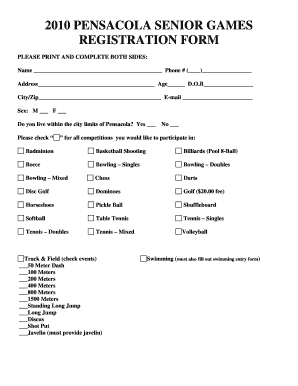
Address Age D.O.B City/Zip E-mail Sex: M F Do you live within the city limits of Pensacola? Yes Please check No for all competitions you would like to participate in: Badminton Basketball Shooting Billiards (Pool 8-Ball) Bocce Bowling Singles Bowling Doubles Bowling Mixed Chess Darts Disc Golf Dominoes Gol.

How it works

  1. Open form

    Open form follow the instructions

  2. Easily sign form

    Easily sign the form with your finger

  3. Share form

    Send filled & signed form or save

How to fill out and sign 2010 PENSACOLA SENIOR GAMES REGISTRATION FORM online?

Get your online template and fill it in using progressive features. Enjoy smart fillable fields and interactivity.Follow the simple instructions below:

The times of frightening complicated tax and legal forms are over. With US Legal Forms the process of creating official documents is anxiety-free. A powerhouse editor is already at your fingertips providing you with an array of beneficial instruments for filling out a 2010 PENSACOLA SENIOR GAMES REGISTRATION FORM. These guidelines, together with the editor will guide you through the whole process.

  1. Hit the orange Get Form option to start editing and enhancing.
  2. Turn on the Wizard mode on the top toolbar to obtain more suggestions.
  3. Fill in every fillable field.
  4. Ensure that the details you add to the 2010 PENSACOLA SENIOR GAMES REGISTRATION FORM is up-to-date and accurate.
  5. Indicate the date to the document with the Date function.
  6. Click on the Sign icon and create a digital signature. There are three available options; typing, drawing, or capturing one.
  7. Be sure that every field has been filled in properly.
  8. Select Done in the top right corne to save or send the template. There are many alternatives for receiving the doc. As an instant download, an attachment in an email or through the mail as a hard copy.

We make completing any 2010 PENSACOLA SENIOR GAMES REGISTRATION FORM much easier. Use it now!

Tips on how to fill out, edit and sign 2010 PENSACOLA SENIOR GAMES REGISTRATION FORM online

How to fill out and sign 2010 PENSACOLA SENIOR GAMES REGISTRATION FORM online?

Get your online template and fill it in using progressive features. Enjoy smart fillable fields and interactivity.Follow the simple instructions below:

The times of frightening complicated tax and legal forms are over. With US Legal Forms the process of creating official documents is anxiety-free. A powerhouse editor is already at your fingertips providing you with an array of beneficial instruments for filling out a 2010 PENSACOLA SENIOR GAMES REGISTRATION FORM. These guidelines, together with the editor will guide you through the whole process.

  1. Hit the orange Get Form option to start editing and enhancing.
  2. Turn on the Wizard mode on the top toolbar to obtain more suggestions.
  3. Fill in every fillable field.
  4. Ensure that the details you add to the 2010 PENSACOLA SENIOR GAMES REGISTRATION FORM is up-to-date and accurate.
  5. Indicate the date to the document with the Date function.
  6. Click on the Sign icon and create a digital signature. There are three available options; typing, drawing, or capturing one.
  7. Be sure that every field has been filled in properly.
  8. Select Done in the top right corne to save or send the template. There are many alternatives for receiving the doc. As an instant download, an attachment in an email or through the mail as a hard copy.

We make completing any 2010 PENSACOLA SENIOR GAMES REGISTRATION FORM much easier. Use it now!

How to edit 2010 PENSACOLA SENIOR GAMES REGISTRATION FORM: customize forms online

Choose the right 2010 PENSACOLA SENIOR GAMES REGISTRATION FORM template and edit it on the spot. Simplify your paperwork with a smart document editing solution for online forms.

Your daily workflow with documents and forms can be more efficient when you have everything that you need in one place. For example, you can find, get, and edit 2010 PENSACOLA SENIOR GAMES REGISTRATION FORM in a single browser tab. Should you need a particular 2010 PENSACOLA SENIOR GAMES REGISTRATION FORM, it is simple to find it with the help of the smart search engine and access it instantly. You do not need to download it or look for a third-party editor to edit it and add your details. All of the resources for effective work go in a single packaged solution.

This editing solution enables you to modify, fill, and sign your 2010 PENSACOLA SENIOR GAMES REGISTRATION FORM form right on the spot. Once you see a proper template, click on it to go to the editing mode. Once you open the form in the editor, you have all the necessary instruments at your fingertips. You can easily fill in the dedicated fields and erase them if necessary with the help of a simple yet multifunctional toolbar. Apply all the changes instantly, and sign the form without exiting the tab by simply clicking the signature field. After that, you can send or print out your document if required.

Make more custom edits with available instruments.

  • Annotate your document with the Sticky note tool by placing a note at any spot within the document.
  • Add necessary graphic components, if needed, with the Circle, Check, or Cross instruments.
  • Modify or add text anywhere in the document using Texts and Text box instruments. Add content with the Initials or Date tool.
  • Modify the template text with the Highlight and Blackout, or Erase instruments.
  • Add custom graphic components with the Arrow and Line, or Draw tools.

Discover new opportunities in efficient and simple paperwork. Find the 2010 PENSACOLA SENIOR GAMES REGISTRATION FORM you need in minutes and fill it in in the same tab. Clear the mess in your paperwork for good with the help of online forms.

Get form

Experience a faster way to fill out and sign forms on the web. Access the most extensive library of templates available.
Get form

Related content

T-Ball Season Begins! Kevin Snow ...
May 2, 2010 — Registration begins Saturday, June 5, 2010 beginning at 8:00 a.m. and will...
Learn more
CATALOG 2008–2009
Contact the Commission on Colleges at 1866 Southern Lane, Decatur, Georgia 30033-4097 or...
Learn more
Annual Pictorial Issue / December, 1962
parallel form. All core driving and sensing circuits are internal to the equipment...
Learn more

Related links form

Distance Learn Contract Template Commercial Sale Contract Template Commercial Pressure Wash Contract Template Classroom Behavior Contract Template

Questions & Answers

Get answers to your most pressing questions about US Legal Forms API.

Contact support

Qualifying for the National Senior Games typically involves participating in state or regional events and meeting specific performance benchmarks. Completing the 2010 PENSACOLA SENIOR GAMES REGISTRATION FORM will allow you to enter the local competition, which can serve as a qualification route. Be sure to familiarize yourself with the National Senior Games standards and requirements. Successfully advancing through these stages can lead to your participation in the national event.

Competing in the senior Olympics involves a few simple steps. First, find out if you meet the age and eligibility requirements for your state or local events. Next, you will need to fill out a registration form—like the 2010 Pensacola Senior Games registration form—to secure your spot. Lastly, prepare through practice and training to ensure your best performance during the competition.

In 2025, the Florida State Senior Games will occur in various venues around the state, allowing athletes from all over Florida to participate. These games are a fantastic opportunity to engage with fellow competitors. For individuals looking to join or learn more about such events, reviewing the 2010 Pensacola Senior Games registration form can provide valuable insights on how to get involved.

The National Senior Games in 2025 will take place in Pittsburgh, Pennsylvania. This exciting event brings together athletes aged 50 and older to showcase their skills and compete in various sports. If you are interested in registering for local events, consider looking up forms similar to the 2010 Pensacola Senior Games registration form, as these can be helpful for organizing your participation.

To compete in the Senior Olympics, individuals typically must be at least 50 years old. This age requirement allows senior athletes to demonstrate their skills and engage in friendly competition with peers. The games promote an active lifestyle and provide opportunities for personal achievement. Don’t forget to look for the 2010 Pensacola Senior Games registration form to join in on the excitement.

Yes, senior games often feature age divisions to ensure fair competition among participants. Typically, divisions are grouped by age brackets, such as 50-54, 55-59, and so on. This structure encourages participation from a wider range of athletes and promotes inclusivity. To get involved, remember to complete your 2010 PENSACOLA SENIOR GAMES REGISTRATION FORM, as it will guide you through the signing-up process.

The 2025 Florida Senior Games will be held in various local venues across the state, fostering community spirit and competition. Specific locations are typically announced in advance, along with event details. For the latest information and to secure your spot, be sure to stay updated through official sources and complete the 2010 PENSACOLA SENIOR GAMES REGISTRATION FORM when it becomes available.

Yes, seniors can participate in the Senior Olympics, which aim to promote a healthy lifestyle through sports. Events are generally open to participants aged 50 and older, providing a great opportunity to showcase athletic talents. To join, ensure you complete the required registration, like the 2010 PENSACOLA SENIOR GAMES REGISTRATION FORM, and check the specific eligibility criteria for your chosen discipline.

To qualify for the senior games, you typically need to meet age requirements, which are often set at 50 years and older. Additionally, some events may require proof of residency or a registration form, such as the 2010 PENSACOLA SENIOR GAMES REGISTRATION FORM. It's essential to review specific guidelines for each event you are interested in, ensuring you fulfill all necessary conditions.

Get This Form Now!

Use professional pre-built templates to fill in and sign documents online faster. Get access to thousands of forms.
Get form
If you believe that this page should be taken down, please follow our DMCA take down processhere.

Industry-leading security and compliance

US Legal Forms protects your data by complying with industry-specific security standards.
  • In businnes since 1997
    25+ years providing professional legal documents.
  • Accredited business
    Guarantees that a business meets BBB accreditation standards in the US and Canada.
  • Secured by Braintree
    Validated Level 1 PCI DSS compliant payment gateway that accepts most major credit and debit card brands from across the globe.
Get 2010 PENSACOLA SENIOR GAMES REGISTRATION FORM
Get form
Form Packages
Adoption
Bankruptcy
Contractors
Divorce
Home Sales
Employment
Identity Theft
Incorporation
Landlord Tenant
Living Trust
Name Change
Personal Planning
Small Business
Wills & Estates
Packages A-Z
Form Categories
Affidavits
Bankruptcy
Bill of Sale
Corporate - LLC
Divorce
Employment
Identity Theft
Internet Technology
Landlord Tenant
Living Wills
Name Change
Power of Attorney
Real Estate
Small Estates
Wills
All Forms
Forms A-Z
Form Library
Customer Service
Terms of Service
Privacy Notice
Legal Hub
Content Takedown Policy
Bug Bounty Program
About Us
Help Portal
Legal Resources
Blog
Affiliates
Contact Us
Delete My Account
Site Map
Industries
Forms in Spanish
Localized Forms
State-specific Forms
Forms Kit
Legal Guides
Real Estate Handbook
All Guides
Prepared for You
Notarize
Incorporation services
Our Customers
For Consumers
For Small Business
For Attorneys
Our Sites
US Legal Forms
USLegal
FormsPass
pdfFiller
signNow
airSlate WorkFlow
DocHub
Instapage
Social Media
Call us now toll free:
+1 833 426 79 33
As seen in:
  • USA Today logo picture
  • CBC News logo picture
  • LA Times logo picture
  • The Washington Post logo picture
  • AP logo picture
  • Forbes logo picture
© Copyright 1997-2025
airSlate Legal Forms, Inc.
3720 Flowood Dr, Flowood, Mississippi 39232
Form Packages
Adoption
Bankruptcy
Contractors
Divorce
Home Sales
Employment
Identity Theft
Incorporation
Landlord Tenant
Living Trust
Name Change
Personal Planning
Small Business
Wills & Estates
Packages A-Z
Form Categories
Affidavits
Bankruptcy
Bill of Sale
Corporate - LLC
Divorce
Employment
Identity Theft
Internet Technology
Landlord Tenant
Living Wills
Name Change
Power of Attorney
Real Estate
Small Estates
Wills
All Forms
Forms A-Z
Form Library
Customer Service
Terms of Service
Privacy Notice
Legal Hub
Content Takedown Policy
Bug Bounty Program
About Us
Help Portal
Legal Resources
Blog
Affiliates
Contact Us
Delete My Account
Site Map
Industries
Forms in Spanish
Localized Forms
State-specific Forms
Forms Kit
Legal Guides
Real Estate Handbook
All Guides
Prepared for You
Notarize
Incorporation services
Our Customers
For Consumers
For Small Business
For Attorneys
Our Sites
US Legal Forms
USLegal
FormsPass
pdfFiller
signNow
airSlate WorkFlow
DocHub
Instapage
Social Media
Call us now toll free:
+1 833 426 79 33
As seen in:
  • USA Today logo picture
  • CBC News logo picture
  • LA Times logo picture
  • The Washington Post logo picture
  • AP logo picture
  • Forbes logo picture
© Copyright 1997-2025
airSlate Legal Forms, Inc.
3720 Flowood Dr, Flowood, Mississippi 39232