Loading
Get Ireland Aib/f149 2010-2026
How it works
-

Open form follow the instructions
-

Easily sign the form with your finger
-

Send filled & signed form or save
How to fill out the Ireland AIB/F149 online
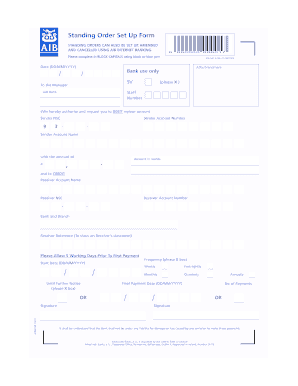
This guide provides a clear and supportive approach to completing the Ireland AIB/F149 form online. Whether you are setting up a standing order or making adjustments, following these detailed steps will ensure a smooth process.
Follow the steps to successfully complete the AIB/F149 form online.
- Press the ‘Get Form’ button to access the AIB/F149 form and open it in your preferred editor.
- Fill in the date of the standing order request in the format DD/MM/YYYY.
- Provide your details by filling in your sender account number, sender account name and the amount to be debited in euros. Write the amount in words beside the numeric value.
- Input the receiver's account details, including the receiver account number, receiver account name, and any reference notes you wish to appear on the receiver's statement.
- Choose the frequency of the payment by selecting the appropriate box for weekly, monthly, quarterly, or annually.
- Specify the start date for the payments in DD/MM/YYYY format, and indicate if there will be a final payment date.
- Sign the form where indicated to authorize the standing order. If applicable, provide the second signature.
- Review all entries for accuracy, and when satisfied, utilize the options to save changes, download, print, or share the form as necessary.
Complete your AIB/F149 form online today for a hassle-free banking experience.
The SWIFT code for AIB Ireland generally starts with the bank identifier, followed by specific location information. For AIB, the common SWIFT code is AIBKIE2D, which you can use for international transfers. Knowing this code can facilitate seamless transactions across borders, aligning with your needs for the Ireland AIB/F149 feature. If you're unsure, checking with AIB or using the US Legal Forms platform can provide clarity.