We use cookies to improve security, personalize the user experience, enhance our marketing activities (including cooperating with our marketing partners) and for other business use.
Click "here" to read our Cookie Policy. By clicking "Accept" you agree to the use of cookies. Read less
Read more
Accept
Loading
Form preview
  • US Legal Forms
  • Form Library
  • More Forms
  • More Multi-State Forms
  • It-203-gg-att-a (2006)

Get It-203-gg-att-a (2006)

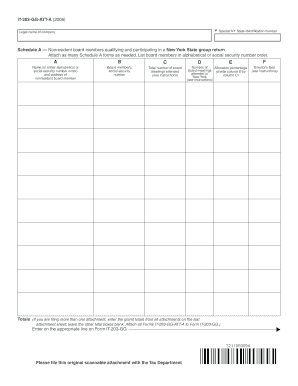
In a New York State group return Attach as many Schedule A forms as needed. List board members in alphabetical or social security number order. A B C Name (in either alphabetical or social security number order) and address of nonresident board member Board member s social security number Total number of board meetings attended (see instructions) D E Number of Allocation percentage board meetings (divide column D by attended in column C) New York (see instructions) F Director s fe.

How it works

  1. Open form

    Open form follow the instructions

  2. Easily sign form

    Easily sign the form with your finger

  3. Share form

    Send filled & signed form or save

How to fill out and sign IT-203-GG-ATT-A (2006) online?

Get your online template and fill it in using progressive features. Enjoy smart fillable fields and interactivity.Follow the simple instructions below:

The preparing of legal documents can be costly and time-consuming. However, with our pre-built web templates, things get simpler. Now, using a IT-203-GG-ATT-A (2006) requires no more than 5 minutes. Our state browser-based blanks and complete guidelines eradicate human-prone errors.

Comply with our simple actions to get your IT-203-GG-ATT-A (2006) well prepared quickly:

  1. Find the template from the library.
  2. Complete all required information in the required fillable areas. The easy-to-use drag&drop interface makes it easy to include or relocate fields.
  3. Make sure everything is completed correctly, without any typos or lacking blocks.
  4. Use your electronic signature to the page.
  5. Click on Done to confirm the alterations.
  6. Save the document or print out your copy.
  7. Submit immediately to the receiver.

Take advantage of the fast search and innovative cloud editor to produce a precise IT-203-GG-ATT-A (2006). Eliminate the routine and create paperwork on the web!

Tips on how to fill out, edit and sign IT-203-GG-ATT-A (2006) online

How to fill out and sign IT-203-GG-ATT-A (2006) online?

Get your online template and fill it in using progressive features. Enjoy smart fillable fields and interactivity.Follow the simple instructions below:

The preparing of legal documents can be costly and time-consuming. However, with our pre-built web templates, things get simpler. Now, using a IT-203-GG-ATT-A (2006) requires no more than 5 minutes. Our state browser-based blanks and complete guidelines eradicate human-prone errors.

Comply with our simple actions to get your IT-203-GG-ATT-A (2006) well prepared quickly:

  1. Find the template from the library.
  2. Complete all required information in the required fillable areas. The easy-to-use drag&drop interface makes it easy to include or relocate fields.
  3. Make sure everything is completed correctly, without any typos or lacking blocks.
  4. Use your electronic signature to the page.
  5. Click on Done to confirm the alterations.
  6. Save the document or print out your copy.
  7. Submit immediately to the receiver.

Take advantage of the fast search and innovative cloud editor to produce a precise IT-203-GG-ATT-A (2006). Eliminate the routine and create paperwork on the web!

How to modify IT-203-GG-ATT-A (2006): customize forms online

Finishing paperwork is more comfortable with smart online instruments. Eliminate paperwork with easily downloadable IT-203-GG-ATT-A (2006) templates you can modify online and print.

Preparing papers and forms should be more reachable, whether it is an everyday component of one’s profession or occasional work. When a person must file a IT-203-GG-ATT-A (2006), studying regulations and instructions on how to complete a form correctly and what it should include might take a lot of time and effort. However, if you find the right IT-203-GG-ATT-A (2006) template, finishing a document will stop being a challenge with a smart editor at hand.

Discover a broader range of functions you can add to your document flow routine. No need to print, fill out, and annotate forms manually. With a smart modifying platform, all of the essential document processing functions will always be at hand. If you want to make your work process with IT-203-GG-ATT-A (2006) forms more efficient, find the template in the catalog, click on it, and see a simpler way to fill it in.

  • If you want to add text in a random area of the form or insert a text field, use the Text and Text field instruments and expand the text in the form as much as you need.
  • Use the Highlight tool to stress the main aspects of the form. If you want to cover or remove some text pieces, utilize the Blackout or Erase instruments.
  • Customize the form by adding default graphic elements to it. Use the Circle, Check, and Cross instruments to add these elements to the forms, if required.
  • If you need additional annotations, utilize the Sticky note resource and place as many notes on the forms page as required.
  • If the form needs your initials or date, the editor has instruments for that too. Reduce the possibility of errors by using the Initials and Date instruments.
  • It is also possible to add custom visual elements to the form. Use the Arrow, Line, and Draw instruments to change the document.

The more instruments you are familiar with, the better it is to work with IT-203-GG-ATT-A (2006). Try the solution that provides everything required to find and modify forms in a single tab of your browser and forget about manual paperwork.

Get form

Experience a faster way to fill out and sign forms on the web. Access the most extensive library of templates available.
Get form

Related content

Form IT-248:2006: Claim for Empire State Film...
Individuals — Enter the line 11 amount and code 248 on Form IT-201-ATT, line 6, or Form...
Learn more
2010 NEW YORK STATE REFERENCE MANUAL FOR ...
Oct 1, 2010 — The tables used to determine the amount of credit allowed can be found in...
Learn more
Instruction Manual
This HD camcorder has Wi-Fi for wireless uploads to computers, FTP servers, YouTube, and...
Learn more

Related links form

Website Sale Contract Template Retail Sublease Agreement Template Room For Rent Lease Agreement Template Equipment Trailer Lease Lease Rental Agreement Template

Questions & Answers

Get answers to your most pressing questions about US Legal Forms API.

Contact support

The IT-203 B form is an extension of the IT-203 form specifically for non-residents who need to provide additional information. It aids in detailing specific types of income and deductions for accurate tax reporting. Understanding how to complete this form is crucial to fulfilling state tax obligations properly. If you are working with the IT-203-GG-ATT-A (2006), consider uslegalforms for assistance in navigating these complexities.

Code 203 in the IRS refers to specific tax regulations or guidelines related to income reporting for certain individuals. This code often signifies particular tax treatment for various income sources. Understanding IRS codes can help you navigate your tax obligations effectively. When considering the implications of IT-203-GG-ATT-A (2006), being informed on IRS codes is beneficial.

The IT201 form is the New York State Resident Income Tax Return. It is utilized by residents to report their income and calculate state taxes owed. Filing this form is crucial for transparent tax reporting and helps avoid any legal complications. When considering the IT-203-GG-ATT-A (2006), it's important to know that different forms serve different purposes based on residency.

The distinction between IT-201 and IT-203 lies in the taxpayer's residency status. IT-201 is for full-time residents, while IT-203 targets non-residents or part-time residents. Therefore, accurately determining your residency is crucial when deciding which form to file. For details on the IT-203-GG-ATT-A (2006), visiting uslegalforms may provide you with essential insights.

Form IT-201 is primarily designed for residents filing their New York State income taxes, while IT-203 caters to non-residents or part-year residents. The primary distinction lies in who must file each form based on residency status. Understanding whether to use IT-201 or IT-203-GG-ATT-A (2006) can help ensure compliance with state tax laws. Always review your residency before selecting the appropriate form.

The form Y 203 is primarily used to report specific financial information to state authorities. By submitting this form, individuals can ensure they comply with relevant tax regulations. It is essential for accurate record-keeping and helps taxpayers avoid penalties or audits. If you are dealing with the IT-203-GG-ATT-A (2006), it is crucial to understand the reporting requirements associated with this form.

Your Adjusted Gross Income (AGI) is typically found on your tax return. If you're using forms like IT-203-GG-ATT-A (2006), AGI will usually be listed on the main form or in your calculation section. You can also check your previous year’s tax returns for reference. For a user-friendly experience in tracking and calculating your AGI, consider utilizing uslegalforms, where you can find reliable resources and forms.

Form Y 203 is utilized for tax purposes related to New York state income for specific purposes, often connected with refunds or corrections to previous filings. Although not as common as the IT-203 forms, it serves a crucial function for some taxpayers. You can find more information regarding its use in your tax scenarios in the IT-203-GG-ATT-A (2006) document. It is important to accurately complete any form to avoid complications.

Individuals who receive income from New York sources but do not reside in the state must file IT-203 B. This form is required for non-residents, allowing them to report their New York income accurately. This ensures compliance with state tax laws and enables you to claim any applicable credits. For more information, consult the IT-203-GG-ATT-A (2006) documentation.

Filing taxes without a prior year Adjusted Gross Income (AGI) is certainly manageable. When filling out IT-203-GG-ATT-A (2006), you can leave the AGI field blank if this applies to you. However, double-check the instructions closely to ensure compliance. Using USLegalForms can simplify your filing process, providing you with the resources you need for a successful return.

Get This Form Now!

Use professional pre-built templates to fill in and sign documents online faster. Get access to thousands of forms.
Get form
If you believe that this page should be taken down, please follow our DMCA take down processhere.

Industry-leading security and compliance

US Legal Forms protects your data by complying with industry-specific security standards.
  • In businnes since 1997
    25+ years providing professional legal documents.
  • Accredited business
    Guarantees that a business meets BBB accreditation standards in the US and Canada.
  • Secured by Braintree
    Validated Level 1 PCI DSS compliant payment gateway that accepts most major credit and debit card brands from across the globe.
Get IT-203-GG-ATT-A (2006)
Get form
Form Packages
Adoption
Bankruptcy
Contractors
Divorce
Home Sales
Employment
Identity Theft
Incorporation
Landlord Tenant
Living Trust
Name Change
Personal Planning
Small Business
Wills & Estates
Packages A-Z
Form Categories
Affidavits
Bankruptcy
Bill of Sale
Corporate - LLC
Divorce
Employment
Identity Theft
Internet Technology
Landlord Tenant
Living Wills
Name Change
Power of Attorney
Real Estate
Small Estates
Wills
All Forms
Forms A-Z
Form Library
Customer Service
Terms of Service
Privacy Notice
Legal Hub
Content Takedown Policy
Bug Bounty Program
About Us
Help Portal
Legal Resources
Blog
Affiliates
Contact Us
Delete My Account
Site Map
Industries
Forms in Spanish
Localized Forms
State-specific Forms
Forms Kit
Legal Guides
Real Estate Handbook
All Guides
Prepared for You
Notarize
Incorporation services
Our Customers
For Consumers
For Small Business
For Attorneys
Our Sites
US Legal Forms
USLegal
FormsPass
pdfFiller
signNow
airSlate WorkFlow
DocHub
Instapage
Social Media
Call us now toll free:
+1 833 426 79 33
As seen in:
  • USA Today logo picture
  • CBC News logo picture
  • LA Times logo picture
  • The Washington Post logo picture
  • AP logo picture
  • Forbes logo picture
© Copyright 1997-2025
airSlate Legal Forms, Inc.
3720 Flowood Dr, Flowood, Mississippi 39232
Form Packages
Adoption
Bankruptcy
Contractors
Divorce
Home Sales
Employment
Identity Theft
Incorporation
Landlord Tenant
Living Trust
Name Change
Personal Planning
Small Business
Wills & Estates
Packages A-Z
Form Categories
Affidavits
Bankruptcy
Bill of Sale
Corporate - LLC
Divorce
Employment
Identity Theft
Internet Technology
Landlord Tenant
Living Wills
Name Change
Power of Attorney
Real Estate
Small Estates
Wills
All Forms
Forms A-Z
Form Library
Customer Service
Terms of Service
Privacy Notice
Legal Hub
Content Takedown Policy
Bug Bounty Program
About Us
Help Portal
Legal Resources
Blog
Affiliates
Contact Us
Delete My Account
Site Map
Industries
Forms in Spanish
Localized Forms
State-specific Forms
Forms Kit
Legal Guides
Real Estate Handbook
All Guides
Prepared for You
Notarize
Incorporation services
Our Customers
For Consumers
For Small Business
For Attorneys
Our Sites
US Legal Forms
USLegal
FormsPass
pdfFiller
signNow
airSlate WorkFlow
DocHub
Instapage
Social Media
Call us now toll free:
+1 833 426 79 33
As seen in:
  • USA Today logo picture
  • CBC News logo picture
  • LA Times logo picture
  • The Washington Post logo picture
  • AP logo picture
  • Forbes logo picture
© Copyright 1997-2025
airSlate Legal Forms, Inc.
3720 Flowood Dr, Flowood, Mississippi 39232