Get Ie Measles Mumps Rubella (mmr) Catch-up Campaign Consent Form
How it works
-

Open form follow the instructions
-

Easily sign the form with your finger
-

Send filled & signed form or save
How to fill out the IE Measles Mumps Rubella (MMR) Catch-up Campaign Consent Form online
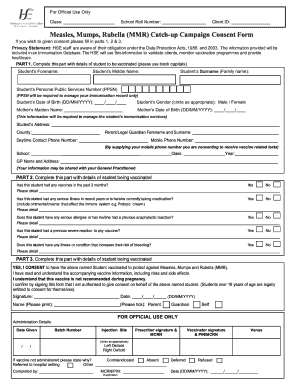
Filling out the IE Measles Mumps Rubella (MMR) Catch-up Campaign Consent Form online is a straightforward process that ensures your student receives necessary vaccinations. This guide offers clear and detailed instructions to help you complete each section of the form effectively.
Follow the steps to fill out the MMR consent form accurately.
- Click the ‘Get Form’ button to access the consent form. This will allow you to open the form for online completion.
- Begin with PART 1, where you need to enter the student's details. Use block capitals and include the student’s forename, middle name, surname (family name), personal public services number (PPSN), date of birth, gender, mother's maiden name, and her date of birth. Please ensure that the PPSN is included for managing your child's immunization record.
- Additionally, provide the student's address, the name of their parent or legal guardian, along with daytime and mobile contact numbers. By supplying a mobile number, you agree to receive text messages regarding vaccination updates.
- Fill in the school and class details, as well as the name and address of the student's general practitioner (GP). Note that their information may be shared with the GP for vaccination purposes.
- Proceed to PART 2, where you will answer important health-related questions. Indicate whether the student has received any vaccines in the past three months, if they have had any serious illnesses recently or are taking any medications, and if they have serious allergies or previous reactions to vaccines. Provide detailed responses where necessary.
- Continue with specific questions regarding any conditions that may increase the risk of bleeding or past severe reactions to vaccines. Please provide thorough and accurate details for all questions.
- In PART 3, indicate your consent for the vaccination by marking 'YES, I CONSENT'. It's important to read the accompanying information about vaccine risks and side effects before proceeding.
- Complete the consent section by signing the form and entering the date, ensuring you print your name clearly. Check the appropriate box to indicate whether you are a parent, guardian, or the student themselves.
- Finally, review the entire form for accuracy. Once confirmed, you can save your changes, download, print, or share the completed consent form as needed.
Complete the MMR consent form online today to ensure your student's vaccination is processed smoothly.
A measles rubella campaign aims to vaccinate populations against these contagious diseases, emphasizing the importance of the MMR vaccine. These campaigns usually focus on reaching individuals who missed routine vaccinations, often utilizing the IE Measles Mumps Rubella (MMR) Catch-up Campaign Consent Form for enrollment. By participating in these campaigns, you contribute to community immunity, thereby minimizing the risk of outbreaks. Staying informed and involved in public health initiatives is vital for everyone's safety.
Industry-leading security and compliance
-
In businnes since 199725+ years providing professional legal documents.
-
Accredited businessGuarantees that a business meets BBB accreditation standards in the US and Canada.
-
Secured by BraintreeValidated Level 1 PCI DSS compliant payment gateway that accepts most major credit and debit card brands from across the globe.