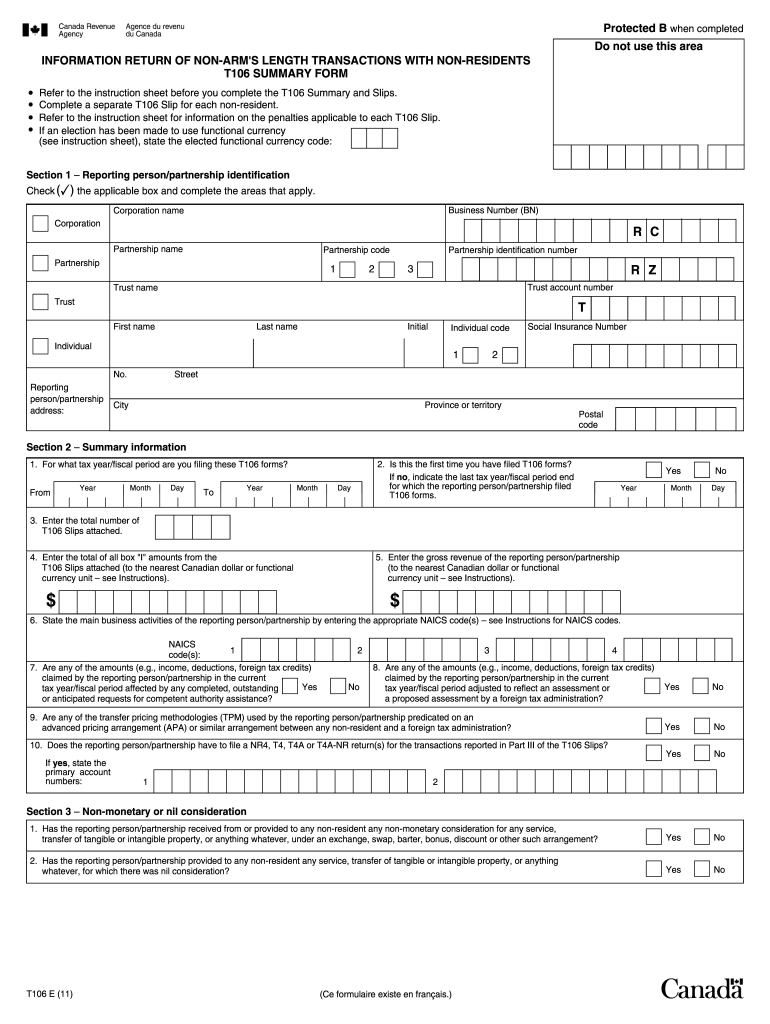
complete the T106 Summary and Slips. Complete a separate T106 Slip for each non-resident. Refer to the instruction sheet for information on the penalties applicable to each T106 Slip. If an election has been made to use functional currency (see instruction sheet), state the elected functional currency code: Section 1 – Reporting person/partnership identification Check (✓) the applicable box and complete the areas that apply. Business Number (BN) Corporation name Corporation R C Partnersh.

Open form follow the instructions

Easily sign the form with your finger

Send filled & signed form or save
How to fill out the Canada T106 E online
Filling out the Canada T106 E form is essential for reporting non-arm's length transactions with non-residents. This guide provides clear, step-by-step instructions to help you complete the form effectively online.
Follow the steps to fill out the Canada T106 E form correctly.
- Press the ‘Get Form’ button to obtain the T106 E form and open it in your preferred editing tool.
- Begin by filling out Section 1, which includes the reporting person or partnership identification. Provide your Business Number (BN), name, and address. Check the applicable box for your entity type (corporation, partnership, or trust).
- Complete Section 3 by answering questions related to non-monetary or nil consideration in your transactions. Provide accurate details about any services or properties exchanged.
- Once all sections are completed, review the information for accuracy. Prepare to certify the document by providing the contact person's name, telephone number, and signature in the certification section.
- Finally, save your changes, and then download or print the completed T106 E form for submission. Ensure that you file the form according to the deadlines set by the Canada Revenue Agency.
Complete your T106 E form online today to ensure compliance with Canadian regulations.
Experience a faster way to fill out and sign forms on the web. Access the most extensive library of templates available.
Related content
Jun 7, 2005 — (g) T106-e. (1) Raise temperature of the fruit using saturated water vapor...
by J Groetzinger · 2012 · Cited by 1 — Canada has a T106 form,3. 1 and the United...
Your T106 can be used on the GSM 850 and the GSM 1900 network. e-GSM. Extended GSM, e-GSM...
Get answers to your most pressing questions about US Legal Forms API.
What is the new $7500 tax credit in Canada?
The new $7500 tax credit in Canada is designed to assist individuals and families in reducing their overall tax burden. This credit can benefit those who qualify, providing a financial boost during tax season. To fully leverage this opportunity, understanding the eligibility criteria and how it integrates with forms like the Canada T106 E is essential.
How do I get a Canadian income tax form?
You can obtain Canadian income tax forms, including the Canada T106 E, from the Canada Revenue Agency (CRA) website or by visiting your local tax office. Additionally, many online resources, like uslegalforms, offer easy access to these forms, ensuring you have the correct documents for your tax filing.
How to get a $10,000 tax refund in Canada?
To receive a $10,000 tax refund in Canada, you should take steps to ensure all deductions and credits are correctly claimed when filing. Completing the Canada T106 E form may be necessary for some taxpayers, especially those with foreign income. Consulting with tax professionals can enhance your chances of achieving a substantial refund.
What is the maximum tax refund you can get in Canada?
The maximum tax refund in Canada varies depending on individual circumstances, including income level and tax credits claimed. While there isn’t a specific cap, those who optimize their tax filings using the Canada T106 E form and properly claim deductions can significantly increase their refund. Understanding your personal tax situation is key to maximizing any potential return.
What are the requirements for T106?
The requirements for filing the Canada T106 E form include reporting income from foreign affiliates and ensuring that your business activities align with Canadian tax laws. It's crucial to keep proper documentation and accurate records. For comprehensive guidance on the requirements, consider accessing resources provided by platforms like uslegalforms.
How to get the biggest tax refund in Canada?
To secure the largest tax refund in Canada, focus on claiming all eligible deductions and credits. Thoroughly review your expenses and consider the Canada T106 E form if applicable to your situation. Using tax preparation services can provide extra support in identifying potential refunds and ensuring compliance with tax regulations.
Can you efile a T106?
Yes, the Canada T106 E form can be filed electronically. E-filing simplifies the process and allows for quicker processing of your tax return. Ensure you have all the necessary information ready, and consider using platforms like uslegalforms for assistance with electronic submissions.
How do people get $10,000 tax refunds?
Many individuals may qualify for a $10,000 tax refund by maximizing their deductions and credits. To achieve this, it's important to accurately report income, claim eligible expenses, and file the Canada T106 E form if applicable. Engaging with a tax professional can also help optimize the refund process, ensuring taxpayers do not miss out on potential benefits.
What is the 183 day rule in Canada?
The 183 day rule in Canada determines an individual’s residency status for tax purposes based on their physical presence in the country. If you stay in Canada for 183 days or more within a year, you may be considered a resident and subject to Canadian taxes on your worldwide income. This rule helps clarify tax responsibilities for individuals traveling or working in Canada. For detailed insights and assistance, you can explore resources available through uslegalforms.
What is the penalty for T106 information return?
Failing to file the T106 information return can result in significant penalties for Canadian taxpayers. The penalty can be a fixed amount plus additional charges if the return is filed late or inaccurately. Ensuring compliance with T106 requirements not only helps avoid penalties but also allows taxpayers to report their foreign investments properly. For support in meeting these requirements, consider using uslegalforms as your resource.
Use professional pre-built templates to fill in and sign documents online faster. Get access to thousands of forms.
If you believe that this page should be taken down, please follow our DMCA take down process here.
This form is available in several versions. Select the version you need from the drop-down list below.