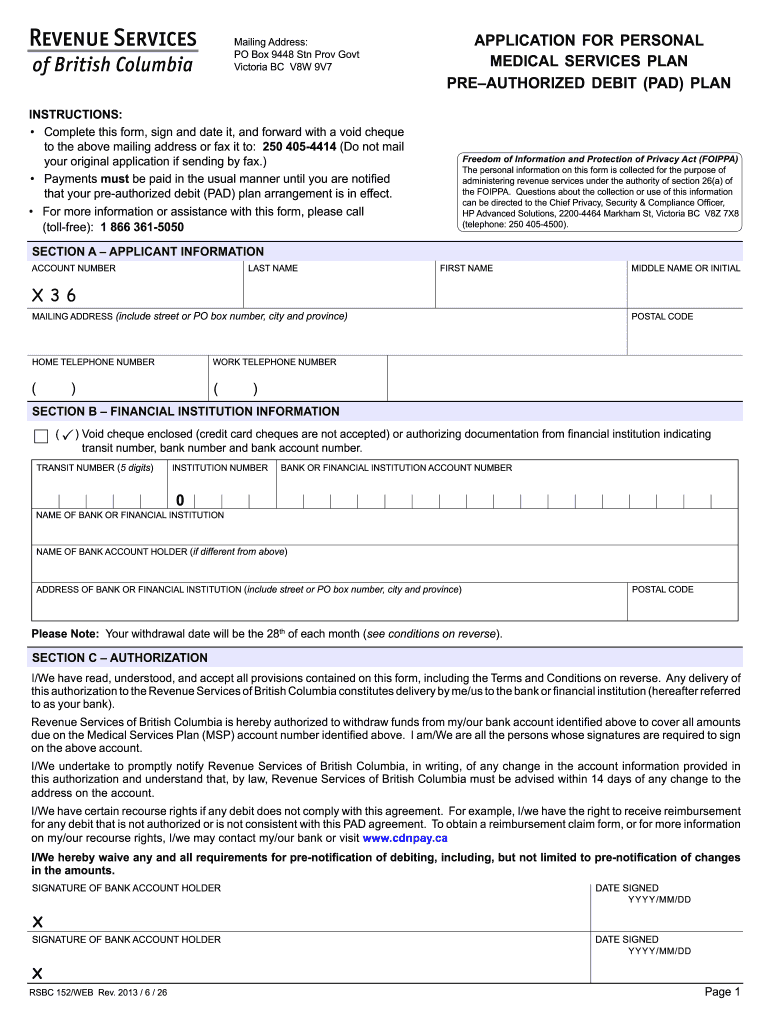
Te it, and forward with a void cheque to the above mailing address or fax it to: 250 405-4414 (Do not mail your original application if sending by fax.) • Payments must be paid in the usual manner until you are notiied that your pre-authorized debit (PAD) plan arrangement is in effect. • For more information or assistance with this form, please call (toll-free): 1 866 361-5050 Freedom of Information and Protection of Privacy Act (FOIPPA) The personal information on this form is c.

Open form follow the instructions

Easily sign the form with your finger

Send filled & signed form or save
How to fill out the Canada RSBC 152 online
The Canada RSBC 152 form, which is the application for the Personal Medical Services Plan Pre-Authorized Debit (PAD) Plan, is essential for users seeking to facilitate their medical service payments. This guide provides a clear, step-by-step approach to completing this form online.
Follow the steps to accurately complete the Canada RSBC 152 online.
- Click ‘Get Form’ button to obtain the form and open it in the editor.
- Fill in your personal details in Section A, including your last name, first name, middle name or initial, mailing address, and contact numbers.
- In Section B, provide your financial institution information. Ensure to include details like the void cheque (non-credit card cheques), transit number, institution number, and your bank account number.
- Complete Section C by reading the authorization terms, confirming your understanding, and signing the form. Include the date you signed.
- After verifying all provided information for accuracy, you can save changes, download or print the completed form.
- Submit your completed form along with a void cheque to the mailing address provided or fax it to the designated number.
Start completing your documents online to ensure a smooth and efficient process.
Experience a faster way to fill out and sign forms on the web. Access the most extensive library of templates available.
Related content
by U Schüklenk · 2011 · Cited by 137 — This report on end-of-life decision-making in...
152. (1) Where a person is charged at a polling station with having committed or attempted...
Get answers to your most pressing questions about US Legal Forms API.
How do I get my tax information in Canada?
You can access your tax information in Canada via the CRA's online platform or by requesting documents directly from their office. Ensure to have your personal identification ready. Should you require assistance navigating this process or need relevant forms, uslegalforms is an excellent tool to guide you through Canada RSBC 152.
How do I get access to Canada?
For access to Canada, individuals typically need to apply for the appropriate visa or residency status through the Government of Canada. The application process may involve submitting various documents and meeting specific criteria. If you need detailed forms and insights specific to immigration under Canada RSBC 152, consider uslegalforms as a resource.
How do I get my tax return in Canada?
To receive your tax return in Canada, ensure that you file your return either electronically or via mail by the deadlines established by the CRA. After processing, the CRA will send you a notice of assessment, which summarizes your return. For more information on requirements or forms, uslegalforms can provide valuable support related to your tax return under Canada RSBC 152.
Where can I find my tax information in Canada?
Your tax information can be found on the CRA's online portal, which provides a comprehensive look at your tax history, including filed returns and assessments. For a full overview, ensure to log in to My Account. If you are looking for guided assistance, uslegalforms offers useful resources covering Canada RSBC 152 that can make the search easier.
How do I get a tax slip in Canada?
You can obtain your tax slip from your employer or financial institution, which is required to provide this documentation by the end of February each year. If you do not receive it, contact them directly to request a copy. Moreover, uslegalforms can assist you with understanding your rights and obligations regarding tax slips under Canada RSBC 152.
How do I get a copy of my record of landing in Canada?
To obtain a copy of your record of landing in Canada, you must file a request with the Immigration, Refugees and Citizenship Canada (IRCC). You can do this online or by mail, providing relevant identification and details. If you're unsure about the steps, uslegalforms can help simplify the process with the necessary forms and instructions.
How do I retrieve my tax information?
You can retrieve your tax information through the CRA's online portal called My Account. After registering, you can access your tax returns and any outstanding balances. If you need assistance with the process, uslegalforms offers valuable templates and guidance, especially related to Canada RSBC 152.
What is intelligent speed assistance Canada?
Intelligent speed assistance in Canada refers to a technology designed to help drivers adhere to speed limits. This system, supported by regulations such as Canada RSBC 152, utilizes GPS data and onboard sensors to monitor speed. When a driver exceeds the limit, the system provides alerts or even adjusts the vehicle's speed. Ultimately, this enhancement promotes road safety and aligns with Canada's commitment to reducing accidents.
How do I reference the income tax Act in Canada?
To reference the income tax Act in Canada, you can cite the specific section or provision relevant to your question or circumstance. Clarity in your citation is crucial for understanding and communication. Canada RSBC 152 plays a significant role in articulating areas of the tax Act, so it can be a useful reference point.
How can I file my tax return in Canada?
You can file your tax return in Canada using several methods, including online tax software, traditional paper forms, or through a tax professional. Filing online is convenient and often faster, while using a professional ensures accuracy and compliance. Refer to Canada RSBC 152 for regulations that could impact your filing process.
Use professional pre-built templates to fill in and sign documents online faster. Get access to thousands of forms.
If you believe that this page should be taken down, please follow our DMCA take down process here.
This form is available in several versions. Select the version you need from the drop-down list below.