E The personal information you provide to us on this form will be used by the Office of the Taxpayers' Ombudsman to review the complaint you have made to the Taxpayers' Ombudsman and may be shared with the Canada Revenue Agency for this purpose. You have the right to the protection of, correction of, and access to your personal information under the Privacy Act. .
Loading

Open form follow the instructions

Easily sign the form with your finger

Send filled & signed form or save
How to fill out the Canada omb100 e online
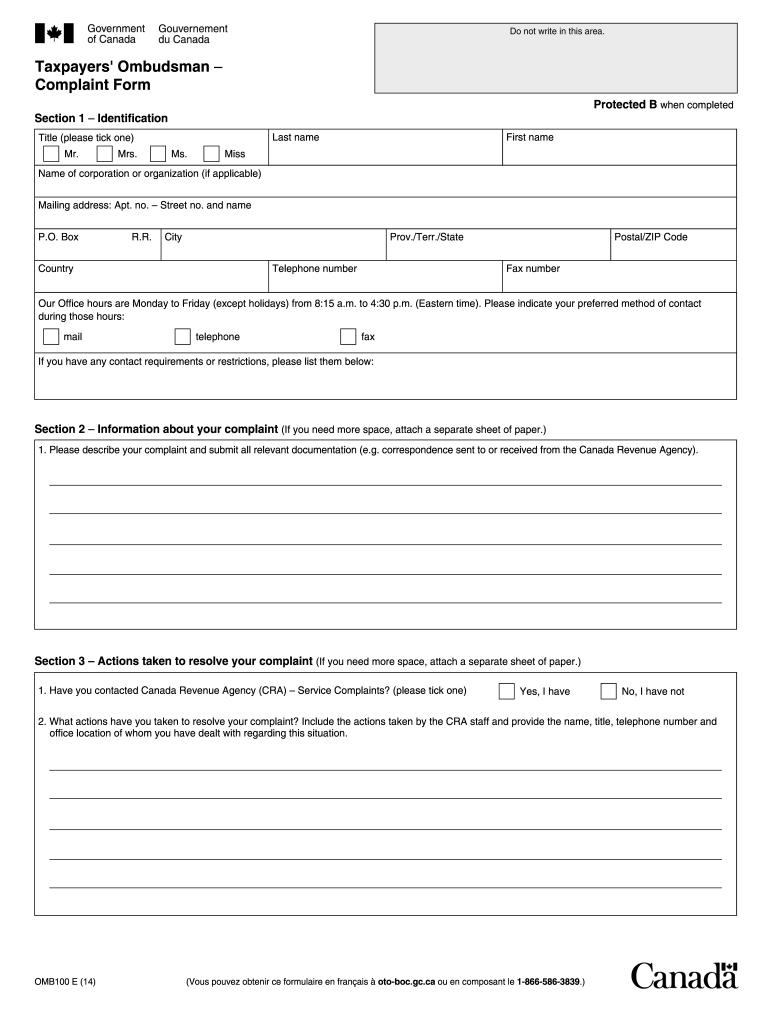
This guide provides step-by-step instructions for completing the Canada omb100 e form. It is designed to assist users in effectively navigating the process, ensuring your complaint is submitted accurately and efficiently.
Follow the steps to fill out the Canada omb100 e form online
- Press the ‘Get Form’ button to access the omb100 e form and open it in your chosen editing tool.
- In Section 1 – Identification, fill in your last name, first name, and, if applicable, the name of your corporation or organization. Provide your complete mailing address, including apartment number, street number and name, city, province or territory, country, and postal or ZIP code. Include your telephone and fax numbers. Choose your preferred method of contact during the office hours of 8:15 a.m. to 4:30 p.m. Eastern time, and note any contact requirements or restrictions.
- In Section 2 – Information about your complaint, describe your complaint thoroughly. Attach any relevant documentation, including correspondence related to your complaint with the Canada Revenue Agency.
- In Section 3 – Actions taken to resolve your complaint, indicate whether you have contacted the Canada Revenue Agency regarding your complaint. If applicable, describe any actions you have taken, including details on any CRA staff you have dealt with, along with their name, title, telephone number, and office location.
- In Section 4 – Consent to disclose information, read the consent statement carefully. If you agree, provide your signature and the date. This indicates that you understand information may be shared with the CRA for your complaint review.
- In Section 5 – Third party authorization, if you wish to appoint a representative, fill in their name, title, telephone number, and mailing address. Provide the necessary signatures for both yourself and your representative, along with the date.
- In Section 6 – Submitting this form, you can fax the completed form to 1-866-586-3855 or mail it to the Office of the Taxpayers' Ombudsman at the provided address.
- In Section 7 – Survey (optional), select how you learned about the Office of the Taxpayers' Ombudsman.
- Once all sections are filled out completely, save your changes to the form. You may choose to download, print, or share the completed document as needed.
Complete your Canada omb100 e form online today!
Experience a faster way to fill out and sign forms on the web. Access the most extensive library of templates available.
Related content
Mar 13, 2025 — [Federal Register Volume 90, Number 48 (Thursday, March 13, 2025)]...
This chapter presents the resulting data and the committee's analysis of those data, as...
Get answers to your most pressing questions about US Legal Forms API.
Where can I complain about a local business?
To complain about a local business in Canada, consider utilizing online platforms like Yelp or Google Reviews which allow customers to share their experiences. You can also reach out to your provincial consumer protection office for official guidance. If your case involves regulatory issues, platforms such as uslegalforms can assist in filing formal complaints regarding Canada omb100 e.
What can I do if a company won't give me a refund in Canada?
If a company refuses to issue a refund, start by reviewing their return policy and documenting all interactions. You can escalate the issue by contacting consumer protection agencies and seeking their guidance. Additionally, using legal form platforms like uslegalforms can help you prepare any necessary documentation for potential legal action related to your case.
How do I file for someone to come to Canada?
Filing for someone to come to Canada involves submitting the appropriate forms through Immigration, Refugees and Citizenship Canada (IRCC). Be sure to include all necessary documentation, such as proof of relationship and any required identification. Understanding the specific requirements is imperative, particularly when dealing with Canada omb100 e.
How do I complain about a bad business?
To complain about a bad business, start by gathering evidence of your transaction and the issues you faced. Next, contact the business directly to give them a chance to address your concerns. If unresolved, escalate by reaching out to consumer protection agencies or using platforms like uslegalforms to formalize your complaint and maintain records related to Canada omb100 e.
How to report a bad business in Canada?
Reporting a bad business in Canada typically involves contacting the local consumer protection office or the BBB. You will need to present evidence of your experience to substantiate your claims. If you require formal documentation or assistance, consider using platforms like uslegalforms to ensure your complaint is thorough and well-structured.
How do I report a business to BBB in Canada?
To report a business to the Better Business Bureau (BBB) in Canada, visit their official website and locate the complaint form. Provide as much detail as possible, including your experience with the business. This process brings attention to issues and ensures that businesses maintain ethical standards, especially in relation to services linked to Canada omb100 e.
How do I report foreign self employment income in Canada?
Reporting foreign self-employment income in Canada involves completing the appropriate forms, such as the T2125, which allows you to outline your income and expenses. You must convert your foreign earnings to Canadian dollars using the exchange rate applicable for the year. Doing this correctly is crucial, especially for compliance with regulations related to Canada omb100 e.
How to call CRA from outside Canada?
To call the Canada Revenue Agency (CRA) from outside the country, you need to dial the appropriate international code followed by the CRA's number. Ensure you have the correct time zone in mind, as CRA operates during business hours, Eastern Time. It is helpful to have your tax information ready, as this may assist with your inquiries regarding Canada omb100 e.
Who is eligible for the $300 federal payment in Canada?
Eligibility for the $300 federal payment in Canada includes individuals who meet specific financial criteria set by the government. Typically, this payment targets low- to middle-income earners who require additional support. It's a crucial part of the Canada omb100 e plan to enhance financial well-being nationwide.
Why did I get a federal payment in Canada?
You received a federal payment in Canada likely because you qualify for a relief program aimed at helping citizens. These payments can be linked to various benefits or emergency funds established by the government. Programs like the Canada omb100 e are designed to ensure support reaches those who need it most.
Use professional pre-built templates to fill in and sign documents online faster. Get access to thousands of forms.
If you believe that this page should be taken down, please follow our DMCA take down process here.
This form is available in several versions. Select the version you need from the drop-down list below.