Loading
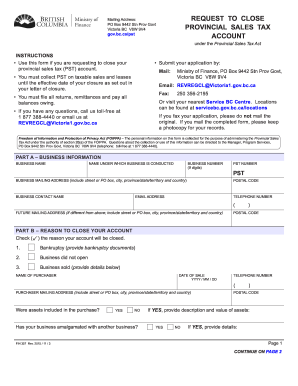
Get Canada Fin 357 2015
How it works
-

Open form follow the instructions
-

Easily sign the form with your finger
-

Send filled & signed form or save
How to fill out the Canada FIN 357 online
This guide provides a comprehensive walkthrough for users on how to effectively complete the Canada FIN 357 form online. By following these instructions, you will be able to successfully request the closure of your provincial sales tax account.
Follow the steps to complete your request for closure.
- Click ‘Get Form’ button to obtain the form and open it in your preferred editor.
- In Part A, enter your business information. Fill in the business name, the name under which the business is conducted, and the business number (nine digits). Also, provide the mailing address including street or PO box, city, province/state/territory, and country. Ensure to include the postal code, email address, business contact name, PST number, and telephone number.
- For the future mailing address section in Part A, if it is different from the above, include the street or PO box, city, province/state/territory, and country along with its postal code.
- In Part B, indicate the reason to close your account by checking the appropriate box. Detailed information may be required depending on the reason selected, such as providing bankruptcy documents or the name of the purchaser if the business was sold.
- For each reason checked in Part B, provide any additional details requested, such as the purchaser's mailing address or details about the closure.
- In Part C, certify that you have the authority to request the closure of the PST account and that all information provided is true and correct. Sign, date, and print your name along with your title or position in the company.
- Once all sections are completed, review the form for accuracy. You can then save your changes, download a copy, print the form, or share it as necessary.
Begin filling out your documents online to ensure a smooth closure of your PST account.
Get form
Experience a faster way to fill out and sign forms on the web. Access the most extensive library of templates available.
Related links form
Filling out a W8 form in Canada requires you to identify your status as a foreign entity and provide information about your income sources. You can typically find the form on the IRS website, and it is crucial to provide accurate details to avoid tax withholding issues. Completing this form correctly is essential for tax purposes, and Canada FIN 357 can help guide you through understanding this process.
Get This Form Now!
Use professional pre-built templates to fill in and sign documents online faster. Get access to thousands of forms.