Loading
Get Canada Sjt023e 2010
How it works
-

Open form follow the instructions
-

Easily sign the form with your finger
-

Send filled & signed form or save
How to fill out the Canada SJT023E online
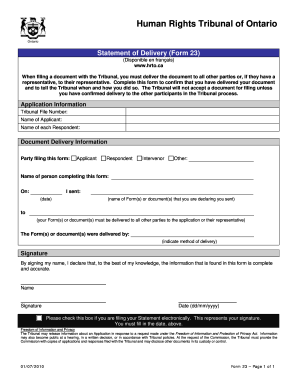
Filing official documents can be daunting, but understanding how to complete the Canada SJT023E form will streamline the process. This guide offers a clear, step-by-step approach to help individuals confirm the delivery of important documents to the Human Rights Tribunal of Ontario.
Follow the steps to accurately complete the Canada SJT023E form.
- Click the ‘Get Form’ button to access the Canada SJT023E form and open it in your preferred document management application.
- Enter the tribunal file number in the designated field. This will identify your case and ensure the document is correctly associated with your application.
- Fill in the name of the applicant in the appropriate space. Ensure that the name matches the official records submitted with your application.
- List the names of each respondent related to your application. This section is crucial for confirming whom you have delivered your document to.
- Identify your role in the case by selecting one of the options: Applicant, Respondent, Intervenor, or Other. This clarifies your participation in the Tribunal process.
- Provide the name of the person completing the form. This ensures accountability and clarity regarding who is submitting the delivery confirmation.
- Fill in the date on which you sent the document. Accurate dating is essential for tracking the timeline of the case.
- Specify the name(s) of the form(s) or documents you are declaring you sent. This provides a clear reference for the Tribunal.
- Indicate the method of delivery, whether by mail, in-person, or electronically. Proper documentation of this is important for legal records.
- Sign the form to declare that all information provided is complete and accurate. Remember, if you are filing electronically, check the box to represent your signature.
- Enter the current date in the dd/mm/yyyy format. Ensure that this date matches the date indicated for sending the document.
- Finally, review all entered information for accuracy. Once confirmed, you can save changes, download, print, or share the completed form as necessary.
Be proactive and complete your Canada SJT023E form online today.
Get form
Experience a faster way to fill out and sign forms on the web. Access the most extensive library of templates available.
Yes, U.S. citizens need to fill out a customs form when traveling to Canada. This process includes declaring any goods they plan to bring with them. Using the Canada SJT023E form can help simplify this process, guiding you through necessary declarations and requirements. Make sure to prepare this form beforehand to avoid complications during your journey.
Get This Form Now!
Use professional pre-built templates to fill in and sign documents online faster. Get access to thousands of forms.