Loading
Form preview
  • US Legal Forms
  • Other Templates
  • Foreign Forms
  • Foreign Canada Other Forms
  • Canada Seneca College Request To Withdraw From A Full-time Program 2013

Get Canada Seneca College Request To Withdraw From A Full-time Program 2013-2026

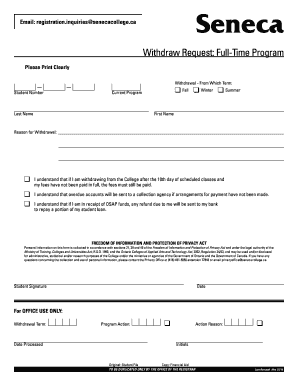
Registration Records Office Fax Newnham 416 491-9187 Seneca York 416 661-1947 King 905 833-0730 Markham 905 940-4090 Request to Withdraw from a Full-Time Program NOTE 1. In order to be eligible for a refund you must withdraw from the College and return this form to the Registration Office within the first ten days of scheduled classes. 2. This form must be signed by your Program Co-ordinator or Chair. PLEASE PRINT CLEARLY Telephone Number Current Program Sem Student Number Withdrawal Effective Month/Day/Year Last Name First Name Street Address Apt. Registration Records Office Fax Newnham 416 491-9187 Seneca York 416 661-1947 King 905 833-0730 Markham 905 940-4090 Request to Withdraw from a Full-Time Program NOTE 1. In order to be eligible for a refund you must withdraw from the College and return this form to the Registration Office within the first ten days of scheduled classes. 2. This form must be signed by your Program Co-ordinator or Chair. PLEASE PRINT CLEARLY Telephone Number C....

How it works

  1. Open form

    Open form follow the instructions

  2. Easily sign form

    Easily sign the form with your finger

  3. Share form

    Send filled & signed form or save

How to fill out the Canada Seneca College Request to Withdraw from a Full-Time Program online

Withdrawing from a full-time program can be a significant decision, and completing the necessary paperwork is an important step in this process. This guide will provide you with clear, step-by-step instructions on how to fill out the Canada Seneca College Request to Withdraw from a Full-Time Program online.

Follow the steps to successfully complete your request.

  1. Press the ‘Get Form’ button to access the withdrawal form and open it for editing.
  2. Begin by ensuring you print all information clearly. Start with your 'Last Name' and 'First Name', then proceed to fill in your 'Street Address', 'Apt. / Unit No.', 'City / Town', 'Province', and 'Postal Code'. This information is crucial for your identification.
  3. Next, provide your telephone number, current program, and semester. Ensure that these details are accurate as they will be used for further communication regarding your withdrawal.
  4. Indicate the 'Withdrawal Effective' date by filling in the month, day, and year you wish to withdraw. This is essential for processing your request in a timely manner.
  5. Select the reason for your withdrawal from the options provided. This helps the college understand your circumstances and improve services.
  6. Review and acknowledge the 'Outstanding College Fees' statement. Understand that if you are withdrawing after the 10th day of scheduled classes, you are still responsible for any unpaid fees. Make sure to check the appropriate box regarding your OSAP funds.
  7. You will need to sign and date the form as the student. Ensure you do this at the designated area for your signature. Your Program Co-ordinator or Chair must also sign to authorize the withdrawal.
  8. After completing all sections, you can either save the changes to your document, download a copy for your records, print it out, or share it as needed to ensure it reaches the Registration Office on time.

Complete your withdrawal process online today by following these steps to ensure a smooth transition.

Get form

Experience a faster way to fill out and sign forms on the web. Access the most extensive library of templates available.
Get form

Related content

International Students at Canadian Colleges:...
by O Legusov · 2023 · Cited by 12 — Most graduates of Canadian colleges are allowed to...
Learn more
Important Dates | Office of the Registrar
For students in a BCOM degree and paying deregulated program fees: Last day to drop from...
Learn more
Climate change and nuclear power
With this study WISE hopes to contribute to a thorough debate about the best solutions to...
Learn more

Related links form

Donation Collection Form Download Employment Application - 3D Medical Staffing Maryland Form 500d Form 1026

Questions & Answers

Get answers to your most pressing questions about US Legal Forms API.

Contact support

Choosing to withdraw rather than fail is often the more prudent decision, especially regarding financial aid at Canada Seneca College. Withdrawals may have less long-term impact on your financial aid eligibility than failing grades. It's wise to consult with financial aid advisors to ensure you make the best decision for your circumstances.

To cancel your enrollment at Canada Seneca College, you need to complete the appropriate forms and submit a formal request. This procedure is essential for correcting your academic record and avoiding any future complications. Utilizing the resources available, such as US Legal Forms, can facilitate this process smoothly.

You can opt to temporarily drop out, which essentially means taking a break without officially withdrawing from Canada Seneca College. This process allows you to maintain your student status while addressing personal matters. Contact the college's administration to learn more about how to proceed with this option.

Withdrawing from college isn't as flexible as it may seem. Canada Seneca College has set deadlines for withdrawal, and failing to adhere to these can affect your academic record. It is crucial to understand when you can submit a request and the potential consequences of your decision.

Yes, you can typically request a temporary withdrawal from Canada Seneca College. This option allows you to pause your studies for personal or academic reasons while ensuring you can return later. Be sure to submit your Canada Seneca College Request to Withdraw from a Full-Time Program following the appropriate guidelines and deadlines.

While you may feel the need to withdraw from a course at any time, Canada Seneca College has specific deadlines for withdrawing without academic penalties. Be sure to check the academic calendar for key dates and policies. Understanding these regulations can safeguard your academic standing and future options.

Being academically withdrawn means you have officially left your program at Canada Seneca College. This status indicates that you will not be completing your courses or meeting your academic requirements. It's important to understand that this decision can impact your academic record and future enrollment options.

To cancel your membership at Seneca College, you need to approach the specific department associated with the membership. Depending on your type of membership, the cancellation process may vary. Make sure to verify any obligations or notifications required. Completing this process correctly is vital when considering the Canada Seneca College Request to Withdraw from a Full-Time Program.

Applying for a break at Seneca College involves submitting a request through the appropriate channels. Visit the student portal to find the necessary forms and guidelines. Make sure to understand the implications of taking a break from your studies, as it may affect your academic standing. This knowledge ensures you handle the Canada Seneca College Request to Withdraw from a Full-Time Program responsibly.

To delete your Seneca account, you must first contact the college's administrative office. They can guide you through the process based on your situation. Keep in mind that deleting your account involves consequences, such as losing access to your academic records. Therefore, make sure this step aligns with your decision regarding the Canada Seneca College Request to Withdraw from a Full-Time Program.

Get This Form Now!

Use professional pre-built templates to fill in and sign documents online faster. Get access to thousands of forms.
Get form
If you believe that this page should be taken down, please follow our DMCA take down processhere.
Get Canada Seneca College Request to Withdraw from a Full-Time Program
Get form
  • Adoption
  • Bankruptcy
  • Contractors
  • Divorce
  • Home Sales
  • Employment
  • Identity Theft
  • Incorporation
  • Landlord Tenant
  • Living Trust
  • Name Change
  • Personal Planning
  • Small Business
  • Wills & Estates
  • Packages A-Z
  • Affidavits
  • Bankruptcy
  • Bill of Sale
  • Corporate - LLC
  • Divorce
  • Employment
  • Identity Theft
  • Internet Technology
  • Landlord Tenant
  • Living Wills
  • Name Change
  • Power of Attorney
  • Real Estate
  • Small Estates
  • Wills
  • All Forms
  • Forms A-Z
  • Other Templates
  • Legal Hub
  • About Us
  • Help Portal
  • Legal Resources
  • Blog
  • Affiliates
  • Contact Us
  • Delete My Account
  • Site Map
  • Industries
  • Forms in Spanish
  • Localized Forms
  • State-specific Forms
  • Forms Kit
  • Real Estate Handbook
  • All Guides
  • Notarize
  • Incorporation services
  • For Consumers
  • For Small Business
  • For Attorneys
  • USLegal
  • FormsPass
  • pdfFiller
  • signNow
  • altaFlow
  • DocHub
  • Instapage
Form Packages
  • Adoption
  • Bankruptcy
  • Contractors
  • Divorce
  • Home Sales
  • Employment
  • Identity Theft
  • Incorporation
  • Landlord Tenant
  • Living Trust
  • Name Change
  • Personal Planning
  • Small Business
  • Wills & Estates
  • Packages A-Z
Form Categories
  • Affidavits
  • Bankruptcy
  • Bill of Sale
  • Corporate - LLC
  • Divorce
  • Employment
  • Identity Theft
  • Internet Technology
  • Landlord Tenant
  • Living Wills
  • Name Change
  • Power of Attorney
  • Real Estate
  • Small Estates
  • Wills
  • All Forms
  • Forms A-Z
  • Other Templates
Customer Service
  • Legal Hub
  • About Us
  • Help Portal
  • Legal Resources
  • Blog
  • Affiliates
  • Contact Us
  • Delete My Account
  • Site Map
  • Industries
  • Forms in Spanish
  • Localized Forms
  • State-specific Forms
  • Forms Kit
Legal Guides
  • Real Estate Handbook
  • All Guides
Prepared for you
  • Notarize
  • Incorporation services
Our Customers
  • For Consumers
  • For Small Business
  • For Attorneys
Our Sites
  • USLegal
  • FormsPass
  • pdfFiller
  • signNow
  • altaFlow
  • DocHub
  • Instapage
Social Media
Call us now toll free:
+1 833 426 79 33
As seen in:
© Copyright 1999-2026 airSlate Legal Forms, Inc. 17 Station Street, Suite 303, Brookline, MA 02445
  • Your Privacy Choices
  • Terms of Service
  • Privacy Notice
  • Content Takedown Policy
  • Bug Bounty Program