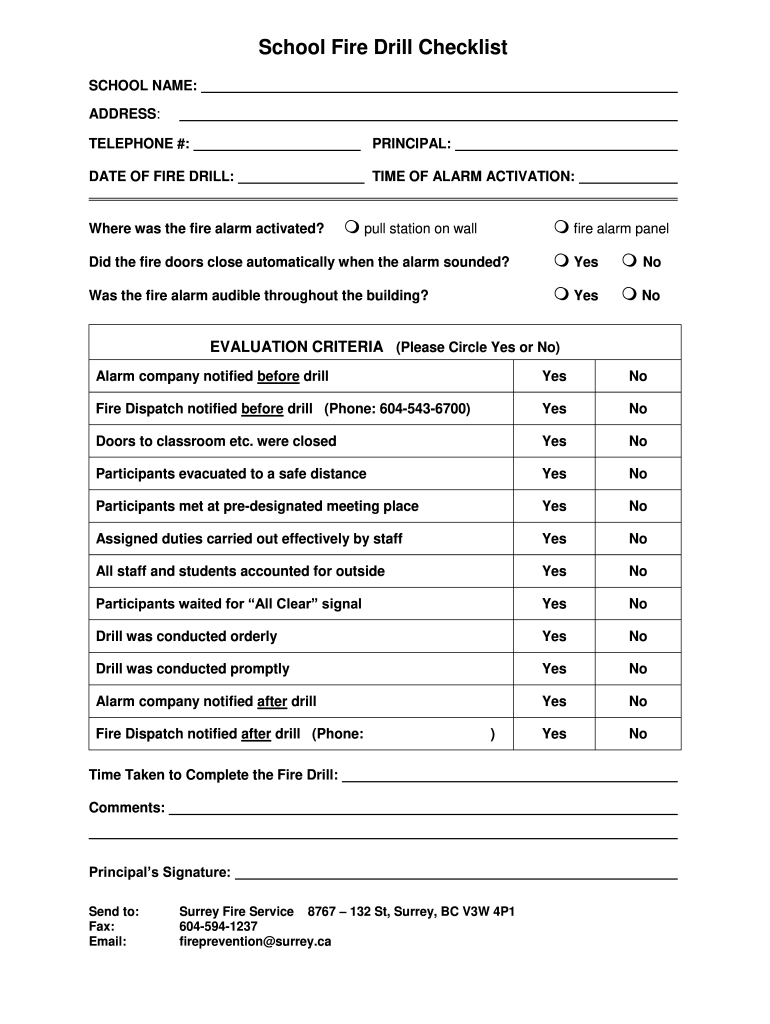
School Fire Drill Checklist SCHOOL NAME: ADDRESS: TELEPHONE #:PRINCIPAL:DATE OF FIRE DRILL:TIME OF ALARM ACTIVATION:Where was the fire alarm activated? pull station on wall fire alarm panelDid the.

Open form follow the instructions

Easily sign the form with your finger

Send filled & signed form or save
How to fill out the Canada School Fire Drill Checklist online
This guide provides clear instructions on how to complete the Canada School Fire Drill Checklist online. Following these steps will help ensure that your school meets safety regulations and conducts effective fire drills.
Follow the steps to successfully complete the checklist.
- Press the ‘Get Form’ button to access the Canada School Fire Drill Checklist and open it for editing.
- Begin by filling out the school name, address, and telephone number at the top of the form.
- Next, enter the principal's name and the date the fire drill will take place.
- Record the time when the fire alarm activation occurs.
- Indicate where the fire alarm was activated by selecting the appropriate option: either 'pull station on wall' or 'fire alarm panel'.
- Confirm whether the fire doors closed automatically when the alarm sounded by selecting 'Yes' or 'No'.
- Clarify if the fire alarm was audible throughout the building by choosing 'Yes' or 'No'.
- In the evaluation criteria section, circle 'Yes' or 'No' for each item listed, including whether the alarm company and fire dispatch were notified before and after the drill, and if various procedures were followed during the evacuation.
- Document the time taken to complete the fire drill in the designated space.
- Provide any additional comments relevant to the drill's execution.
- Finally, have the principal sign the form and send it to the appropriate contact, either via fax or email.
Complete your Canada School Fire Drill Checklist online today to enhance your school's safety preparedness.
Experience a faster way to fill out and sign forms on the web. Access the most extensive library of templates available.
Related content
The Safety Checklist Program provides information needed by schools to maintain safe...
Public Safety Group Checklist ... Call the Fire Department immediately by activating the...
by F Decision · Cited by 7 — improve the fire resistance of school bus interiors? What...
Get answers to your most pressing questions about US Legal Forms API.
What are the guidelines for the fire drill?
Guidelines for fire drills include having a clear evacuation plan, conducting drills regularly, and training staff on their responsibilities. It’s essential to encourage participation and discuss the importance of drills for safety. The Canada School Fire Drill Checklist can help schools align their practices with established safety guidelines.
How to conduct a school fire drill?
To conduct a school fire drill, start with thorough planning and communication. Ensure all staff and students know where to go and what to do during the event. Follow the guidelines laid out in the Canada School Fire Drill Checklist to conduct the drill smoothly, observing how well everyone adheres to the process.
What are the five steps of a fire drill?
The five steps of a fire drill typically include preparation, notification, evacuation, assembly, and evaluation. Prepare by creating a plan, then notify everyone when the drill starts. Evacuate via established routes, assemble at a safe area, and finally evaluate the drill using the Canada School Fire Drill Checklist to identify areas for improvement.
What is the OSHA standard for fire drills?
The Occupational Safety and Health Administration (OSHA) requires that employers provide a safe work environment, which includes conducting regular fire drills. While specific standards may differ, the general expectation is to practice evacuation procedures regularly. Utilizing the Canada School Fire Drill Checklist can assist schools in meeting OSHA standards efficiently.
What are the instructions for a fire drill?
Instructions for a fire drill include notifying everyone about the drill in advance, explaining the escape routes, and detailing assembly points outside the building. It is crucial to follow the Canada School Fire Drill Checklist during the drill for consistency. Everyone should understand their roles and the importance of remaining calm during the process.
What is a fire drill checklist?
A fire drill checklist is a tool that outlines the necessary steps and procedures for conducting an effective drill. It typically includes items such as alarm tests, evacuation routes, and roles for staff and students. Using the Canada School Fire Drill Checklist helps schools prepare and respond efficiently during real emergencies.
How to conduct a fire drill at school step by step?
To conduct a fire drill at school, begin with a clear plan. Inform staff and students about the schedule and guidelines. Start the drill with an alarm, then guide everyone to designated exits using the Canada School Fire Drill Checklist. Ensure all areas are evacuated and assemble at a predetermined safe location for a headcount.
How do you write a fire drill report?
Writing a fire drill report involves summarizing the drill's execution, noting down participants' behavior and evacuation success. Include specific details such as timing and any obstacles encountered. Finally, refer to the Canada School Fire Drill Checklist to ensure you cover all relevant points in your report.
How to write a fire evacuation procedure?
To write a fire evacuation procedure, begin by describing the roles of staff and students during an evacuation. Outline the escape routes and specify assembly points clearly. Utilize the Canada School Fire Drill Checklist to confirm that your procedures cover all necessary safety protocols.
What should be included in a fire drill report?
A fire drill report should include essential details such as the date and time of the drill, the number of participants, and their evacuation time. Additionally, document any issues that arose and suggestions for improvement, using the Canada School Fire Drill Checklist as a guide to ensure all aspects are addressed.
Use professional pre-built templates to fill in and sign documents online faster. Get access to thousands of forms.
If you believe that this page should be taken down, please follow our DMCA take down process here.