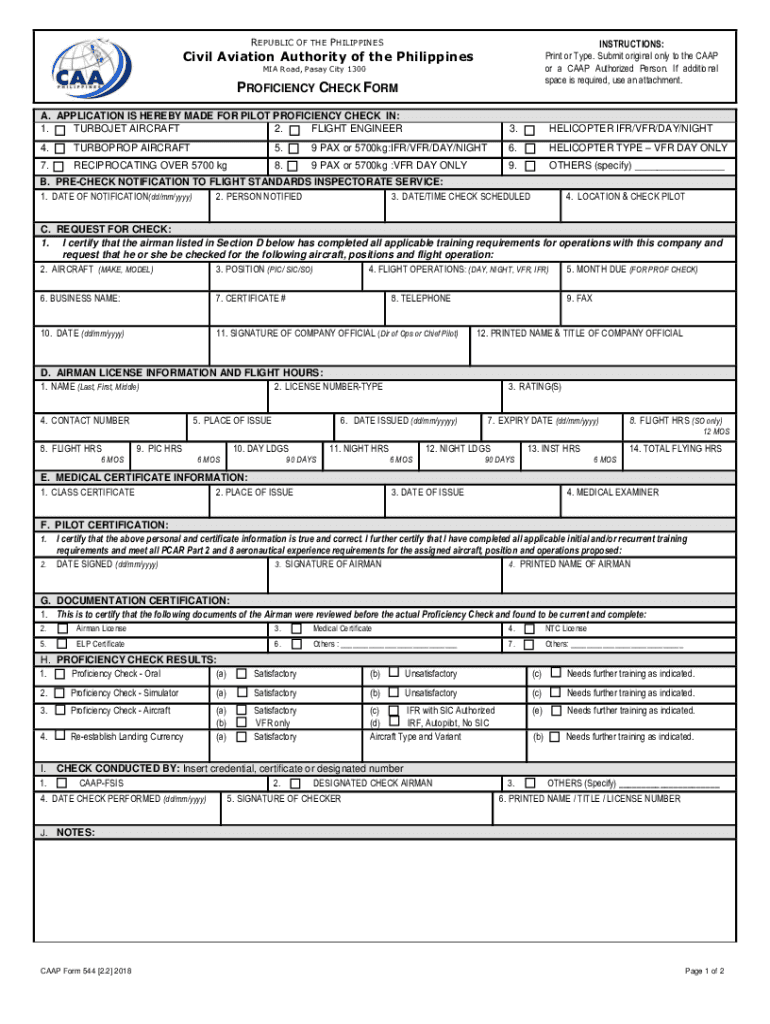
Of the Philippines MIA Road, Pasay City 1300 PROFICIENCY CHECK FORM A. APPLICATION IS HEREBY MADE FOR PILOT PROFICIENCY CHECK IN: 1. TURBOJET AIRCRAFT 2. FLIGHT ENGINEER 3. HELICOPTER IFR/VFR/DAY/NIGHT 4. TURBOPROP AIRCRAFT 5. 9 PAX or 5700kg:IFR/VFR/DAY/NIGHT 6. HELICOPTER TYPE VFR DAY ONLY 7. RECIPROCATING OVER 5700 kg 8. 9 PAX or 5700kg :VFR DAY ONLY 9. OTHERS (specify) B. PRE-CHECK NOTIFICATION TO FLIGHT STANDARDS INSPECTORATE SERVICE: 1. DATE OF NOTIFIC.
Loading

Open form follow the instructions

Easily sign the form with your finger

Send filled & signed form or save
How to fill out and sign PH CAAP Form 544 online?
Get your online template and fill it in using progressive features. Enjoy smart fillable fields and interactivity.Follow the simple instructions below:
Finding a legal specialist, creating a scheduled appointment and going to the office for a personal conference makes finishing a PH CAAP Form 544 from beginning to end exhausting. US Legal Forms lets you quickly make legally binding papers based on pre-built browser-based templates.
Execute your docs within a few minutes using our straightforward step-by-step guide:
- Get the PH CAAP Form 544 you want.
- Open it using the online editor and begin adjusting.
- Fill the blank areas; engaged parties names, places of residence and phone numbers etc.
- Change the blanks with smart fillable fields.
- Include the particular date and place your electronic signature.
- Click Done after double-checking everything.
- Download the ready-produced record to your device or print it as a hard copy.
Easily produce a PH CAAP Form 544 without needing to involve professionals. There are already more than 3 million people taking advantage of our unique catalogue of legal documents. Join us right now and get access to the #1 library of online samples. Try it out yourself!
Tips on how to fill out, edit and sign PH CAAP Form 544 online
How to fill and sign PH CAAP Form 544
Get your online template and fill it in using progressive features. Enjoy smart fillable fields and interactivity.Follow the simple instructions below:
Finding a legal specialist, creating a scheduled appointment and going to the office for a personal conference makes finishing a PH CAAP Form 544 from beginning to end exhausting. US Legal Forms lets you quickly make legally binding papers based on pre-built browser-based templates.
Execute your docs within a few minutes using our straightforward step-by-step guide:
- Get the PH CAAP Form 544 you want.
- Open it using the online editor and begin adjusting.
- Fill the blank areas; engaged parties names, places of residence and phone numbers etc.
- Change the blanks with smart fillable fields.
- Include the particular date and place your electronic signature.
- Click Done after double-checking everything.
- Download the ready-produced record to your device or print it as a hard copy.
Easily produce a PH CAAP Form 544 without needing to involve professionals. There are already more than 3 million people taking advantage of our unique catalogue of legal documents. Join us right now and get access to the #1 library of online samples. Try it out yourself!
How to edit PH CAAP Form 544
Approve and share PH CAAP Form 544 along with any other business and personal documentation online without wasting time and resources on printing and postal delivery. Take the most out of our online document editor with a built-in compliant eSignature tool.
Approving and submitting PH CAAP Form 544 documents electronically is quicker and more effective than managing them on paper. However, it requires using online solutions that ensure a high level of data protection and provide you with a compliant tool for generating electronic signatures. Our robust online editor is just the one you need to prepare your PH CAAP Form 544 and other personal and business or tax forms in an accurate and suitable manner in line with all the requirements. It features all the essential tools to quickly and easily fill out, modify, and sign paperwork online and add Signature fields for other parties, specifying who and where should sign.
It takes only a few simple actions to complete and sign PH CAAP Form 544 online:
- Open the chosen file for further processing.
- Make use of the upper panel to add Text, Initials, Image, Check, and Cross marks to your template.
- Underline the most significant details and blackout or erase the sensitive ones if needed.
- Click on the Sign tool above and select how you want to eSign your form.
- Draw your signature, type it, upload its image, or use another option that suits you.
- Switch to the Edit Fillable Fileds panel and place Signature areas for others.
- Click on Add Signer and type in your recipient’s email to assign this field to them.
- Check that all information provided is complete and precise before you click Done.
- Share your document with others using one of the available options.
When approving PH CAAP Form 544 with our powerful online solution, you can always be sure to get it legally binding and court-admissible. Prepare and submit paperwork in the most effective way possible!
How to fill and sign PH CAAP Form 544
Get your online template and fill it in using progressive features. Enjoy smart fillable fields and interactivity.Follow the simple instructions below:
Finding a legal specialist, creating a scheduled appointment and going to the office for a personal conference makes finishing a PH CAAP Form 544 from beginning to end exhausting. US Legal Forms lets you quickly make legally binding papers based on pre-built browser-based templates.
Execute your docs within a few minutes using our straightforward step-by-step guide:
- Get the PH CAAP Form 544 you want.
- Open it using the online editor and begin adjusting.
- Fill the blank areas; engaged parties names, places of residence and phone numbers etc.
- Change the blanks with smart fillable fields.
- Include the particular date and place your electronic signature.
- Click Done after double-checking everything.
- Download the ready-produced record to your device or print it as a hard copy.
Easily produce a PH CAAP Form 544 without needing to involve professionals. There are already more than 3 million people taking advantage of our unique catalogue of legal documents. Join us right now and get access to the #1 library of online samples. Try it out yourself!
Experience a faster way to fill out and sign forms on the web. Access the most extensive library of templates available.
Related content
Apr 17, 2024 — Cold water, flow-through CAAP facilities are designed to allow the...
The Manual of Standards for Aerodromes outlines the civil aviation regulations established...
Philippines (CAAP), is to improve aviation safety by enhancing the capability of. Page...
Get answers to your most pressing questions about US Legal Forms API.
How to get a CAAP permit?
Obtaining a CAAP permit requires you to apply directly through the Civil Aviation Authority of the Philippines. You will need to provide required documents, including the PH CAAP Form 544, to support your application. After submitting your application, CAAP will review it and issue the permit if all criteria are met. Utilizing platforms like US Legal Forms can streamline the documentation process for you.
How to get a CAAP license?
To obtain a CAAP license, you must complete the necessary training and meet specific requirements outlined by CAAP. This often involves passing exams and fulfilling flight hours based on the type of license you seek. Additionally, ensuring all documentation, like the PH CAAP Form 544, is in order is essential for a smooth approval process. You can find detailed steps and application forms on the CAAP website or platforms like US Legal Forms.
How do I email CAAP?
To email CAAP, you can visit their official website to find the appropriate contact information. They typically provide specific email addresses for various inquiries and services. By reaching out via email, you can get help regarding documentation, including the PH CAAP Form 544, and other aviation-related questions. Be sure to clearly state your query for a prompt response.
What is CAAP in aviation requirements?
In terms of aviation requirements, CAAP sets the necessary regulations for aircraft operations, maintenance, and pilot licensing. It ensures that all aviation stakeholders comply with national and international safety standards. This organization also helps facilitate the processing of essential forms, such as the PH CAAP Form 544, which are vital for legal compliance in the aviation sector.
What is the purpose of CAAP?
The purpose of CAAP is to promote the safety, security, and efficiency of civil aviation in the Philippines. It establishes regulations, issues licenses, and monitors compliance with aviation standards. This ensures that air travel remains safe for passengers and cargo alike. When working with documents like the PH CAAP Form 544, CAAP's guidelines ensure adherence to these critical standards.
What does CAAP stand for?
CAAP stands for the Civil Aviation Authority of the Philippines. This organization oversees all aviation-related operations within the country. Understanding CAAP is essential for anyone involved in aviation, as it ensures safety and regulatory compliance. For processing documents, including the PH CAAP Form 544, CAAP plays a crucial role.
Is it CAAP or cab?
The correct term is CAAP, referring to the Civil Aviation Authority of the Philippines. While 'cab' might refer to other contexts, CAAP specifically governs aviation standards and regulations in the Philippines. For aviation-related matters, focus on completing the PH CAAP Form 544 accurately.
How to apply CAAP?
Applying to CAAP requires completing specific forms, including the PH CAAP Form 544, and providing relevant documentation. The application process encompasses several key steps, including submitting your forms to the CAAP office. Ensure that you adhere to all requirements to avoid delays in your application.
How to get CAAP?
Acquiring CAAP involves understanding the procedures set by the Civil Aviation Authority of the Philippines. Start by visiting their official website, where you can find guidelines on certification, training, and necessary forms like the PH CAAP Form 544. Following these steps will guide you through the process effectively.
How to get a permit for a drone?
To obtain a permit for a drone, you need to follow specific steps outlined by the Civil Aviation Authority of the Philippines. This process typically includes submitting the PH CAAP Form 544 along with required documents and fees. Make sure to check the latest regulations and requirements on the CAAP website to ensure compliance.
Use professional pre-built templates to fill in and sign documents online faster. Get access to thousands of forms.
If you believe that this page should be taken down, please follow our DMCA take down process here.