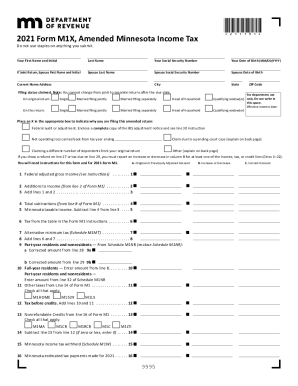
Joint Return, Spouse First Name and Initial Spouse Last Name Spouse Social Security Number Spouse Date of Birth City State Current Home Address Filing status claimed. Note: You cannot change from joint to separate returns after the due date. ZIP Code For department use On original return: Single Married filing jointly Married filing separately Head of household Qualifying widow(er) only. Do not write in On this return: Single Married filing jointly Married filing separately H.
Open form follow the instructions
Easily sign the form with your finger
Send filled & signed form or save
How to fill out and sign MN Form M1X online?
Get your online template and fill it in using progressive features. Enjoy smart fillable fields and interactivity.Follow the simple instructions below:
The prep of lawful papers can be costly and time-ingesting. However, with our pre-built web templates, everything gets simpler. Now, creating a MN Form M1X takes a maximum of 5 minutes. Our state-specific online blanks and crystal-clear recommendations eradicate human-prone mistakes.
Follow our simple actions to have your MN Form M1X prepared rapidly:
- Pick the template in the catalogue.
- Enter all required information in the required fillable areas. The intuitive drag&drop user interface makes it simple to add or move areas.
- Make sure everything is filled out properly, without typos or missing blocks.
- Use your electronic signature to the page.
- Click on Done to confirm the adjustments.
- Download the papers or print out your PDF version.
- Send instantly towards the recipient.
Use the fast search and advanced cloud editor to make a precise MN Form M1X. Clear away the routine and produce documents on the internet!
Tips on how to fill out, edit and sign MN Form M1X online
How to fill and sign MN Form M1X
Get your online template and fill it in using progressive features. Enjoy smart fillable fields and interactivity.Follow the simple instructions below:
The prep of lawful papers can be costly and time-ingesting. However, with our pre-built web templates, everything gets simpler. Now, creating a MN Form M1X takes a maximum of 5 minutes. Our state-specific online blanks and crystal-clear recommendations eradicate human-prone mistakes.
Follow our simple actions to have your MN Form M1X prepared rapidly:
- Pick the template in the catalogue.
- Enter all required information in the required fillable areas. The intuitive drag&drop user interface makes it simple to add or move areas.
- Make sure everything is filled out properly, without typos or missing blocks.
- Use your electronic signature to the page.
- Click on Done to confirm the adjustments.
- Download the papers or print out your PDF version.
- Send instantly towards the recipient.
Use the fast search and advanced cloud editor to make a precise MN Form M1X. Clear away the routine and produce documents on the internet!
How to edit MN Form M1X
Sign and share MN Form M1X along with any other business and personal paperwork online without wasting time and resources on printing and postal delivery. Take the most out of our online form editor with a built-in compliant eSignature tool.
Signing and submitting MN Form M1X templates electronically is faster and more efficient than managing them on paper. However, it requires using online solutions that guarantee a high level of data safety and provide you with a certified tool for generating eSignatures. Our robust online editor is just the one you need to prepare your MN Form M1X and other personal and business or tax templates in a precise and suitable manner in line with all the requirements. It offers all the necessary tools to easily and quickly fill out, modify, and sign documentation online and add Signature fields for other people, specifying who and where should sign.
It takes just a few simple steps to fill out and sign MN Form M1X online:
- Open the selected file for further processing.
- Use the top panel to add Text, Initials, Image, Check, and Cross marks to your template.
- Underline the most significant details and blackout or erase the sensitive ones if required.
- Click on the Sign tool above and decide on how you want to eSign your sample.
- Draw your signature, type it, upload its picture, or use another option that suits you.
- Switch to the Edit Fillable Fileds panel and place Signature fields for other parties.
- Click on Add Signer and type in your recipient’s email to assign this field to them.
- Make sure that all information provided is complete and precise before you click Done.
- Share your documentation with others using one of the available options.
When approving MN Form M1X with our comprehensive online solution, you can always be certain you get it legally binding and court-admissible. Prepare and submit documentation in the most beneficial way possible!
How to fill and sign MN Form M1X
Get your online template and fill it in using progressive features. Enjoy smart fillable fields and interactivity.Follow the simple instructions below:
The prep of lawful papers can be costly and time-ingesting. However, with our pre-built web templates, everything gets simpler. Now, creating a MN Form M1X takes a maximum of 5 minutes. Our state-specific online blanks and crystal-clear recommendations eradicate human-prone mistakes.
Follow our simple actions to have your MN Form M1X prepared rapidly:
- Pick the template in the catalogue.
- Enter all required information in the required fillable areas. The intuitive drag&drop user interface makes it simple to add or move areas.
- Make sure everything is filled out properly, without typos or missing blocks.
- Use your electronic signature to the page.
- Click on Done to confirm the adjustments.
- Download the papers or print out your PDF version.
- Send instantly towards the recipient.
Use the fast search and advanced cloud editor to make a precise MN Form M1X. Clear away the routine and produce documents on the internet!
Experience a faster way to fill out and sign forms on the web. Access the most extensive library of templates available.
Related content
Search | Minnesota Department of Revenue 15.pdf 2016 Minnesota Individual Income Tax (Form...
To claim an income tax refund, you must file Form M1X within 3 ½ years of the original...
by JP Vielma · Cited by 481 — Abstract. A wide range of problems can be modeled as...
Get answers to your most pressing questions about US Legal Forms API.
What is the Minnesota tax form called?
The primary Minnesota tax form is referred to as the M1 form for individual income taxes. However, when you need to amend this return, you will use the MN Form M1X. Understanding these forms will help ensure your tax filing process goes smoothly. For comprehensive guidance on both forms, consider exploring options provided by platforms like US Legal Forms.
What is the M1X form in Minnesota?
In Minnesota, the M1X form serves as an official document to amend your state income tax return. This form corrects any mistakes in your original filing and adjusts your tax liability accordingly. By completing the MN Form M1X, you can make sure your tax information accurately reflects your financial situation. Make sure to check for updates or changes from the Minnesota Department of Revenue before filing.
What is the M1X form for Minnesota taxes?
The M1X form for Minnesota taxes is used to amend a previously filed state tax return. If you discover errors or need to change information on your tax return, the MN Form M1X allows you to correct those details formally. Filing this form helps ensure your tax records are accurate and up to date. It's crucial to file the M1X promptly to avoid potential penalties.
Can I file a 1040x myself?
Yes, you can file a 1040X yourself, but it's essential to follow the correct procedures to ensure accuracy. The 1040X form is used for federal amendments, while the MN Form M1X is specific to Minnesota state taxes. Make sure to clearly outline your changes and provide necessary documentation. If you're unsure about the process, consider using resources like US Legal Forms for guidance.
Where can I get MN state tax forms?
You can access MN state tax forms, including the MN Form M1X, directly from the Minnesota Department of Revenue's official website. They provide downloadable versions of all essential forms you may need for your taxes. Alternatively, local libraries or tax preparer's offices often carry these forms. Using the official site is the quickest way to ensure you have the most current versions.
Where to mail form M1X?
To submit your MN Form M1X, mail it to the Minnesota Department of Revenue. The specific address may vary depending on whether you are including a payment or not. You can find the latest mailing address on the Minnesota Department of Revenue's official website. Double-check the address to ensure your amended return arrives promptly.
What to include in an amended tax return?
When filing an amended tax return using the MN Form M1X, you should include any changes to your income, deductions, or credits. Ensure you provide the correct information that supports the changes you are making. It is important to attach any necessary documentation that backs up these adjustments, such as W-2s or other tax forms. Always review and confirm that the information aligns with your original return.
Is it a red flag to amend a tax return?
Amending a tax return using the MN Form M1X is not necessarily a red flag; rather, it shows you are proactive about correcting any errors. The important thing is to ensure that all information is accurate and properly documented with your amendment. A well-prepared amendment can provide clarity and transparency to tax authorities, which can help alleviate concerns.
At what age do seniors stop paying property taxes in MN?
In Minnesota, seniors may qualify for property tax refunds or reductions, but they do not automatically stop paying property taxes at a specific age. However, senior citizens aged 65 and older may be eligible for specific programs that can lessen their property tax burden. Researching these options can greatly benefit eligible seniors.
How to calculate Minnesota taxable income?
To calculate your Minnesota taxable income, start with your federal adjusted gross income and make adjustments based on Minnesota tax laws. Subtract any allowable deductions specific to Minnesota and add any applicable modifications. It is crucial to check the latest instructions on the MN Form M1X for guidance on specific adjustments.
Use professional pre-built templates to fill in and sign documents online faster. Get access to thousands of forms.
If you believe that this page should be taken down, please follow our DMCA take down process here.
This form is available in several versions. Select the version you need from the drop-down list below.