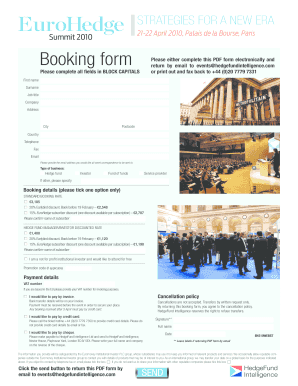
Get Eurohedge Summit 2010 Booking Form
How it works
-

Open form follow the instructions
-

Easily sign the form with your finger
-

Send filled & signed form or save
How to fill out and sign EuroHedge Summit 2010 Booking Form online?
Get your online template and fill it in using progressive features. Enjoy smart fillable fields and interactivity.Follow the simple instructions below:The preparing of lawful documents can be high-priced and time-consuming. However, with our predesigned online templates, everything gets simpler. Now, working with a EuroHedge Summit 2010 Booking Form requires a maximum of 5 minutes. Our state-specific browser-based samples and simple recommendations eliminate human-prone faults.
Adhere to our easy steps to have your EuroHedge Summit 2010 Booking Form prepared quickly:
- Choose the template from the catalogue.
- Type all necessary information in the required fillable areas. The intuitive drag&drop graphical user interface makes it simple to add or move fields.
- Check if everything is completed correctly, without typos or missing blocks.
- Apply your e-signature to the PDF page.
- Click on Done to save the alterations.
- Save the record or print your PDF version.
- Send immediately to the receiver.
Use the fast search and advanced cloud editor to make a correct EuroHedge Summit 2010 Booking Form. Remove the routine and make documents on the web!
Tips on how to fill out, edit and sign EuroHedge Summit 2010 Booking Form online
How to fill out and sign EuroHedge Summit 2010 Booking Form online?
Get your online template and fill it in using progressive features. Enjoy smart fillable fields and interactivity.Follow the simple instructions below:
The preparing of lawful documents can be high-priced and time-consuming. However, with our predesigned online templates, everything gets simpler. Now, working with a EuroHedge Summit 2010 Booking Form requires a maximum of 5 minutes. Our state-specific browser-based samples and simple recommendations eliminate human-prone faults.
Adhere to our easy steps to have your EuroHedge Summit 2010 Booking Form prepared quickly:
- Choose the template from the catalogue.
- Type all necessary information in the required fillable areas. The intuitive drag&drop graphical user interface makes it simple to add or move fields.
- Check if everything is completed correctly, without typos or missing blocks.
- Apply your e-signature to the PDF page.
- Click on Done to save the alterations.
- Save the record or print your PDF version.
- Send immediately to the receiver.
Use the fast search and advanced cloud editor to make a correct EuroHedge Summit 2010 Booking Form. Remove the routine and make documents on the web!
How to edit EuroHedge Summit 2010 Booking Form: customize forms online
Simplify your paperwork preparation process and adapt it to your demands within clicks. Fill out and approve EuroHedge Summit 2010 Booking Form with a powerful yet user-friendly online editor.
Preparing paperwork is always difficult, particularly when you deal with it from time to time. It demands you strictly follow all the formalities and precisely fill out all areas with full and precise data. Nevertheless, it often occurs that you need to modify the document or add more areas to fill out. If you need to improve EuroHedge Summit 2010 Booking Form before submitting it, the simplest way to do it is by using our powerful yet simple-to-use online editing tools.
This extensive PDF editing solution enables you to quickly and easily complete legal paperwork from any internet-connected device, make simple changes to the template, and insert more fillable areas. The service enables you to pick a specific area for each data type, like Name, Signature, Currency and SSN etc. You can make them mandatory or conditional and choose who should complete each field by assigning them to a defined recipient.
Make the steps below to improve your EuroHedge Summit 2010 Booking Form online:
- Open needed sample from the catalog.
- Fill out the blanks with Text and place Check and Cross tools to the tickboxes.
- Utilize the right-side panel to alter the template with new fillable areas.
- Select the areas based on the type of data you want to be collected.
- Make these fields mandatory, optional, and conditional and customize their order.
- Assign each field to a specific party with the Add Signer option.
- Check if you’ve made all the required modifications and click Done.
Our editor is a universal multi-featured online solution that can help you easily and quickly adapt EuroHedge Summit 2010 Booking Form and other templates in accordance with your requirements. Minimize document preparation and submission time and make your forms look perfect without hassle.
Industry-leading security and compliance
-
In businnes since 199725+ years providing professional legal documents.
-
Accredited businessGuarantees that a business meets BBB accreditation standards in the US and Canada.
-
Secured by BraintreeValidated Level 1 PCI DSS compliant payment gateway that accepts most major credit and debit card brands from across the globe.