Loading
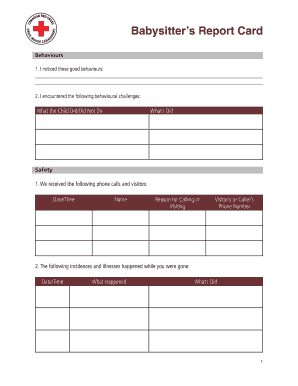
Get Canada Red Cross Babysitter's Report Card
How it works
-

Open form follow the instructions
-

Easily sign the form with your finger
-

Send filled & signed form or save
How to fill out the Canada Red Cross Babysitter's Report Card online
Filling out the Canada Red Cross Babysitter's Report Card online can be a straightforward process when you follow the right steps. This guide will provide you with clear, step-by-step instructions to help you complete the report card accurately.
Follow the steps to fill out the report card seamlessly.
- Click ‘Get Form’ button to access the report card and open it in the designated editor.
- Begin by filling out the section on behaviours. In the first part, document any good behaviours you observed, using as much detail as necessary. For the second part, note any behavioural challenges encountered, including what the child did or did not do, along with your response.
- In the safety section, list any phone calls and visitors that occurred during your time babysitting. Include the date and time of each interaction, the name of the caller or visitor, their reason for contacting you, and their phone number.
- Document any incidences or illnesses that occurred while you were babysitting. Provide the date and time, describe what happened, and outline how you responded to each situation.
- In the play section, record the games and toys that were involved in playtime. Additionally, mention positive behaviours observed during these activities.
- For the basic care section, type in the foods that were consumed by the child. Provide details about their naptime or bedtime, including the time they went to sleep, the duration, and how many times they woke up during that period.
- Input the number of times you changed the diaper or helped with toileting for each child as applicable.
- In the medication section, detail any medications given, including the child's name, the medication, the time given, the amount administered, and any reactions observed.
- Finally, use the other comments section to add any additional notes that may be relevant.
- Once you have completed all sections of the form, make sure to save your changes. You can then download, print, or share the report card as needed.
Complete the Canada Red Cross Babysitter's Report Card online to maintain organized records and ensure the safety and care of the children.
Qualifications and experience What is essential for professional baby sitters, however, is well-evidenced experience of working with children. Baby sitters registered with Sitters all need a minimum of two years' childcare experience, for example, and many of them have much more.