Loading
Form preview
  • US Legal Forms
  • Other Templates
  • Foreign Forms
  • Foreign Canada Other Forms
  • Canada Rbc Royal Bank Form 00950 2007

Get Canada Rbc Royal Bank Form 00950 2007-2026

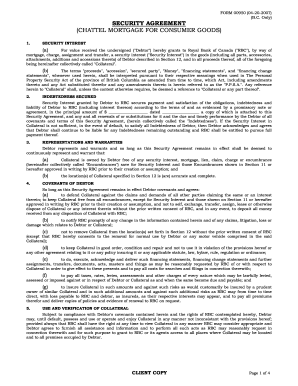
F Canada ("RBC"), by way of mortgage, charge, assignment and transfer, a security interest ("Security Interest") in the goods (including all parts, accessories, attachments, additions and accessions thereto) of Debtor described in Section 12, and in all proceeds thereof, all of the foregoing being hereinafter collectively called "Collateral". (b) The terms "proceeds", "accession", "secured party", "Money", "financing statements", and "financing change statements", whenever used herein, shall be .

How it works

  1. Open form

    Open form follow the instructions

  2. Easily sign form

    Easily sign the form with your finger

  3. Share form

    Send filled & signed form or save

How to fill out the Canada RBC Royal Bank Form 00950 online

This guide provides comprehensive instructions for completing the Canada RBC Royal Bank Form 00950 online. Designed to assist users of all experience levels, this guide breaks down each section of the form to ensure clarity and ease of use.

Follow the steps to effectively complete the form online.

  1. Click the ‘Get Form’ button to access the form and open it in the editor.
  2. Begin by reviewing the Security Agreement section. Ensure you understand the definitions provided, particularly regarding ‘Collateral’ and ‘Security Interest’.
  3. Proceed to the Indebtedness Secured section. Fill in the principal amount and the date accurately, as this information outlines the financial obligation.
  4. In the Representations and Warranties section, confirm that the collaterals listed are owned free of any other claims, unless noted in Section 11.
  5. Fill out the Covenants of Debtor section, which includes obligations such as notifying RBC of any changes in information or potential claims.
  6. Accurately complete the Encumbrances Affecting Collateral section, if applicable. Specify any existing debts associated with collateral.
  7. In Section 12, provide a clear description of the collateral and its physical location to ensure proper identification.
  8. Confirm the accuracy of the Debtor Information section. Enter the name, date of birth, and address details as required.
  9. Once all fields are filled, review the entire form for accuracy. Make any necessary edits.
  10. Finally, save your changes, and download or print the form as needed. You can also share the form via appropriate channels.

Start filling out your Canada RBC Royal Bank Form 00950 online today to ensure a smooth process.

Get form

Experience a faster way to fill out and sign forms on the web. Access the most extensive library of templates available.
Get form

Related content

Royal Bank of Canada
Additional information relating to Royal Bank of Canada, including our 2005 Annual...
Learn more
The Federal Home Loan Bank System: The Lender of...
by AB Ashcraft · 2008 — The Federal Home Loan Bank (FHLB) System is a large, complex...
Learn more
Combining Excellence
Mar 15, 2018 — In the 60th year since our founding, I am extremely excited to tell you...
Learn more

Related links form

Questionnaire For National Security Positions - US Navy - Public Navy Fcc Form 500 Sa89 Function Report Adult Online Fillable Form

Questions & Answers

Get answers to your most pressing questions about US Legal Forms API.

Contact support

RBC Royal Bank does not utilize IBANs like many banks outside Canada. For transactions involving international accounts, you will typically use the bank's SWIFT code instead. For assistance related to the Canada RBC Royal Bank Form 00950, it is advisable to check RBC's resources or contact their support for specific requirements.

RBS (Royal Bank of Scotland) uses IBANs for international transactions, but the number varies by country and specific account. However, in Canada, RBC does not provide IBANs but uses other codes for transfers. If you’re focusing on the Canada RBC Royal Bank Form 00950, ensure you follow the guidelines set by RBC for the correct account identification.

To download your direct deposit form from RBC, log into your online banking account. Navigate to the 'Forms' section, where you can easily locate the direct deposit form. For those needing the Canada RBC Royal Bank Form 00950 specifically, ensure you select the right form that meets your needs.

In Canada, RBC does not use IBANs (International Bank Account Numbers) like banks in Europe do. However, for international transactions, you may need a SWIFT code instead. If you’re working with documents related to the Canada RBC Royal Bank Form 00950, be sure to check which identification numbers are required for your specific transactions.

Yes, RBC stands for Royal Bank of Canada. It is a leading financial institution in Canada, offering a range of banking services. For those looking to understand or utilize the Canada RBC Royal Bank Form 00950, knowing that RBC and Royal Bank of Canada are interchangeable can simplify your banking experience.

The SWIFT code for Royal Bank of Canada (RBC) is ROYCCAT2. This code is essential for international wire transfers and ensures the secure transfer of funds. For any transactions involving the Canada RBC Royal Bank Form 00950, using the correct SWIFT code is vital to ensure prompt processing.

To upload documents to your cell phone, first ensure you have the documents saved in an accessible format. You can then use cloud services or email to transfer them to your phone. For official documents like the Canada RBC Royal Bank Form 00950, consider using secure storage apps to keep them organized and easily accessible.

To upload documents to RBC Online Banking, log into your account and navigate to the 'Documents' section. You will find an option to upload files; simply select the documents you wish to upload, including the Canada RBC Royal Bank Form 00950, and follow the prompts to complete the process.

The SWIFT code for the Royal Bank of Canada (RBC) is ROYCCAT2. This code is essential for international payments and transfers. When dealing with banking forms like the Canada RBC Royal Bank Form 00950, having the correct SWIFT code helps ensure that your transactions are processed smoothly.

To upload documents to RBC, use the RBC online banking platform or the mobile app. Select the 'Upload Documents' option and follow the prompts to upload files directly from your device. Ensure you have the Canada RBC Royal Bank Form 00950 saved on your device for easy access during this process.

Get This Form Now!

Use professional pre-built templates to fill in and sign documents online faster. Get access to thousands of forms.
Get form
If you believe that this page should be taken down, please follow our DMCA take down processhere.
Get Canada RBC Royal Bank Form 00950
Get form
  • Adoption
  • Bankruptcy
  • Contractors
  • Divorce
  • Home Sales
  • Employment
  • Identity Theft
  • Incorporation
  • Landlord Tenant
  • Living Trust
  • Name Change
  • Personal Planning
  • Small Business
  • Wills & Estates
  • Packages A-Z
  • Affidavits
  • Bankruptcy
  • Bill of Sale
  • Corporate - LLC
  • Divorce
  • Employment
  • Identity Theft
  • Internet Technology
  • Landlord Tenant
  • Living Wills
  • Name Change
  • Power of Attorney
  • Real Estate
  • Small Estates
  • Wills
  • All Forms
  • Forms A-Z
  • Other Templates
  • Legal Hub
  • About Us
  • Help Portal
  • Legal Resources
  • Blog
  • Affiliates
  • Contact Us
  • Delete My Account
  • Site Map
  • Industries
  • Forms in Spanish
  • Localized Forms
  • State-specific Forms
  • Forms Kit
  • Real Estate Handbook
  • All Guides
  • Notarize
  • Incorporation services
  • For Consumers
  • For Small Business
  • For Attorneys
  • USLegal
  • FormsPass
  • pdfFiller
  • signNow
  • altaFlow
  • DocHub
  • Instapage
Form Packages
  • Adoption
  • Bankruptcy
  • Contractors
  • Divorce
  • Home Sales
  • Employment
  • Identity Theft
  • Incorporation
  • Landlord Tenant
  • Living Trust
  • Name Change
  • Personal Planning
  • Small Business
  • Wills & Estates
  • Packages A-Z
Form Categories
  • Affidavits
  • Bankruptcy
  • Bill of Sale
  • Corporate - LLC
  • Divorce
  • Employment
  • Identity Theft
  • Internet Technology
  • Landlord Tenant
  • Living Wills
  • Name Change
  • Power of Attorney
  • Real Estate
  • Small Estates
  • Wills
  • All Forms
  • Forms A-Z
  • Other Templates
Customer Service
  • Legal Hub
  • About Us
  • Help Portal
  • Legal Resources
  • Blog
  • Affiliates
  • Contact Us
  • Delete My Account
  • Site Map
  • Industries
  • Forms in Spanish
  • Localized Forms
  • State-specific Forms
  • Forms Kit
Legal Guides
  • Real Estate Handbook
  • All Guides
Prepared for you
  • Notarize
  • Incorporation services
Our Customers
  • For Consumers
  • For Small Business
  • For Attorneys
Our Sites
  • USLegal
  • FormsPass
  • pdfFiller
  • signNow
  • altaFlow
  • DocHub
  • Instapage
Social Media
Call us now toll free:
+1 833 426 79 33
As seen in:
© Copyright 1999-2026 airSlate Legal Forms, Inc. 17 Station Street, Ste. 203, Brookline, MA 02445
  • Your Privacy Choices
  • Terms of Service
  • Privacy Notice
  • Content Takedown Policy
  • Bug Bounty Program