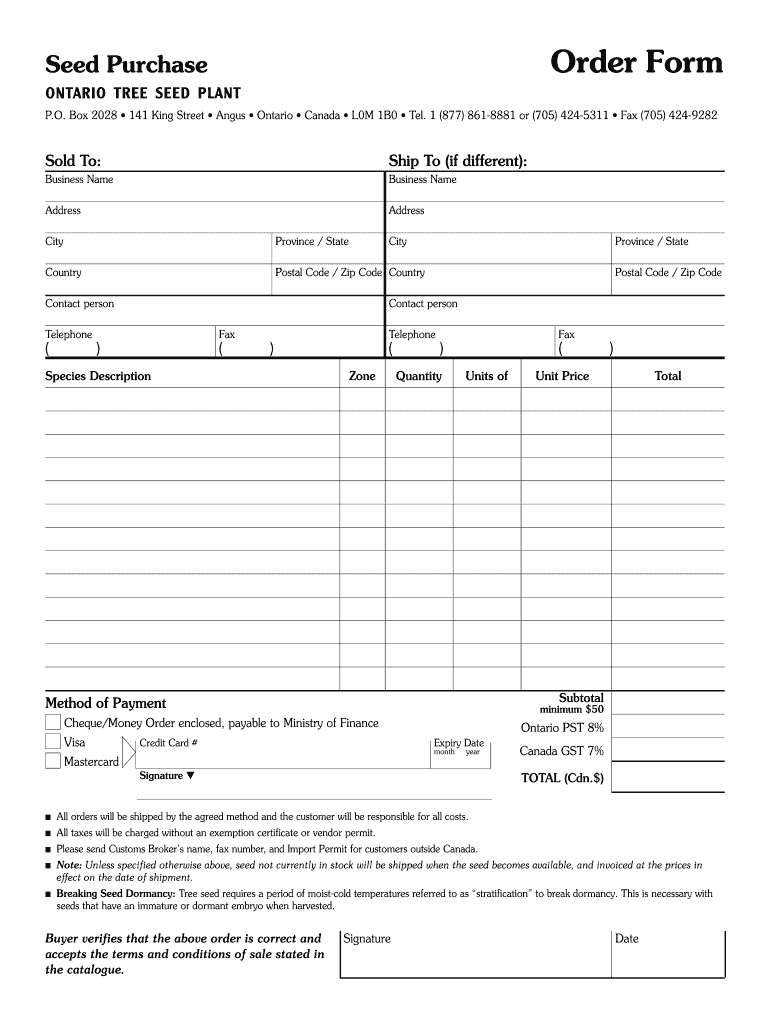
Old To: Ship To (if different): Business Name Business Name Address Address City Province / State City Country Postal Code / Zip Code Country Contact person Postal Code / Zip Code Contact person Telephone ( Province / State Fax ) ( Telephone ) Species Description ( Zone Fax ) Quantity ( Units of Unit Price Total Subtotal Method of Payment minimum $50 Cheque/Money Order enclosed, payable to Ministry of Finance Visa ) Credit Card # Ontario PST 8% Expiry Date mon.

Open form follow the instructions

Easily sign the form with your finger

Send filled & signed form or save
How to fill out the Canada Ontario Seed Purchase Order Form online
This guide provides a clear and comprehensive approach to filling out the Canada Ontario Seed Purchase Order Form online. Each section is outlined to ensure a smooth and efficient process.
Follow the steps to properly complete the order form.
- Click ‘Get Form’ button to access the document and open it in the editor.
- In the 'Sold To' section, fill out your business name, address, city, province or state, postal code or zip code, and contact person details to ensure accurate order processing.
- If shipping to a different address, complete the 'Ship To' section similarly, ensuring all information matches the intended delivery location.
- Proceed to enter the species description for the seeds you wish to purchase, along with the quantity required. Ensure you select the correct zone for seeds.
- Next, fill in the unit price for each type of seed requested. Multiply the unit price by the quantity to get the total for each item.
- Calculate the subtotal of your order and include the applicable Ontario PST (8%) and Canada GST (7%) based on the total amount.
- Select a method of payment and provide the necessary details. For credit card payments, enter the card number and expiry date.
- Sign the form to verify that your order is correct and that you accept the terms and conditions of sale stated in the catalogue. Record the date of signing.
- Once all sections are completed, review the form for any inaccuracies or missing information. Save changes as needed, then proceed to download, print, or share the completed form.
Complete your forms online today to ensure timely processing of your seed order.
Experience a faster way to fill out and sign forms on the web. Access the most extensive library of templates available.
Related content
Dec 22, 2015 — The Canadian province of Ontario has introduced new regulations that...
Ontario Stewardship. Technology and information transfer is a priority of the...
We wanted to gain a better understanding of how our project currently fits in current...
Get answers to your most pressing questions about US Legal Forms API.
How do I create a purchase order form?
How to Create a Purchase Order Choose a template. Add issue data. Write the PO number. Add business information including the billing address for the buyer and the seller. Mention product details including item descriptions, model numbers, quantity, and so on. Mention the delivery date.
What is a PO order form?
A purchase order form is an official contract document in which a buyer agrees to purchase goods or services from a vendor. Purchase order forms are crucial because they standardize the business' procurement process.
Who issues the purchase order form?
A purchase order is issued by the buyer, who wants to make sure they got exactly what they ordered, while an invoice is issued by the vendor, who wants to make sure they get paid. Purchase orders are sent by the buyer to the vendor first, and they outline exactly what the order should contain and when it should arrive.
What is a PO form?
A purchase order form is an official contract document in which a buyer agrees to purchase goods or services from a vendor. Purchase order forms are crucial because they standardize the business' procurement process.
Can you create your own purchase order form?
Purchase orders benefit both you and your suppliers, ensuring there are no miscommunications throughout the purchase process. With the right template, purchase orders can be easy and simple to create, even if you don't have a dedicated vendor relationship manager on your team.
Use professional pre-built templates to fill in and sign documents online faster. Get access to thousands of forms.
If you believe that this page should be taken down, please follow our DMCA take down process here.