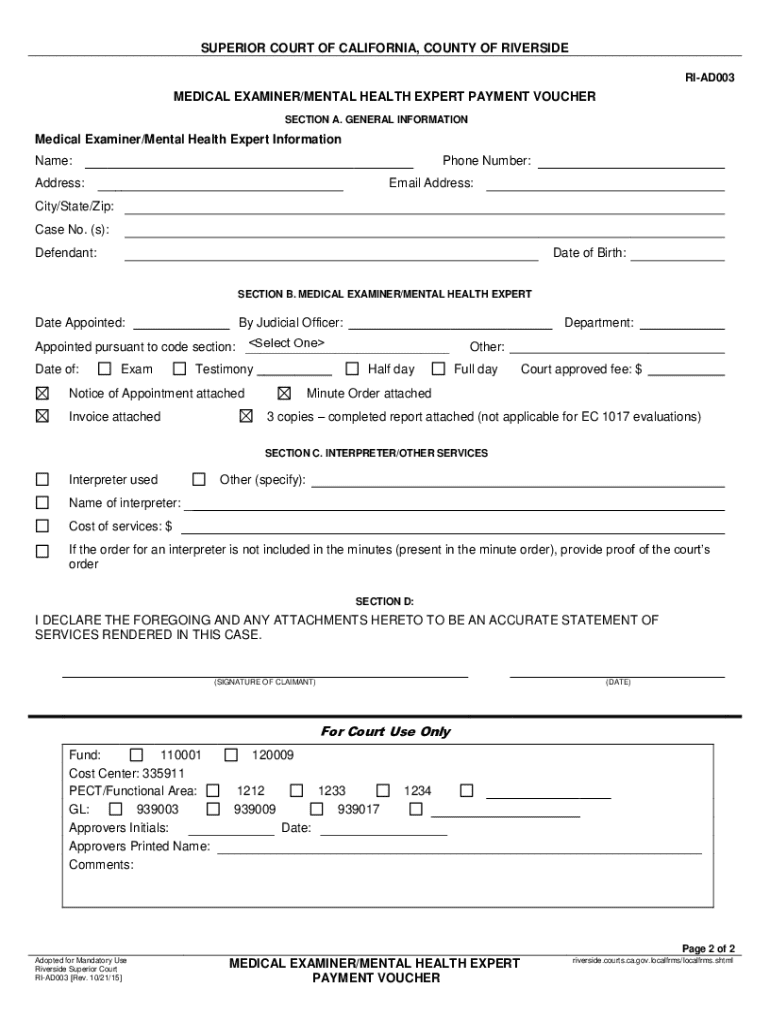
And interpreter fees on court ordered medical examinations. Form must be typed Section A. General Information: 1. Complete the following information: a. The name, address, email and phone number of the claimant/vendor b. The case number, including the case prefix c. The defendant date of birth d. The defendant name Section B. Medical Examiners/Mental Health Expert 2. Complete the following information: a. The date of appointment, the name of the judicial officer who has made the appo.
Loading

Open form follow the instructions

Easily sign the form with your finger

Send filled & signed form or save
How to fill out and sign CA RI-AD003 - County Of Riverside online?
Get your online template and fill it in using progressive features. Enjoy smart fillable fields and interactivity.Follow the simple instructions below:
The days of frightening complex tax and legal documents are over. With US Legal Forms the entire process of creating official documents is anxiety-free. The best editor is already at your fingertips giving you multiple useful instruments for filling out a CA RI-AD003 - County Of Riverside. These guidelines, combined with the editor will guide you with the whole process.
- Click on the orange Get Form button to start modifying.
- Activate the Wizard mode on the top toolbar to obtain extra pieces of advice.
- Fill each fillable field.
- Ensure the data you add to the CA RI-AD003 - County Of Riverside is up-to-date and correct.
- Include the date to the sample with the Date option.
- Select the Sign tool and create an e-signature. You can find 3 available alternatives; typing, drawing, or uploading one.
- Make sure that every field has been filled in correctly.
- Click Done in the top right corne to export the sample. There are various options for getting the doc. An attachment in an email or through the mail as a hard copy, as an instant download.
We make completing any CA RI-AD003 - County Of Riverside much easier. Use it now!
Tips on how to fill out, edit and sign CA RI-AD003 - County Of Riverside online
How to fill and sign CA RI-AD003 - County Of Riverside
Get your online template and fill it in using progressive features. Enjoy smart fillable fields and interactivity.Follow the simple instructions below:
The days of frightening complex tax and legal documents are over. With US Legal Forms the entire process of creating official documents is anxiety-free. The best editor is already at your fingertips giving you multiple useful instruments for filling out a CA RI-AD003 - County Of Riverside. These guidelines, combined with the editor will guide you with the whole process.
- Click on the orange Get Form button to start modifying.
- Activate the Wizard mode on the top toolbar to obtain extra pieces of advice.
- Fill each fillable field.
- Ensure the data you add to the CA RI-AD003 - County Of Riverside is up-to-date and correct.
- Include the date to the sample with the Date option.
- Select the Sign tool and create an e-signature. You can find 3 available alternatives; typing, drawing, or uploading one.
- Make sure that every field has been filled in correctly.
- Click Done in the top right corne to export the sample. There are various options for getting the doc. An attachment in an email or through the mail as a hard copy, as an instant download.
We make completing any CA RI-AD003 - County Of Riverside much easier. Use it now!
How to edit CA RI-AD003 - County Of Riverside
Fill out and sign your CA RI-AD003 - County Of Riverside quickly and error-free. Get and edit, and sign customizable form templates in a comfort of a single tab.
Your document workflow can be much more efficient if everything required for editing and handling the flow is arranged in one place. If you are looking for a CA RI-AD003 - County Of Riverside form sample, this is a place to get it and fill it out without looking for third-party solutions. With this intelligent search engine and editing tool, you won’t need to look any further.
Just type the name of the CA RI-AD003 - County Of Riverside or any other form and find the right template. If the sample seems relevant, you can start editing it right on the spot by clicking Get form. No need to print or even download it. Hover and click on the interactive fillable fields to place your details and sign the form in a single editor.
Use more editing instruments to customize your template:
- Check interactive checkboxes in forms by clicking on them. Check other parts of the CA RI-AD003 - County Of Riverside form text by using the Cross, Check, and Circle instruments
- If you need to insert more text into the file, utilize the Text tool or add fillable fields with the respective button. You may also specify the content of each fillable field.
- Add pictures to forms with the Image button. Add pictures from your device or capture them with your computer camera.
- Add custom graphic elements to the document. Use Draw, Line, and Arrow instruments to draw on the document.
- Draw over the text in the document if you want to conceal it or stress it. Cover text fragments using theErase and Highlight, or Blackout instrument.
- Add custom elements such as Initials or Date using the respective instruments. They will be generated automatically.
- Save the form on your computer or convert its format to the one you require.
When equipped with a smart forms catalog and a powerful document editing solution, working with documentation is easier. Find the form you need, fill it out immediately, and sign it on the spot without downloading it. Get your paperwork routine simplified with a solution designed for editing forms.
How to fill and sign CA RI-AD003 - County Of Riverside
Get your online template and fill it in using progressive features. Enjoy smart fillable fields and interactivity.Follow the simple instructions below:
The days of frightening complex tax and legal documents are over. With US Legal Forms the entire process of creating official documents is anxiety-free. The best editor is already at your fingertips giving you multiple useful instruments for filling out a CA RI-AD003 - County Of Riverside. These guidelines, combined with the editor will guide you with the whole process.
- Click on the orange Get Form button to start modifying.
- Activate the Wizard mode on the top toolbar to obtain extra pieces of advice.
- Fill each fillable field.
- Ensure the data you add to the CA RI-AD003 - County Of Riverside is up-to-date and correct.
- Include the date to the sample with the Date option.
- Select the Sign tool and create an e-signature. You can find 3 available alternatives; typing, drawing, or uploading one.
- Make sure that every field has been filled in correctly.
- Click Done in the top right corne to export the sample. There are various options for getting the doc. An attachment in an email or through the mail as a hard copy, as an instant download.
We make completing any CA RI-AD003 - County Of Riverside much easier. Use it now!
Experience a faster way to fill out and sign forms on the web. Access the most extensive library of templates available.
Related content
The following instructions pertain to requests for payment of medical examiner and...
Get answers to your most pressing questions about US Legal Forms API.
How to file a fictitious business name in Riverside County?
To file a fictitious business name in Riverside County, you must complete a specific application and submit it to the county clerk's office. This process includes identifying your business, completing the necessary forms, and paying any applicable fees. For assistance and detailed guidance on filing your application, consider using the resources provided by USLegalForms tailored for CA RI-AD003 - County Of Riverside.
What is a TRC hearing?
A TRC hearing, or Trial Readiness Conference, is a court session where parties confirm their readiness to proceed to trial. During this hearing, the judge reviews any pending issues and ensures that required documents are submitted. For effective navigation of these legal processes, refer to CA RI-AD003 - County Of Riverside.
Is a trial setting conference the same as a case management conference?
No, a trial setting conference and a case management conference serve different purposes. While a trial setting conference focuses on scheduling the trial, a case management conference is concerned with managing the overall progress of the case and addressing procedural issues. Both are essential processes within CA RI-AD003 - County Of Riverside.
How many days before trial is the final status conference?
The final status conference typically occurs a few days before the scheduled trial date. In Riverside County, this conference allows the court to identify any last-minute concerns and confirm that all parties are ready to proceed. Knowing this timeframe can help you effectively prepare under CA RI-AD003 - County Of Riverside.
What does trial setting conference mean?
A trial setting conference is a meeting in which the court schedules a tentative date for a trial. During this conference, the judge assesses the readiness of the case and discusses any outstanding issues with the parties involved. Understanding this process is crucial for anyone navigating the legal landscape in CA RI-AD003 - County Of Riverside.
What is a trial setting conference statement in Riverside County?
In Riverside County, a trial setting conference statement is a document that parties submit to the court before scheduling a trial. This statement outlines the case's status, any prior agreements, and the issues to be resolved. It ensures that everyone is on the same page and helps streamline the trial process under CA RI-AD003 - County Of Riverside.
Are court records public information in California?
Yes, court records are generally considered public information in California, including those from Riverside County. This transparency allows you to access various legal documents for civic or personal inquiries. For a streamlined experience with CA RI-AD003 - County Of Riverside records, USLegalForms can provide you with the necessary legal forms and assistance.
How do I request to appear remotely in Riverside County?
To request a remote appearance in Riverside County, you must complete the relevant forms and submit them to the court ahead of time. Typically, this can be done through the Riverside County Superior Court's website. For more information and support, check out USLegalForms, which offers resources related to CA RI-AD003 - County Of Riverside.
How to lookup court cases in Riverside, CA?
You can quickly access court case information in Riverside, CA, via the Riverside County Superior Court's official website. By entering the required details, you can find both criminal and civil case information. If you need additional assistance or legal forms, USLegalForms offers solutions to help navigate the CA RI-AD003 - County Of Riverside process.
How to get a copy of a deed in Riverside County?
To get a copy of a deed in Riverside County, you can request one through the Riverside County Recorder's Office. You can do this in person or online, providing some basic information about the property. Using services from USLegalForms can make obtaining these records more straightforward and efficient for matters relating to CA RI-AD003 - County Of Riverside.
Use professional pre-built templates to fill in and sign documents online faster. Get access to thousands of forms.
If you believe that this page should be taken down, please follow our DMCA take down process here.