Loading
Get Canada Nas-2120 2004
How it works
-

Open form follow the instructions
-

Easily sign the form with your finger
-

Send filled & signed form or save
How to fill out the Canada NAS-2120 online
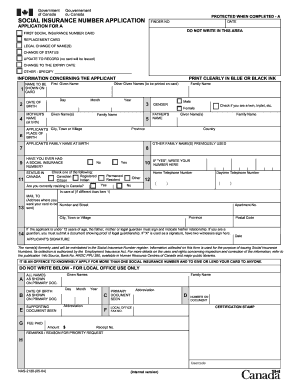
This guide provides a clear and supportive approach to filling out the Canada NAS-2120, the application for a Social Insurance Number. By following the instructions outlined below, you can successfully complete the form online with confidence.
Follow the steps to complete your application successfully.
- Click the ‘Get Form’ button to obtain the form and open it in the editor.
- In the first section, specify if this is your first Social Insurance Number application, a replacement card request, or any other changes by checking the appropriate box.
- Enter your full name in the format of first given name, other given names, and family name. Ensure it is clear and accurate.
- Provide your date of birth by selecting the day, month, and year. Double-check for accuracy.
- Fill in your place of birth, including city, town, or village, and country.
- Indicate if you have ever received a Social Insurance Number by checking 'Yes' or 'No'. If 'Yes', enter your previous number.
- Select your status in Canada by checking one of the provided options: Registered Canadian Indian, Citizen, Permanent Resident, or Other.
- Enter your telephone numbers for home and daytime contact. This helps in case follow-up is necessary.
- If applicable, indicate if you are a twin, triplet, or part of a multiple birth.
- Provide your father's and mother's names at birth as required and their corresponding family names.
- Select your gender by marking the appropriate box.
- If you are under 12 years old, ensure that a parent or legal guardian signs the application. They must provide proof of guardianship if applicable.
- Complete your mailing address where you want the card to be sent, including postal code.
- Review all entered information for accuracy before submitting your application.
- Once you have finished, save changes, then choose to download, print, or share the form as necessary.
Start your online application for the Canada NAS-2120 today!
Get form
Experience a faster way to fill out and sign forms on the web. Access the most extensive library of templates available.
To apply for a SIN in Canada, you need to provide proof of identity and legal status in Canada, such as a work permit, study permit, or permanent resident card. Additional documents may include your passport or any other form of identification. Ensuring you have the right documents prepared will streamline your application process connected to regulations like Canada NAS-2120.
Get This Form Now!
Use professional pre-built templates to fill in and sign documents online faster. Get access to thousands of forms.