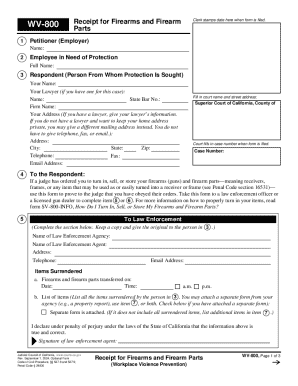
Get Wv-800 Receipt For Firearms And Firearm Parts
How it works
-

Open form follow the instructions
-

Easily sign the form with your finger
-

Send filled & signed form or save
How to fill out and sign WV-800 Receipt For Firearms And Firearm Parts online?
Get your online template and fill it in using progressive features. Enjoy smart fillable fields and interactivity.Follow the simple instructions below:Are you still seeking a quick and practical tool to fill in WV-800 Receipt For Firearms And Firearm Parts at a reasonable price? Our service provides you with an extensive selection of templates that are offered for submitting online. It only takes a few minutes.
Keep to these simple guidelines to get WV-800 Receipt For Firearms And Firearm Parts prepared for submitting:
- Choose the sample you require in our library of templates.
- Open the form in our online editor.
- Read the guidelines to discover which details you will need to provide.
- Click on the fillable fields and put the requested data.
- Put the date and place your e-signature after you fill out all of the boxes.
- Double-check the completed document for misprints as well as other mistakes. If you necessity to correct something, the online editing tool as well as its wide range of instruments are at your disposal.
- Save the resulting document to your device by clicking on Done.
- Send the e-document to the intended recipient.
Submitting WV-800 Receipt For Firearms And Firearm Parts does not really have to be confusing any longer. From now on comfortably cope with it from your apartment or at your workplace from your smartphone or desktop.
Tips on how to fill out, edit and sign WV-800 Receipt For Firearms And Firearm Parts online
How to fill out and sign WV-800 Receipt For Firearms And Firearm Parts online?
Get your online template and fill it in using progressive features. Enjoy smart fillable fields and interactivity.Follow the simple instructions below:
Are you still seeking a quick and practical tool to fill in WV-800 Receipt For Firearms And Firearm Parts at a reasonable price? Our service provides you with an extensive selection of templates that are offered for submitting online. It only takes a few minutes.
Keep to these simple guidelines to get WV-800 Receipt For Firearms And Firearm Parts prepared for submitting:
- Choose the sample you require in our library of templates.
- Open the form in our online editor.
- Read the guidelines to discover which details you will need to provide.
- Click on the fillable fields and put the requested data.
- Put the date and place your e-signature after you fill out all of the boxes.
- Double-check the completed document for misprints as well as other mistakes. If you necessity to correct something, the online editing tool as well as its wide range of instruments are at your disposal.
- Save the resulting document to your device by clicking on Done.
- Send the e-document to the intended recipient.
Submitting WV-800 Receipt For Firearms And Firearm Parts does not really have to be confusing any longer. From now on comfortably cope with it from your apartment or at your workplace from your smartphone or desktop.
How to edit WV-800 Receipt For Firearms And Firearm Parts: customize forms online
Take advantage of the functionality of the multi-featured online editor while completing your WV-800 Receipt For Firearms And Firearm Parts. Use the diversity of tools to quickly fill out the blanks and provide the required information in no time.
Preparing paperwork is time-taking and pricey unless you have ready-made fillable forms and complete them electronically. The easiest way to cope with the WV-800 Receipt For Firearms And Firearm Parts is to use our professional and multi-functional online editing solutions. We provide you with all the necessary tools for prompt form fill-out and enable you to make any edits to your forms, adapting them to any needs. In addition to that, you can make comments on the updates and leave notes for other parties involved.
Here’s what you can do with your WV-800 Receipt For Firearms And Firearm Parts in our editor:
- Complete the blank fields utilizing Text, Cross, Check, Initials, Date, and Sign options.
- Highlight essential information with a preferred color or underline them.
- Conceal sensitive data using the Blackout tool or simply remove them.
- Import images to visualize your WV-800 Receipt For Firearms And Firearm Parts.
- Replace the original text using the one suiting your requirements.
- Add comments or sticky notes to communicate with others on the updates.
- Create additional fillable areas and assign them to particular recipients.
- Protect the template with watermarks, place dates, and bates numbers.
- Share the document in various ways and save it on your device or the cloud in different formats after you finish modifying.
Dealing with WV-800 Receipt For Firearms And Firearm Parts in our powerful online editor is the quickest and most productive way to manage, submit, and share your paperwork the way you need it from anywhere. The tool operates from the cloud so that you can access it from any location on any internet-connected device. All forms you create or complete are securely stored in the cloud, so you can always open them whenever needed and be confident of not losing them. Stop wasting time on manual document completion and get rid of papers; make it all on the web with minimum effort.