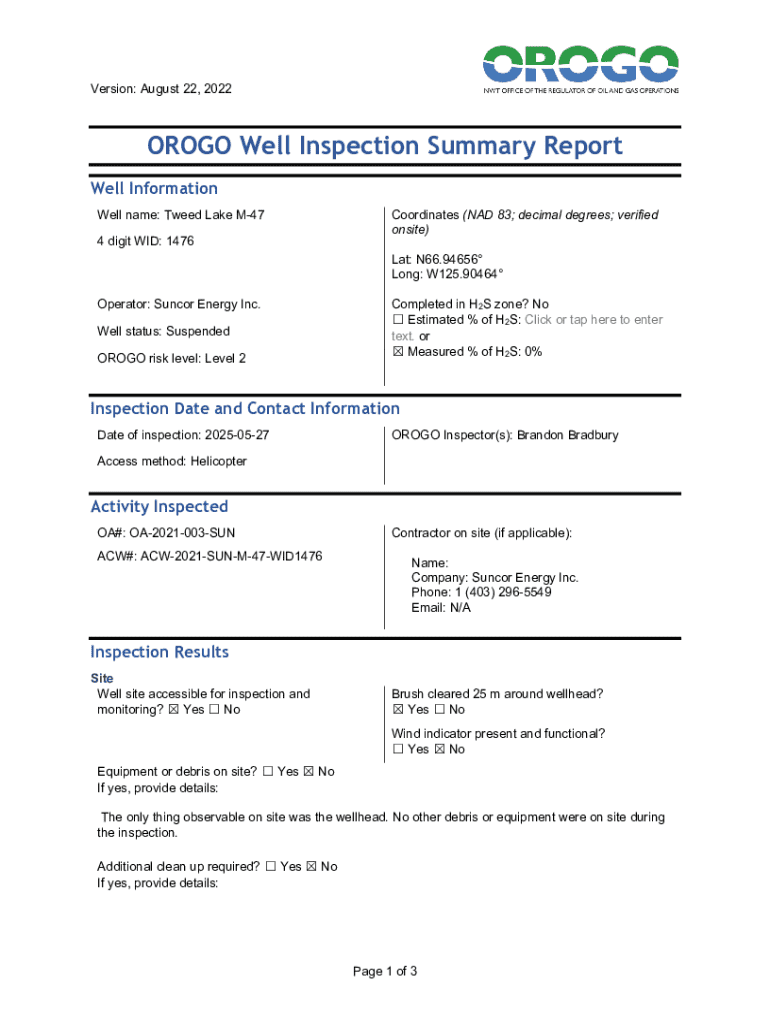
This document provides a summary of the inspection conducted on the Tweed Lake M47 well, including well information, inspection results, and comments on the condition and accessibility of the well.
Loading

Open form follow the instructions

Easily sign the form with your finger

Send filled & signed form or save
How to fill out and sign Canada NWT OROGO Well Inspection Summary Report online?
Get your online template and fill it in using progressive features. Enjoy smart fillable fields and interactivity.Follow the simple instructions below:
Experience all the benefits of completing and submitting legal documents on the internet. With our solution filling out Canada NWT OROGO Well Inspection Summary Report only takes a couple of minutes. We make that possible through giving you access to our full-fledged editor capable of transforming/correcting a document?s original text, inserting special boxes, and e-signing.
Fill out Canada NWT OROGO Well Inspection Summary Report in just a couple of minutes by using the guidelines listed below:
- Select the template you want from our collection of legal form samples.
- Click on the Get form key to open it and begin editing.
- Submit all the requested boxes (they are yellow-colored).
- The Signature Wizard will enable you to insert your electronic signature as soon as you?ve finished imputing information.
- Put the date.
- Double-check the whole template to ensure you have filled out everything and no changes are required.
- Press Done and download the filled out document to the computer.
Send the new Canada NWT OROGO Well Inspection Summary Report in a digital form as soon as you finish completing it. Your information is securely protected, as we adhere to the latest security criteria. Join millions of happy customers that are already filling out legal documents from their houses.
Tips on how to fill out, edit and sign Canada NWT OROGO Well Inspection Summary Report online
How to fill and sign Canada NWT OROGO Well Inspection Summary Report
Get your online template and fill it in using progressive features. Enjoy smart fillable fields and interactivity.Follow the simple instructions below:
Experience all the benefits of completing and submitting legal documents on the internet. With our solution filling out Canada NWT OROGO Well Inspection Summary Report only takes a couple of minutes. We make that possible through giving you access to our full-fledged editor capable of transforming/correcting a document?s original text, inserting special boxes, and e-signing.
Fill out Canada NWT OROGO Well Inspection Summary Report in just a couple of minutes by using the guidelines listed below:
- Select the template you want from our collection of legal form samples.
- Click on the Get form key to open it and begin editing.
- Submit all the requested boxes (they are yellow-colored).
- The Signature Wizard will enable you to insert your electronic signature as soon as you?ve finished imputing information.
- Put the date.
- Double-check the whole template to ensure you have filled out everything and no changes are required.
- Press Done and download the filled out document to the computer.
Send the new Canada NWT OROGO Well Inspection Summary Report in a digital form as soon as you finish completing it. Your information is securely protected, as we adhere to the latest security criteria. Join millions of happy customers that are already filling out legal documents from their houses.
How to edit Canada NWT OROGO Well Inspection Summary Report
Fill out and sign your Canada NWT OROGO Well Inspection Summary Report quickly and error-free. Find and edit, and sign customizable form templates in a comfort of a single tab.
Your document workflow can be considerably more efficient if all you need for editing and handling the flow is organized in one place. If you are searching for a Canada NWT OROGO Well Inspection Summary Report form sample, this is a place to get it and fill it out without looking for third-party solutions. With this intelligent search engine and editing tool, you won’t need to look any further.
Simply type the name of the Canada NWT OROGO Well Inspection Summary Report or any other form and find the right template. If the sample seems relevant, you can start editing it right on the spot by clicking Get form. No need to print out or even download it. Hover and click on the interactive fillable fields to place your details and sign the form in a single editor.
Use more editing instruments to customize your template:
- Check interactive checkboxes in forms by clicking on them. Check other areas of the Canada NWT OROGO Well Inspection Summary Report form text by using the Cross, Check, and Circle instruments
- If you need to insert more textual content into the file, utilize the Text tool or add fillable fields with the respective button. You can even specify the content of each fillable field.
- Add images to forms with the Image button. Add images from your device or capture them with your computer camera.
- Add custom visual components to the document. Use Draw, Line, and Arrow instruments to draw on the form.
- Draw over the text in the document if you wish to conceal it or stress it. Cover text fragments with theErase and Highlight, or Blackout instrument.
- Add custom components like Initials or Date with the respective instruments. They will be generated automatically.
- Save the form on your device or convert its format to the one you need.
When equipped with a smart forms catalog and a powerful document editing solution, working with documentation is easier. Find the form look for, fill it out instantly, and sign it on the spot without downloading it. Get your paperwork routine simplified with a solution designed for editing forms.
How to fill and sign Canada NWT OROGO Well Inspection Summary Report
Get your online template and fill it in using progressive features. Enjoy smart fillable fields and interactivity.Follow the simple instructions below:
Experience all the benefits of completing and submitting legal documents on the internet. With our solution filling out Canada NWT OROGO Well Inspection Summary Report only takes a couple of minutes. We make that possible through giving you access to our full-fledged editor capable of transforming/correcting a document?s original text, inserting special boxes, and e-signing.
Fill out Canada NWT OROGO Well Inspection Summary Report in just a couple of minutes by using the guidelines listed below:
- Select the template you want from our collection of legal form samples.
- Click on the Get form key to open it and begin editing.
- Submit all the requested boxes (they are yellow-colored).
- The Signature Wizard will enable you to insert your electronic signature as soon as you?ve finished imputing information.
- Put the date.
- Double-check the whole template to ensure you have filled out everything and no changes are required.
- Press Done and download the filled out document to the computer.
Send the new Canada NWT OROGO Well Inspection Summary Report in a digital form as soon as you finish completing it. Your information is securely protected, as we adhere to the latest security criteria. Join millions of happy customers that are already filling out legal documents from their houses.
Experience a faster way to fill out and sign forms on the web. Access the most extensive library of templates available.
Related content
This section of the report provides a summary and analysis of information compiled....
The Global Information Technology Report 2015 is a special project within the framework of...
By leveraging OSS technologies, the project has improved key metrics across both the...
Get answers to your most pressing questions about US Legal Forms API.
How to write an inspection report sample?
To write an inspection report sample, first outline the structure you wish to follow, including the introduction, findings, and recommendations. Using the Canada NWT OROGO Well Inspection Summary Report as your template, flesh out each section with relevant data and clear observations. Be detailed yet concise, allowing readers to grasp the essential points without confusion. Additionally, creating a sample report with visual aids can further enhance understanding and engagement.
What is an example sentence for an inspection report?
An example sentence for an inspection report might be, 'The Canada NWT OROGO Well Inspection Summary Report indicates that the well is functioning within acceptable limits, although minor repairs are suggested for long-term integrity.' This sentence provides a concise statement of the well’s condition and implies actionable next steps. Clarity in language helps ensure readers understand the report’s findings immediately. Effective communication is vital in your inspection reports.
What type of information do I need to complete an inspection report?
You will need various types of information to complete an inspection report, including site details, inspection dates, and specific observations of the well. For the Canada NWT OROGO Well Inspection Summary Report, gather data about water levels, any contaminants found, and the overall integrity of the well structure. This thorough information collection serves as the backbone of your report, ensuring it is comprehensive and useful. Checklists or templates can aid in gathering this information efficiently.
What are the four major components of an inspection report?
The four major components of an inspection report typically include an introduction, findings, conclusions, and recommendations. In the context of the Canada NWT OROGO Well Inspection Summary Report, these elements provide a holistic view of the well’s condition and any necessary follow-up actions. By including these sections, you empower stakeholders to make informed decisions effectively. Remember, clarity and precision are pivotal in each component.
How to write an inspection report?
To write an inspection report, start by gathering all necessary details from the inspection process. Make sure to include facts about the site, including dates and specific observations. For the Canada NWT OROGO Well Inspection Summary Report, ensure you detail the well's condition and any findings. Organize the information clearly to present a comprehensive summary for your audience.
Use professional pre-built templates to fill in and sign documents online faster. Get access to thousands of forms.
If you believe that this page should be taken down, please follow our DMCA take down process here.