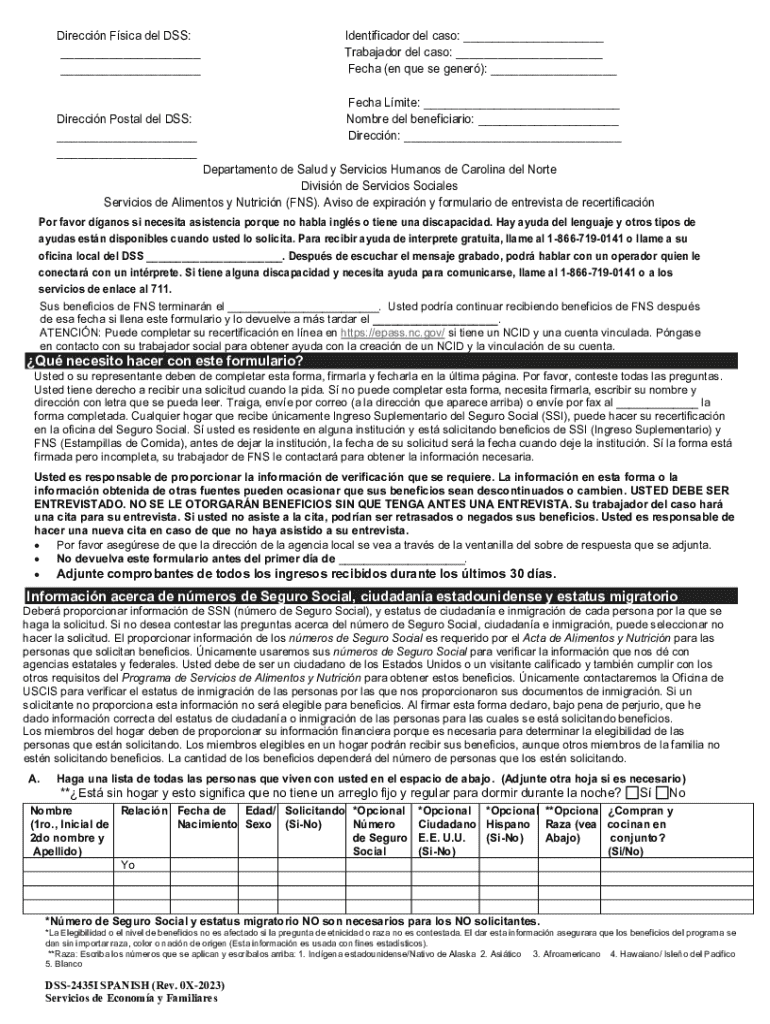
Direcci n Postal del DSS: Fecha L mite: Nombre del beneficiario: Direcci n: Departamento de Salud y Servicios Humanos de Carolina del Norte Divisi n de Servicios Sociales Servicios de Alimentos y Nutrici n (FNS). Aviso de expiraci n y formulario de entrevista de recertificaci n Por favor d ganos si necesita asistencia porque no habla ingl s o tiene una di.
Loading

Open form follow the instructions

Easily sign the form with your finger

Send filled & signed form or save
How to fill out and sign NC DSS-2435I SP online?
Get your online template and fill it in using progressive features. Enjoy smart fillable fields and interactivity.Follow the simple instructions below:
Tax, business, legal as well as other documents demand a top level of protection and compliance with the legislation. Our templates are regularly updated according to the latest amendments in legislation. In addition, with us, all of the data you provide in the NC DSS-2435I SP is protected against leakage or damage by means of cutting-edge encryption.
The following tips will help you fill out NC DSS-2435I SP easily and quickly:
- Open the template in the full-fledged online editor by hitting Get form.
- Complete the necessary boxes which are yellow-colored.
- Click the green arrow with the inscription Next to move from one field to another.
- Use the e-autograph solution to put an electronic signature on the template.
- Add the relevant date.
- Read through the entire template to ensure that you haven?t skipped anything important.
- Click Done and download your new template.
Our solution allows you to take the whole process of completing legal forms online. As a result, you save hours (if not days or even weeks) and get rid of unnecessary payments. From now on, submit NC DSS-2435I SP from the comfort of your home, place of work, and even while on the move.
Tips on how to fill out, edit and sign NC DSS-2435I SP online
How to fill and sign NC DSS-2435I SP
Get your online template and fill it in using progressive features. Enjoy smart fillable fields and interactivity.Follow the simple instructions below:
Tax, business, legal as well as other documents demand a top level of protection and compliance with the legislation. Our templates are regularly updated according to the latest amendments in legislation. In addition, with us, all of the data you provide in the NC DSS-2435I SP is protected against leakage or damage by means of cutting-edge encryption.
The following tips will help you fill out NC DSS-2435I SP easily and quickly:
- Open the template in the full-fledged online editor by hitting Get form.
- Complete the necessary boxes which are yellow-colored.
- Click the green arrow with the inscription Next to move from one field to another.
- Use the e-autograph solution to put an electronic signature on the template.
- Add the relevant date.
- Read through the entire template to ensure that you haven?t skipped anything important.
- Click Done and download your new template.
Our solution allows you to take the whole process of completing legal forms online. As a result, you save hours (if not days or even weeks) and get rid of unnecessary payments. From now on, submit NC DSS-2435I SP from the comfort of your home, place of work, and even while on the move.
How to edit NC DSS-2435I SP
Use our advanced editor to transform a simple online template into a completed document. Keep reading to learn how to edit NC DSS-2435I SP online easily.
Once you discover a perfect NC DSS-2435I SP, all you need to do is adjust the template to your preferences or legal requirements. In addition to completing the fillable form with accurate data, you might need to erase some provisions in the document that are irrelevant to your circumstance. On the other hand, you might want to add some missing conditions in the original template. Our advanced document editing features are the simplest way to fix and adjust the document.
The editor enables you to change the content of any form, even if the file is in PDF format. You can add and remove text, insert fillable fields, and make further changes while keeping the initial formatting of the document. You can also rearrange the structure of the form by changing page order.
You don’t need to print the NC DSS-2435I SP to sign it. The editor comes along with electronic signature capabilities. The majority of the forms already have signature fields. So, you simply need to add your signature and request one from the other signing party via email.
Follow this step-by-step guide to build your NC DSS-2435I SP:
- Open the preferred template.
- Use the toolbar to adjust the form to your preferences.
- Complete the form providing accurate details.
- Click on the signature field and add your eSignature.
- Send the document for signature to other signers if needed.
After all parties sign the document, you will receive a signed copy which you can download, print, and share with others.
Our solutions allow you to save tons of your time and minimize the chance of an error in your documents. Streamline your document workflows with effective editing tools and a powerful eSignature solution.
How to fill and sign NC DSS-2435I SP
Get your online template and fill it in using progressive features. Enjoy smart fillable fields and interactivity.Follow the simple instructions below:
Tax, business, legal as well as other documents demand a top level of protection and compliance with the legislation. Our templates are regularly updated according to the latest amendments in legislation. In addition, with us, all of the data you provide in the NC DSS-2435I SP is protected against leakage or damage by means of cutting-edge encryption.
The following tips will help you fill out NC DSS-2435I SP easily and quickly:
- Open the template in the full-fledged online editor by hitting Get form.
- Complete the necessary boxes which are yellow-colored.
- Click the green arrow with the inscription Next to move from one field to another.
- Use the e-autograph solution to put an electronic signature on the template.
- Add the relevant date.
- Read through the entire template to ensure that you haven?t skipped anything important.
- Click Done and download your new template.
Our solution allows you to take the whole process of completing legal forms online. As a result, you save hours (if not days or even weeks) and get rid of unnecessary payments. From now on, submit NC DSS-2435I SP from the comfort of your home, place of work, and even while on the move.
Experience a faster way to fill out and sign forms on the web. Access the most extensive library of templates available.
Related content
DSS-2435I SPANISH (Rev. 0X-2023). Servicios de Economía y Familiares ... ATENCIÓN: Puede...
Coordenadora do Programa de Pos-Graduacao em Educacao iii À Cinthya, minha amada esposa...
Get answers to your most pressing questions about US Legal Forms API.
How much do you have to make to qualify for food stamps in Oklahoma?
In Oklahoma, your income must be within specific limits to qualify for food stamps. Generally, these limits consider your household size and are updated annually. It is essential to review the current income eligibility guidelines on official resources. Utilizing the NC DSS-2435I SP form can aid in assessing your situation and ensuring compliance with requirements.
How do I renew my food stamps in MD?
To renew your food stamps in Maryland, start by verifying your current eligibility and the renewal timeline. You can usually complete the renewal process online, by mail, or in person using the appropriate forms. Look for the NC DSS-2435I SP or similar forms that apply to your situation. Submit any required documents promptly to ensure continued benefits.
How to fill out NC 4P?
Filling out the NC 4P requires gathering essential information about your household’s demographics and income. Each section of the form needs accurate details to reflect your current situation. Focus on clarity and completeness, as incomplete forms can delay your application. If you have questions, resources like the NC DSS-2435I SP provide guidance throughout the process.
How do I report a change in income for Food stamps in NC?
To report a change in income for food stamps in North Carolina, you must inform your local agency either online or via phone. Ensure to have your new income details at hand, which may involve filling out the NC DSS-2435I SP form if substantial changes occur. Timely reporting prevents benefit disruptions and keeps your case accurate. Be proactive in this process for the best assistance.
What disqualifies you from getting Food stamps in North Carolina?
Several factors may disqualify you from receiving food stamps in North Carolina. These include having an income exceeding the allowed limit, failing to provide necessary documentation, or not complying with program requirements. Additionally, prior cases of fraud may also result in disqualification. Understanding these factors helps you maintain eligibility when using forms like the NC DSS-2435I SP.
How to fill out a Snap recertification form?
To fill out a SNAP recertification form, begin by gathering all necessary information regarding your household. This includes income details, expenses, and household member information. You can use the NC DSS-2435I SP form, which guides you through the required sections to ensure accuracy. After completion, submit the form to the appropriate agency office to stay eligible for benefits.
How does SNAP redetermination work?
SNAP redetermination is the process used to assess your ongoing eligibility for food assistance. When your certification period ends, you must complete the NC DSS-2435I SP form to update your information. This includes your income, household size, and any changes in expenses. Submitting this form timely ensures you continue receiving benefits without interruption.
How long do NC food stamps take to get approved?
The approval time for food stamps in North Carolina typically takes about 30 days after submission of your application. However, if you have urgent needs, you may qualify for expedited services. Using tools like the NC DSS-2435I SP can help ensure your application is complete, potentially speeding up the approval process.
What does DSS stand for in North Carolina?
In North Carolina, DSS stands for the Department of Social Services. This institution is crucial for providing various social welfare programs, including food assistance, public assistance, and health services. When you utilize resources like the NC DSS-2435I SP, you engage with DSS to access vital support for your family.
What time does EBT post in NC?
In North Carolina, EBT benefits typically post at 6 a.m. on the assigned day each month. It’s important to note that this date varies based on the last digit of your social security number. Knowing when to expect your benefits can help you plan better, especially when utilizing the NC DSS-2435I SP for your food assistance needs.
Use professional pre-built templates to fill in and sign documents online faster. Get access to thousands of forms.
If you believe that this page should be taken down, please follow our DMCA take down process here.