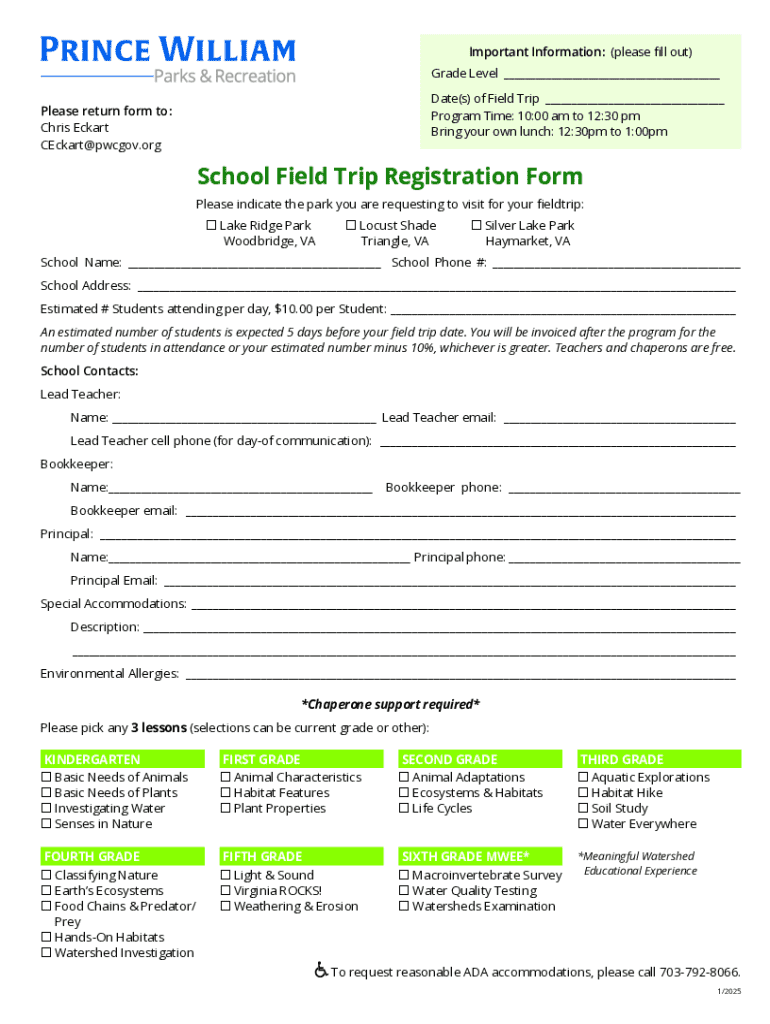
(SOL s). Please join us as we use our forests, lakes, streams, and fields to support what s being taught in the classroom. We look forward to seeing you in one of our parks soon! Lake Ridge Park Locust Shade Park Silver Lake Regional Park For Information Contact: Chris Eckart CEckart pwcgov.org 703-792-8072 pwcparks.info/sip Important Information: (please fill out) Grade Level Date(s) of Field Trip Progra.
Loading

Open form follow the instructions

Easily sign the form with your finger

Send filled & signed form or save
How to fill out and sign VA School Field Trip Registration Form - Prince William County online?
Get your online template and fill it in using progressive features. Enjoy smart fillable fields and interactivity.Follow the simple instructions below:
The preparing of lawful paperwork can be high-priced and time-ingesting. However, with our predesigned online templates, things get simpler. Now, using a VA School Field Trip Registration Form - Prince William County takes at most 5 minutes. Our state-specific online samples and clear instructions eliminate human-prone faults.
Follow our simple actions to have your VA School Field Trip Registration Form - Prince William County prepared rapidly:
- Select the web sample in the catalogue.
- Complete all required information in the required fillable fields. The easy-to-use drag&drop interface makes it simple to add or move fields.
- Make sure everything is filled out appropriately, with no typos or missing blocks.
- Use your electronic signature to the page.
- Click on Done to save the alterations.
- Save the document or print your PDF version.
- Submit immediately to the recipient.
Use the fast search and innovative cloud editor to generate a precise VA School Field Trip Registration Form - Prince William County. Clear away the routine and make papers on the web!
Tips on how to fill out, edit and sign VA School Field Trip Registration Form - Prince William County online
How to fill and sign VA School Field Trip Registration Form - Prince William County
Get your online template and fill it in using progressive features. Enjoy smart fillable fields and interactivity.Follow the simple instructions below:
The preparing of lawful paperwork can be high-priced and time-ingesting. However, with our predesigned online templates, things get simpler. Now, using a VA School Field Trip Registration Form - Prince William County takes at most 5 minutes. Our state-specific online samples and clear instructions eliminate human-prone faults.
Follow our simple actions to have your VA School Field Trip Registration Form - Prince William County prepared rapidly:
- Select the web sample in the catalogue.
- Complete all required information in the required fillable fields. The easy-to-use drag&drop interface makes it simple to add or move fields.
- Make sure everything is filled out appropriately, with no typos or missing blocks.
- Use your electronic signature to the page.
- Click on Done to save the alterations.
- Save the document or print your PDF version.
- Submit immediately to the recipient.
Use the fast search and innovative cloud editor to generate a precise VA School Field Trip Registration Form - Prince William County. Clear away the routine and make papers on the web!
How to edit VA School Field Trip Registration Form - Prince William County
Eliminate the mess from your paperwork routine. Discover the simplest way to find and edit, and file a VA School Field Trip Registration Form - Prince William County
The process of preparing VA School Field Trip Registration Form - Prince William County demands accuracy and attention, especially from people who are not well familiar with this sort of job. It is essential to get a suitable template and fill it in with the correct information. With the right solution for handling documents, you can get all the tools at hand. It is simple to streamline your editing process without learning additional skills. Identify the right sample of VA School Field Trip Registration Form - Prince William County and fill it out right away without switching between your browser tabs. Discover more tools to customize your VA School Field Trip Registration Form - Prince William County form in the modifying mode.
While on the VA School Field Trip Registration Form - Prince William County page, click on the Get form button to start modifying it. Add your details to the form on the spot, as all the needed tools are at hand right here. The sample is pre-designed, so the work required from the user is minimal. Simply use the interactive fillable fields in the editor to easily complete your paperwork. Simply click on the form and proceed to the editor mode without delay. Fill out the interactive field, and your file is all set.
Try out more tools to customize your form:
- Place more textual content around the document if needed. Use the Text and Text Box tools to insert text in a separate box.
- Add pre-designed visual elements like Circle, Cross, and Check with respective tools.
- If needed, capture or upload images to the document with the Image tool.
- If you need to draw something in the document, use Line, Arrow, and Draw tools.
- Try the Highlight, Erase, and Blackout tools to customize the text in the document.
- If you need to add comments to specific document sections, click on the Sticky tool and place a note where you want.
Sometimes, a small error can wreck the whole form when someone fills it manually. Forget about inaccuracies in your paperwork. Find the templates you need in moments and finish them electronically using a smart modifying solution.
How to fill and sign VA School Field Trip Registration Form - Prince William County
Get your online template and fill it in using progressive features. Enjoy smart fillable fields and interactivity.Follow the simple instructions below:
The preparing of lawful paperwork can be high-priced and time-ingesting. However, with our predesigned online templates, things get simpler. Now, using a VA School Field Trip Registration Form - Prince William County takes at most 5 minutes. Our state-specific online samples and clear instructions eliminate human-prone faults.
Follow our simple actions to have your VA School Field Trip Registration Form - Prince William County prepared rapidly:
- Select the web sample in the catalogue.
- Complete all required information in the required fillable fields. The easy-to-use drag&drop interface makes it simple to add or move fields.
- Make sure everything is filled out appropriately, with no typos or missing blocks.
- Use your electronic signature to the page.
- Click on Done to save the alterations.
- Save the document or print your PDF version.
- Submit immediately to the recipient.
Use the fast search and innovative cloud editor to generate a precise VA School Field Trip Registration Form - Prince William County. Clear away the routine and make papers on the web!
Experience a faster way to fill out and sign forms on the web. Access the most extensive library of templates available.
Related content
Fill out this form and send it to us to schedule your field trip today! ... 1 County...
Prince William County Public Schools Logo 14715 Bristow Rd., Manassas, Virginia 20112...
Sep 14, 2016 — The Purpose and Intent of this Request for Proposal (RFP) is to establish...
Get answers to your most pressing questions about US Legal Forms API.
How to fill the field trip permission form?
To fill out the VA School Field Trip Registration Form - Prince William County, start by gathering the necessary information about the student, trip details, and any medical considerations. Clearly write your contact information and ensure you provide accurate emergency contact details. Review the form for any specific instructions or sections that require additional clarification. Once completed, submit the form to the designated school authority as instructed.
What is the smallest high school in Prince William County?
The smallest high school in Prince William County, based on enrollment numbers, is often known for its close-knit community and personalized attention to students. This school offers a unique environment that fosters academic and social growth. If you have a child attending this school, be sure to utilize the VA School Field Trip Registration Form - Prince William County for seamless trip planning and participation.
What is proof of residency for Prince William County Schools?
Proof of residency for Prince William County Schools requires documents such as a lease agreement, utility bill, or government-issued ID showing the parent or guardian's name and address. This verification is essential for enrollment and participation in school activities. When completing the VA School Field Trip Registration Form - Prince William County, include all necessary residency documentation to avoid delays.
What is the most common field trip?
The most common field trips in Prince William County typically include visits to historical sites, nature reserves, and cultural institutions. Schools often prioritize experiences that align with educational standards and provide hands-on learning opportunities. If you are organizing a trip, make sure to complete the VA School Field Trip Registration Form - Prince William County to ensure everything is properly documented.
Is Prince William County Republican or Democrat?
Prince William County has a mixed political environment, traditionally leaning toward the Republican party in various elections. However, demographic changes have led to more competitive races, with both parties actively engaging residents. Understanding the local political landscape can help when filling out your VA School Field Trip Registration Form - Prince William County, as it may influence school-related activities and policies.
How to fill field trip permission form?
Filling out the field trip permission form is straightforward. Start by obtaining the VA School Field Trip Registration Form - Prince William County from your school or the official website. Carefully read the instructions, complete the required information such as student details and guardian signatures, and submit it by the due date for smooth processing. This form is crucial for allowing students to participate in educational outdoor experiences.
Use professional pre-built templates to fill in and sign documents online faster. Get access to thousands of forms.
If you believe that this page should be taken down, please follow our DMCA take down process here.