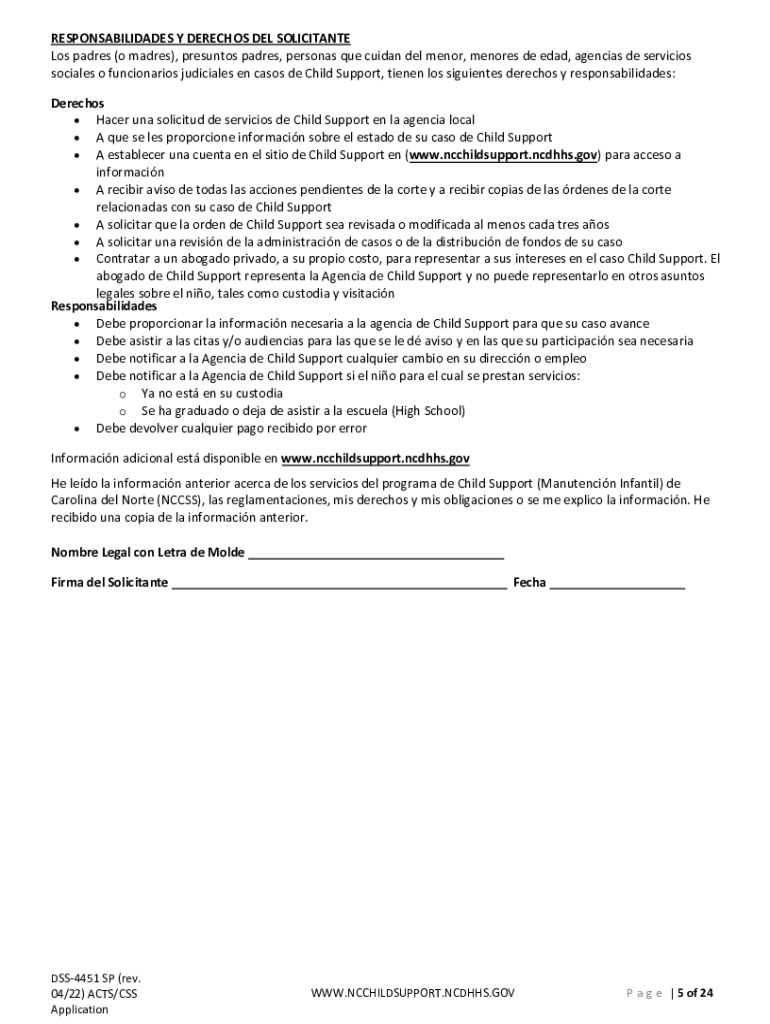
Grama (NCCSS) est disponible para de los padres (o madres), presuntos padres, personas que cuidan de un menor, para menores de edad, agencias de servicios sociales y funcionarios judiciales. Si decide solicitar servicios de manutenci n de ni os, complete la solicitud en su totalidad y firme donde sea apropiado. Para ayudarnos a procesar su solicitud lo antes posible, por favor envi lo siguiente: La solicitud (completa y con la informaci n correcta de acuerdo a su mejor saber) Cop.
Loading

Open form follow the instructions

Easily sign the form with your finger

Send filled & signed form or save
How to fill out and sign NC DSS-4451 SP online?
Get your online template and fill it in using progressive features. Enjoy smart fillable fields and interactivity.Follow the simple instructions below:
The prep of legal paperwork can be high-priced and time-consuming. However, with our preconfigured web templates, everything gets simpler. Now, creating a NC DSS-4451 SP takes no more than 5 minutes. Our state online blanks and complete instructions eliminate human-prone faults.
Comply with our simple steps to have your NC DSS-4451 SP ready quickly:
- Select the web sample from the catalogue.
- Type all required information in the necessary fillable areas. The user-friendly drag&drop graphical user interface makes it simple to include or relocate areas.
- Check if everything is filled out appropriately, without typos or absent blocks.
- Apply your e-signature to the PDF page.
- Click Done to confirm the adjustments.
- Save the record or print out your PDF version.
- Distribute immediately towards the recipient.
Make use of the fast search and powerful cloud editor to make a correct NC DSS-4451 SP. Clear away the routine and create papers online!
Tips on how to fill out, edit and sign NC DSS-4451 SP online
How to fill and sign NC DSS-4451 SP
Get your online template and fill it in using progressive features. Enjoy smart fillable fields and interactivity.Follow the simple instructions below:
The prep of legal paperwork can be high-priced and time-consuming. However, with our preconfigured web templates, everything gets simpler. Now, creating a NC DSS-4451 SP takes no more than 5 minutes. Our state online blanks and complete instructions eliminate human-prone faults.
Comply with our simple steps to have your NC DSS-4451 SP ready quickly:
- Select the web sample from the catalogue.
- Type all required information in the necessary fillable areas. The user-friendly drag&drop graphical user interface makes it simple to include or relocate areas.
- Check if everything is filled out appropriately, without typos or absent blocks.
- Apply your e-signature to the PDF page.
- Click Done to confirm the adjustments.
- Save the record or print out your PDF version.
- Distribute immediately towards the recipient.
Make use of the fast search and powerful cloud editor to make a correct NC DSS-4451 SP. Clear away the routine and create papers online!
How to edit NC DSS-4451 SP
Finishing papers is more comfortable with smart online instruments. Eliminate paperwork with easily downloadable NC DSS-4451 SP templates you can modify online and print out.
Preparing papers and paperwork should be more reachable, whether it is an everyday part of one’s profession or occasional work. When a person must file a NC DSS-4451 SP, studying regulations and instructions on how to complete a form correctly and what it should include might take a lot of time and effort. Nevertheless, if you find the proper NC DSS-4451 SP template, completing a document will stop being a challenge with a smart editor at hand.
Discover a wider selection of features you can add to your document flow routine. No need to print out, complete, and annotate forms manually. With a smart modifying platform, all of the essential document processing features will always be at hand. If you want to make your work process with NC DSS-4451 SP forms more efficient, find the template in the catalog, select it, and see a less complicated method to fill it in.
- If you need to add text in a random area of the form or insert a text field, use the Text and Text field tools and expand the text in the form as much as you want.
- Use the Highlight tool to stress the key parts of the form. If you need to conceal or remove some text parts, use the Blackout or Erase instruments.
- Customize the form by adding default graphic components to it. Use the Circle, Check, and Cross instruments to add these elements to the forms, if required.
- If you need additional annotations, use the Sticky note resource and put as many notes on the forms page as required.
- If the form needs your initials or date, the editor has instruments for that too. Minimize the chance of errors by using the Initials and Date tools.
- It is also possible to add custom graphic components to the form. Use the Arrow, Line, and Draw instruments to customize the file.
The more instruments you are familiar with, the simpler it is to work with NC DSS-4451 SP. Try the solution that offers everything necessary to find and modify forms in one tab of your browser and forget about manual paperwork.
How to fill and sign NC DSS-4451 SP
Get your online template and fill it in using progressive features. Enjoy smart fillable fields and interactivity.Follow the simple instructions below:
The prep of legal paperwork can be high-priced and time-consuming. However, with our preconfigured web templates, everything gets simpler. Now, creating a NC DSS-4451 SP takes no more than 5 minutes. Our state online blanks and complete instructions eliminate human-prone faults.
Comply with our simple steps to have your NC DSS-4451 SP ready quickly:
- Select the web sample from the catalogue.
- Type all required information in the necessary fillable areas. The user-friendly drag&drop graphical user interface makes it simple to include or relocate areas.
- Check if everything is filled out appropriately, without typos or absent blocks.
- Apply your e-signature to the PDF page.
- Click Done to confirm the adjustments.
- Save the record or print out your PDF version.
- Distribute immediately towards the recipient.
Make use of the fast search and powerful cloud editor to make a correct NC DSS-4451 SP. Clear away the routine and create papers online!
Experience a faster way to fill out and sign forms on the web. Access the most extensive library of templates available.
Related content
May 24, 2022 — DSS-4451 Spanish. DSS-4451 sp.pdf. PDF • 1.14 MB - May 24, 2022...
by A Pannekoek · 1939 · Cited by 1 — SAO/NASA ADS Astronomy Abstract Service. The...
... DSS Keys on Yealink IP Phones.pdf ./Yeastar/FXO/ ÿ ... SP-IP24_1000PR_pas.pdf ./SNR...
Get answers to your most pressing questions about US Legal Forms API.
Who is above DSS in NC?
In North Carolina, the Division of Social Services comes under the Department of Health and Human Services (DHHS). The DHHS oversees various aspects of social services and has the authority to address complaints and concerns regarding DSS’s operations. If you feel your issues with DSS are not resolved, you can reach out to higher officials at DHHS directly. Using the NC DSS-4451 SP can help you organize your concerns for more effective communication.
How to file a complaint in NC?
To file a general complaint in North Carolina, start by identifying the agency linked to your concern. Reach out to this agency through their official website or customer service line for precise filing instructions. For cases involving social services, using the NC DSS-4451 SP form can streamline the process and ensure comprehensive follow-up. Remember, clear communication is vital for resolving issues quickly.
How to file a complaint against DSS in NC?
Filing a complaint against DSS in North Carolina involves contacting your county's DSS office directly. Clearly explain your situation and provide any necessary documentation that supports your complaint. If issues persist, you can escalate the matter using the NC DSS-4451 SP form to ensure it reaches the right administrative channels. This form serves as a structured way to express your concerns formally.
How do I complain about child support in NC?
To complain about child support in North Carolina, you need to contact the Child Support Enforcement program in your county. They will guide you through the appropriate steps to formally voice your concerns. If your issue is unresolved, consider documenting your complaint through the NC DSS-4451 SP for a clear record. This approach can facilitate better communication and resolution with the authorities.
How long does a DSS investigation take in NC?
The duration of a DSS investigation in North Carolina can vary based on the complexity of the case. Typically, investigations are expected to be completed within 30 days, but more complicated situations may take longer. During this time, it's important to stay informed and provide any necessary documentation promptly. Utilizing the NC DSS-4451 SP can help clarify expectations and processes.
How to make a complaint on social services?
To make a complaint on social services, you should first contact your local office of the North Carolina Division of Social Services. Provide specific details about your concerns to ensure a thorough review. If you don't receive a satisfactory response, consider using the NC DSS-4451 SP form to escalate your complaint to higher authorities. Remember, using the appropriate channels helps address your issue effectively.
What is the new child support law in North Carolina?
The new child support law in North Carolina aligns with the NC DSS-4451 SP framework, which aims to promote fairness in support obligations. This law modifies how income is calculated and introduces new standards to better reflect the needs of children. Understanding these changes is vital for both parents to navigate child support effectively. US Legal Forms provides resources to help you stay informed about these updates and adjust your agreements as necessary.
What is the minimum amount for child support?
In North Carolina, the minimum amount for child support is determined based on the NC DSS-4451 SP guidelines. These guidelines consider factors such as the income of both parents and the needs of the child. To ensure a fair assessment, it's crucial to review your specific financial situation. Legal tools, like US Legal Forms, can help you understand and calculate the appropriate child support amount under the NC DSS-4451 SP.
Use professional pre-built templates to fill in and sign documents online faster. Get access to thousands of forms.
If you believe that this page should be taken down, please follow our DMCA take down process here.