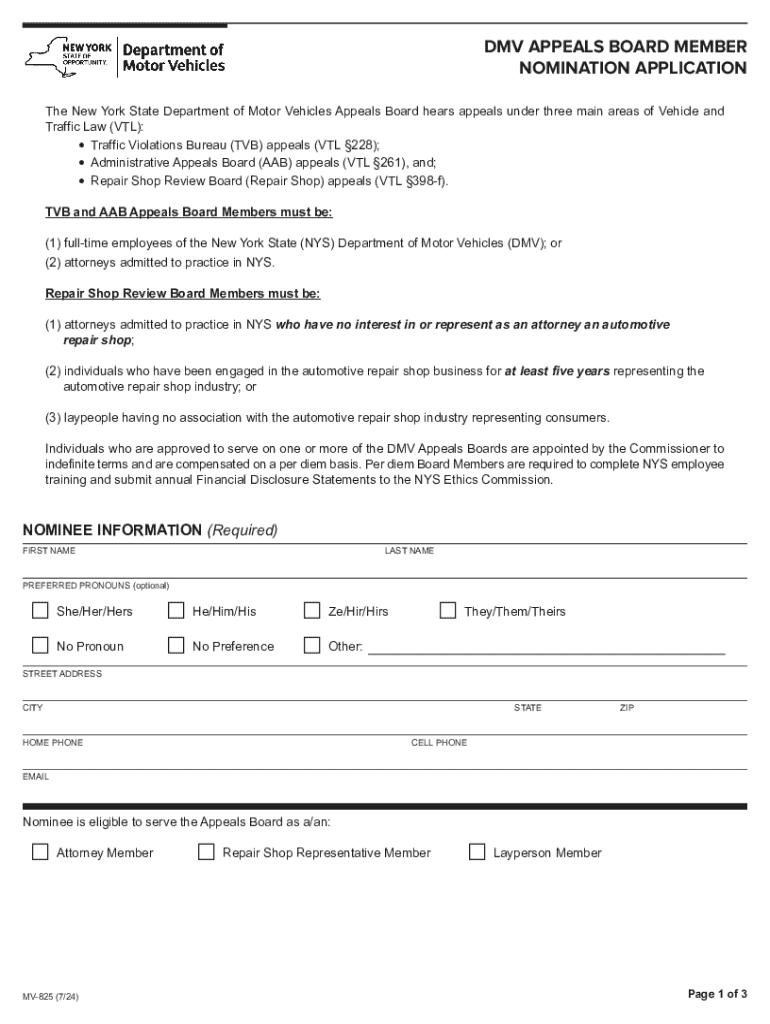
Bureau (TVB) appeals (VTL 228); l Administrative Appeals Board (AAB) appeals (VTL 261), and; l Repair Shop Review Board (Repair Shop) appeals (VTL 398-f). TVB and AAB Appeals Board Members must be: (1) full-time employees of the New York State (NYS) Department of Motor Vehicles (DMV); or (2) attorneys admitted to practice in NYS. Repair Shop Review Board Members must be: (1) attorneys admitted to practice in NYS who have no interest in or represent as an attorney an automotive repair shop.
Loading

Open form follow the instructions

Easily sign the form with your finger

Send filled & signed form or save
How to fill out and sign NY MV-825 online?
Get your online template and fill it in using progressive features. Enjoy smart fillable fields and interactivity.Follow the simple instructions below:
The times of terrifying complex legal and tax documents have ended. With US Legal Forms the procedure of submitting official documents is anxiety-free. The leading editor is right close at hand offering you a range of useful instruments for submitting a NY MV-825. The following tips, combined with the editor will assist you through the entire process.
- Click the Get Form button to begin filling out.
- Turn on the Wizard mode on the top toolbar to acquire additional tips.
- Fill in every fillable area.
- Ensure the info you fill in NY MV-825 is up-to-date and accurate.
- Add the date to the record with the Date option.
- Click on the Sign tool and create a digital signature. There are three available options; typing, drawing, or uploading one.
- Re-check each and every field has been filled in correctly.
- Click Done in the top right corne to save the record. There are various options for getting the doc. An attachment in an email or through the mail as a hard copy, as an instant download.
We make completing any NY MV-825 simpler. Start now!
Tips on how to fill out, edit and sign NY MV-825 online
How to fill and sign NY MV-825
Get your online template and fill it in using progressive features. Enjoy smart fillable fields and interactivity.Follow the simple instructions below:
The times of terrifying complex legal and tax documents have ended. With US Legal Forms the procedure of submitting official documents is anxiety-free. The leading editor is right close at hand offering you a range of useful instruments for submitting a NY MV-825. The following tips, combined with the editor will assist you through the entire process.
- Click the Get Form button to begin filling out.
- Turn on the Wizard mode on the top toolbar to acquire additional tips.
- Fill in every fillable area.
- Ensure the info you fill in NY MV-825 is up-to-date and accurate.
- Add the date to the record with the Date option.
- Click on the Sign tool and create a digital signature. There are three available options; typing, drawing, or uploading one.
- Re-check each and every field has been filled in correctly.
- Click Done in the top right corne to save the record. There are various options for getting the doc. An attachment in an email or through the mail as a hard copy, as an instant download.
We make completing any NY MV-825 simpler. Start now!
How to edit NY MV-825
Have your stressless and paper-free way of working with NY MV-825. Use our reliable online solution and save tons of time.
Drafting every form, including NY MV-825, from scratch requires too much effort, so having a tried-and-true solution of pre-drafted document templates can do magic for your productivity.
But working with them can be challenge, especially when it comes to the files in PDF format. Fortunately, our huge library features a built-in editor that allows you to easily fill out and customize NY MV-825 without the need of leaving our website so that you don't need to lose hours executing your documents. Here's what to do with your form using our tools:
- Step 1. Find the required document on our website.
- Step 2. Hit Get Form to open it in the editor.
- Step 3. Take advantage of specialized editing tools that let you insert, remove, annotate and highlight or blackout text.
- Step 4. Create and add a legally-binding signature to your form by utilizing the sign option from the top toolbar.
- Step 5. If the template layout doesn’t look the way you want it, use the tools on the right to erase, put, and re-order pages.
- step 6. Insert fillable fields so other persons can be invited to fill out the template (if applicable).
- Step 7. Pass around or send the form, print it out, or select the format in which you’d like to get the document.
Whether you need to complete editable NY MV-825 or any other template available in our catalog, you’re well on your way with our online document editor. It's easy and secure and doesn’t require you to have particular tech background. Our web-based tool is set up to deal with practical everything you can imagine concerning document editing and completion.
No longer use traditional way of working with your forms. Go with a more efficient option to help you streamline your activities and make them less dependent on paper.
How to fill and sign NY MV-825
Get your online template and fill it in using progressive features. Enjoy smart fillable fields and interactivity.Follow the simple instructions below:
The times of terrifying complex legal and tax documents have ended. With US Legal Forms the procedure of submitting official documents is anxiety-free. The leading editor is right close at hand offering you a range of useful instruments for submitting a NY MV-825. The following tips, combined with the editor will assist you through the entire process.
- Click the Get Form button to begin filling out.
- Turn on the Wizard mode on the top toolbar to acquire additional tips.
- Fill in every fillable area.
- Ensure the info you fill in NY MV-825 is up-to-date and accurate.
- Add the date to the record with the Date option.
- Click on the Sign tool and create a digital signature. There are three available options; typing, drawing, or uploading one.
- Re-check each and every field has been filled in correctly.
- Click Done in the top right corne to save the record. There are various options for getting the doc. An attachment in an email or through the mail as a hard copy, as an instant download.
We make completing any NY MV-825 simpler. Start now!
Experience a faster way to fill out and sign forms on the web. Access the most extensive library of templates available.
Related content
MV-825 (7/24). □. CELL PHONE. Repair Shop Representative Member. □. STATE. Layperson...
The motion of respondent Michael A. Newdow to add parties is denied. Justice Scalia took...
GE TRANQUELL surge arresters provide protection, temporary over voltage capability, and...
Get answers to your most pressing questions about US Legal Forms API.
Do you need a notary to transfer a car title in NY?
In New York, a notary is not required to transfer a car title, but having one can be beneficial. The presence of a notary can provide additional validation, especially in complicated transactions. When you're completing the NY MV-825 form, ensure that all required signatures are present for a smooth transfer. This can prevent any potential disputes or issues in the future.
Do both parties need to be present for a title transfer in NY?
Yes, both parties must be present for a title transfer in New York, especially when dealing with the sale of a vehicle. It is important that the seller signs the title over to the buyer in person. If you are the buyer or seller, ensure that you have all necessary documents, including the NY MV-825 form, ready for completion on-site. This will help clarify ownership and make the process official.
How to fill out a NY car title?
To fill out a NY car title, you must provide details such as the buyer's and seller's information, vehicle description, and odometer reading. Make sure to sign the title in the designated area, as this is crucial for a valid transfer. If you need guidance on completing this accurately, consider using the NY MV-825 form available on USLegalForms. This resource can help ensure you complete the title correctly.
What are the 6 point ID requirements in NY?
In New York, the 6 point ID requirement includes documents that prove your identity, date of birth, and residency. You can combine various items like a driver's license, social security card, or utility bill to meet these requirements. It is essential to have these documents prepared when you apply for your NY MV-825 form at the DMV. This will streamline your experience and help you avoid delays.
How to fill out a New York title?
Filling out a New York title requires entering accurate information about the vehicle like the make, model, and VIN. Ensure you also include the odometer reading and signature of the seller. Using the NY MV-825 form can guide you through the necessary steps for this process. By following the instructions clearly, you can avoid issues during the vehicle registration.
What forms do I need to register a motorcycle in NY?
To register a motorcycle in New York, you will need the NY MV-825 form, along with the motorcycle title, proof of identity, and proof of insurance. Make sure to gather all necessary documents before heading to the DMV. You can easily find and fill out the NY MV-825 form on USLegalForms, which simplifies the registration process. This ensures you have everything prepared for a smooth registration experience.
Which of the following types of vessels are exempt from registration in New York?
In New York, various types of vessels are often exempt from registration requirements. For instance, non-motorized canoes, kayaks, and boats used solely for fishing under certain conditions are commonly included. If you have a vessel that meets these criteria, you may want to focus on completing the NY MV-825 for other necessary registrations. Understanding these exemptions can save you time and effort.
Which vessels are exempt from being titled in New York?
New York law states that certain types of vessels do not need a title. This includes personal watercraft and certain small boats used primarily for recreation. When registering these vessels, make sure to fill out the NY MV-825 correctly, as this form will help clarify your ownership rather than requiring a title. Stay informed about exemptions to avoid unnecessary paperwork.
What vessels are exempt from being titled in NY?
In New York, vessels that are less than 14 feet long are typically exempt from titling. Additionally, non-motorized canoes and kayaks also do not require a title. If you need to register any of these vessels, complete the NY MV-825 to facilitate the registration process. However, always check the latest regulations to ensure compliance.
Can you register a boat without a title in New York?
Yes, you can register a boat in New York even if you don't have a title. However, you will need to provide certain documentation to establish ownership. This includes a bill of sale or a previous registration card, among other required forms like the NY MV-825. It’s crucial to have all your paperwork prepared to avoid delays.
Use professional pre-built templates to fill in and sign documents online faster. Get access to thousands of forms.
If you believe that this page should be taken down, please follow our DMCA take down process here.