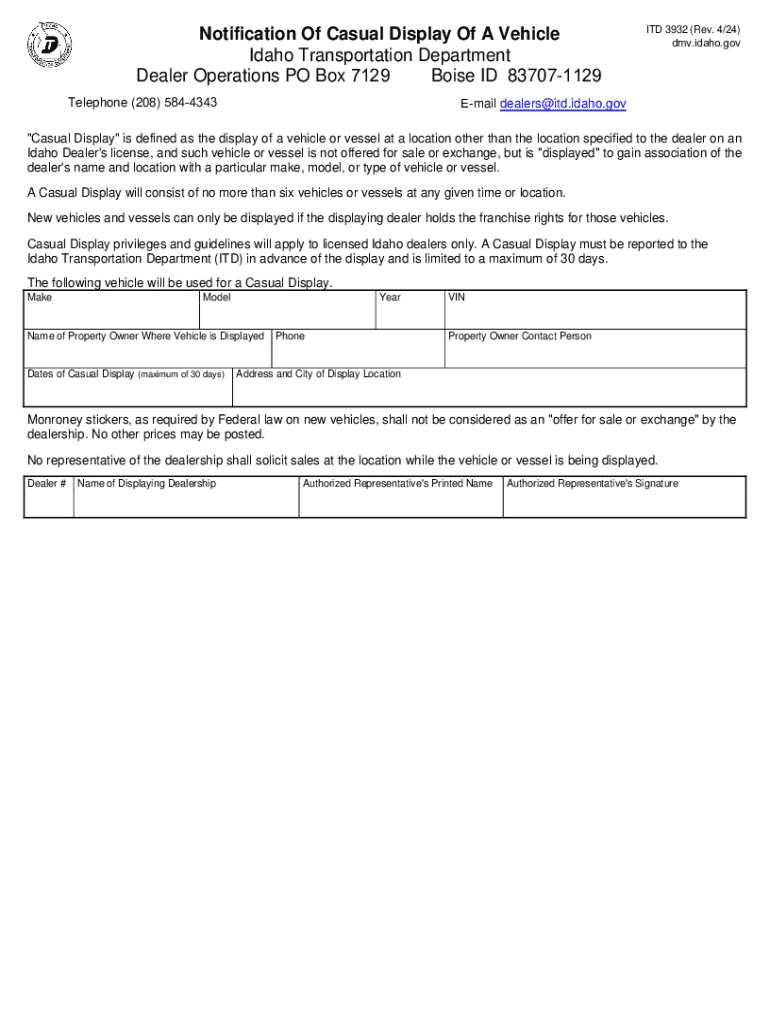
Notification Of Casual Display Of A Vehicle Idaho Transportation Department Dealer Operations PO Box 7129 Boise ID 83707-1129 Telephone (208) 584-4343 ITD 3932 (Rev. 4/24) dmv.idaho.gov E-mail dealers itd.idaho.gov.
Loading

Open form follow the instructions

Easily sign the form with your finger

Send filled & signed form or save
How to fill out and sign ID ITD 3932 online?
Get your online template and fill it in using progressive features. Enjoy smart fillable fields and interactivity.Follow the simple instructions below:
The prep of lawful paperwork can be high-priced and time-consuming. However, with our pre-built online templates, everything gets simpler. Now, creating a ID ITD 3932 requires not more than 5 minutes. Our state online samples and crystal-clear guidelines remove human-prone errors.
Follow our simple steps to have your ID ITD 3932 ready rapidly:
- Find the web sample in the catalogue.
- Type all required information in the required fillable areas. The user-friendly drag&drop interface makes it simple to include or relocate areas.
- Make sure everything is completed properly, without any typos or absent blocks.
- Use your e-signature to the page.
- Simply click Done to confirm the alterations.
- Save the papers or print your copy.
- Send immediately towards the recipient.
Take advantage of the quick search and advanced cloud editor to make a precise ID ITD 3932. Clear away the routine and make documents on the internet!
Tips on how to fill out, edit and sign ID ITD 3932 online
How to fill and sign ID ITD 3932
Get your online template and fill it in using progressive features. Enjoy smart fillable fields and interactivity.Follow the simple instructions below:
The prep of lawful paperwork can be high-priced and time-consuming. However, with our pre-built online templates, everything gets simpler. Now, creating a ID ITD 3932 requires not more than 5 minutes. Our state online samples and crystal-clear guidelines remove human-prone errors.
Follow our simple steps to have your ID ITD 3932 ready rapidly:
- Find the web sample in the catalogue.
- Type all required information in the required fillable areas. The user-friendly drag&drop interface makes it simple to include or relocate areas.
- Make sure everything is completed properly, without any typos or absent blocks.
- Use your e-signature to the page.
- Simply click Done to confirm the alterations.
- Save the papers or print your copy.
- Send immediately towards the recipient.
Take advantage of the quick search and advanced cloud editor to make a precise ID ITD 3932. Clear away the routine and make documents on the internet!
How to edit ID ITD 3932
Approve and share ID ITD 3932 together with any other business and personal documents online without wasting time and resources on printing and postal delivery. Take the most out of our online document editor using a built-in compliant eSignature option.
Signing and submitting ID ITD 3932 documents electronically is quicker and more efficient than managing them on paper. However, it requires utilizing online solutions that ensure a high level of data safety and provide you with a compliant tool for generating electronic signatures. Our powerful online editor is just the one you need to prepare your ID ITD 3932 and other individual and business or tax templates in an accurate and appropriate manner in accordance with all the requirements. It offers all the necessary tools to easily and quickly complete, edit, and sign documentation online and add Signature fields for other parties, specifying who and where should sign.
It takes only a few simple steps to fill out and sign ID ITD 3932 online:
- Open the chosen file for further managing.
- Use the upper toolkit to add Text, Initials, Image, Check, and Cross marks to your template.
- Underline the key details and blackout or remove the sensitive ones if required.
- Click on the Sign option above and decide on how you want to eSign your sample.
- Draw your signature, type it, upload its image, or use an alternative option that suits you.
- Switch to the Edit Fillable Fileds panel and drop Signature fields for others.
- Click on Add Signer and enter your recipient’s email to assign this field to them.
- Make sure that all data provided is complete and accurate before you click Done.
- Share your document with others utilizing one of the available options.
When approving ID ITD 3932 with our comprehensive online editor, you can always be certain you get it legally binding and court-admissible. Prepare and submit paperwork in the most efficient way possible!
How to fill and sign ID ITD 3932
Get your online template and fill it in using progressive features. Enjoy smart fillable fields and interactivity.Follow the simple instructions below:
The prep of lawful paperwork can be high-priced and time-consuming. However, with our pre-built online templates, everything gets simpler. Now, creating a ID ITD 3932 requires not more than 5 minutes. Our state online samples and crystal-clear guidelines remove human-prone errors.
Follow our simple steps to have your ID ITD 3932 ready rapidly:
- Find the web sample in the catalogue.
- Type all required information in the required fillable areas. The user-friendly drag&drop interface makes it simple to include or relocate areas.
- Make sure everything is completed properly, without any typos or absent blocks.
- Use your e-signature to the page.
- Simply click Done to confirm the alterations.
- Save the papers or print your copy.
- Send immediately towards the recipient.
Take advantage of the quick search and advanced cloud editor to make a precise ID ITD 3932. Clear away the routine and make documents on the internet!
Experience a faster way to fill out and sign forms on the web. Access the most extensive library of templates available.
Related content
ITD 3932 (Rev. 4/24) dmv.idaho.gov. Notification Of Casual Display Of A Vehicle. Idaho...
Its purpose is to protect the confidential nature of the University's computer network...
Get answers to your most pressing questions about US Legal Forms API.
How to register a car in Idaho from out of state?
To register a car in Idaho from out of state, you need to gather required documents like your vehicle's title and proof of identity. You will also need to complete the ID ITD 3932 form for the registration process. Finally, visit a local DMV office or register online to finalize your registration. Being prepared will help you avoid any delays.
How to register a trailer in Idaho?
Registering a trailer in Idaho involves similar steps as registering a vehicle. You will need the title of the trailer, proof of identity, and proof of residency. Additionally, you must fill out the ID ITD 3932 form, which is essential for the registration process. Following these steps will ensure you can use your trailer without complications.
How to get an Idaho driver's license from out of state?
To obtain an Idaho driver's license from out of state, you must visit a local DMV office. Bring your out of state license, proof of identity, and proof of residency. You may also need to surrender your previous license as part of the process. Completing the ID ITD 3932 form will be necessary as you go through this transition.
What is proof of residency for vehicle registration in Idaho?
Proof of residency for vehicle registration in Idaho can include various documents. Typically, you can use a utility bill, bank statement, or lease agreement that includes your name and Idaho address. This documentation is essential when you complete the ID ITD 3932 form for registration. Having valid proof helps to establish your residency status confidently.
Can I register my car online in Idaho?
Yes, you can register your car online in Idaho through the Idaho Transportation Department's website. This convenient option allows you to fill out the necessary forms, like ID ITD 3932, and submit your registration without visiting an office. Make sure to have all required documents and payment information handy to ensure a smooth online experience.
What do I need to register my out of state car in Idaho?
To register your out of state car in Idaho, you must gather several documents. These include your vehicle's title, proof of identity, and proof of residency. Additionally, you might need to complete the ID ITD 3932 form for vehicle registration. Having these documents ready will make the process smoother.
How to get a VIN inspection in Idaho?
To get a VIN inspection in Idaho, visit an authorized inspection station or a local law enforcement office. You will need to bring your vehicle, relevant paperwork, and identification. During the inspection, an inspector will verify your vehicle identification number against your paperwork. Moreover, for more information on ID ITD 3932 and related regulations, consider visiting the US Legal Forms platform, where you can find the necessary documents and resources.
Use professional pre-built templates to fill in and sign documents online faster. Get access to thousands of forms.
If you believe that this page should be taken down, please follow our DMCA take down process here.