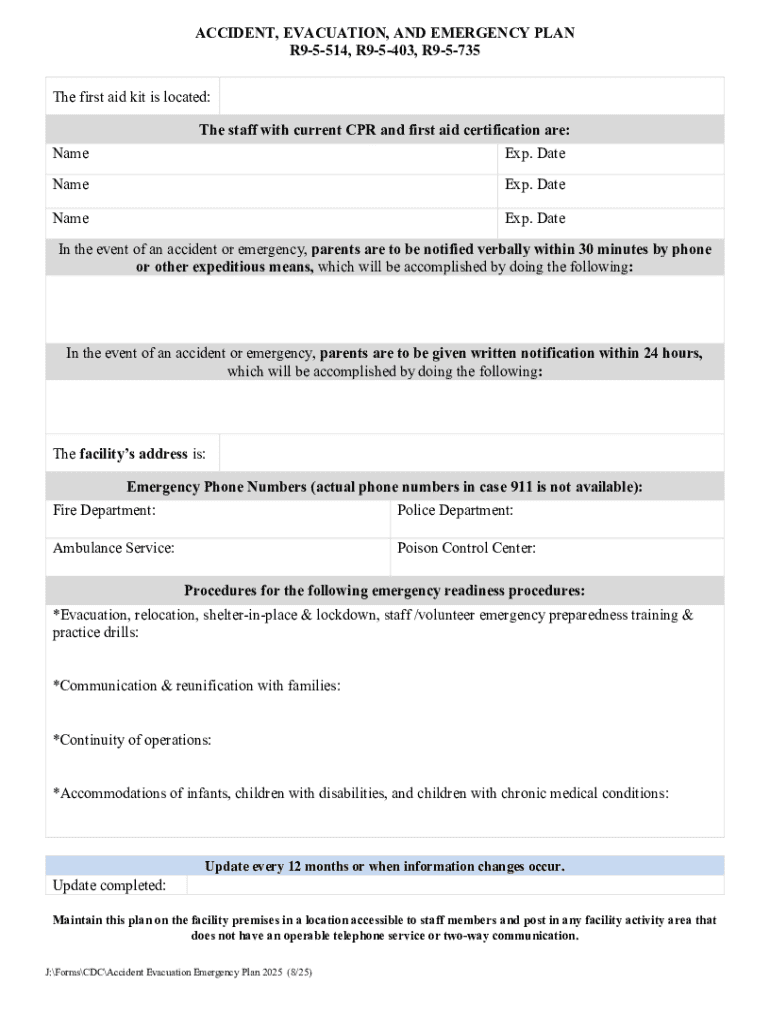
Ame Exp. Date In the event of an accident or emergency, parents are to be notified verbally within 30 minutes by phone or other expeditious means, which will be accomplished by doing the following: In the event of an accident or emergency, parents are to be given written notification within 24 hours, which will be accomplished by doing the following: The facility s address is: Emergency Phone Numbers (actual phone numbers in case 911 is not available): Fire Department: Police Department:.
Loading

Open form follow the instructions

Easily sign the form with your finger

Send filled & signed form or save
How to fill out and sign AZ Accident Evacuation Emergency Plan online?
Get your online template and fill it in using progressive features. Enjoy smart fillable fields and interactivity.Follow the simple instructions below:
The times of distressing complex tax and legal forms have ended. With US Legal Forms the process of completing official documents is anxiety-free. The leading editor is already at your fingertips supplying you with a wide variety of beneficial tools for completing a AZ Accident Evacuation Emergency Plan. The following tips, with the editor will assist you with the complete procedure.
- Click the Get Form option to begin editing.
- Switch on the Wizard mode in the top toolbar to have additional suggestions.
- Fill out every fillable field.
- Be sure the info you fill in AZ Accident Evacuation Emergency Plan is up-to-date and accurate.
- Indicate the date to the record using the Date function.
- Click on the Sign icon and create a signature. You can use 3 options; typing, drawing, or uploading one.
- Check once more each field has been filled in correctly.
- Select Done in the top right corne to save and send or download the document. There are several alternatives for getting the doc. An attachment in an email or through the mail as a hard copy, as an instant download.
We make completing any AZ Accident Evacuation Emergency Plan easier. Get started now!
Tips on how to fill out, edit and sign AZ Accident Evacuation Emergency Plan online
How to fill and sign AZ Accident Evacuation Emergency Plan
Get your online template and fill it in using progressive features. Enjoy smart fillable fields and interactivity.Follow the simple instructions below:
The times of distressing complex tax and legal forms have ended. With US Legal Forms the process of completing official documents is anxiety-free. The leading editor is already at your fingertips supplying you with a wide variety of beneficial tools for completing a AZ Accident Evacuation Emergency Plan. The following tips, with the editor will assist you with the complete procedure.
- Click the Get Form option to begin editing.
- Switch on the Wizard mode in the top toolbar to have additional suggestions.
- Fill out every fillable field.
- Be sure the info you fill in AZ Accident Evacuation Emergency Plan is up-to-date and accurate.
- Indicate the date to the record using the Date function.
- Click on the Sign icon and create a signature. You can use 3 options; typing, drawing, or uploading one.
- Check once more each field has been filled in correctly.
- Select Done in the top right corne to save and send or download the document. There are several alternatives for getting the doc. An attachment in an email or through the mail as a hard copy, as an instant download.
We make completing any AZ Accident Evacuation Emergency Plan easier. Get started now!
How to edit AZ Accident Evacuation Emergency Plan
Fill out and sign your AZ Accident Evacuation Emergency Plan quickly and error-free. Find and edit, and sign customizable form templates in a comfort of a single tab.
Your document workflow can be a lot more efficient if all you need for editing and managing the flow is organized in one place. If you are looking for a AZ Accident Evacuation Emergency Plan form sample, this is a place to get it and fill it out without searching for third-party solutions. With this intelligent search engine and editing tool, you won’t need to look any further.
Simply type the name of the AZ Accident Evacuation Emergency Plan or any other form and find the right sample. If the sample seems relevant, you can start editing it right on the spot by clicking Get form. No need to print out or even download it. Hover and click on the interactive fillable fields to insert your details and sign the form in a single editor.
Use more editing instruments to customize your form:
- Check interactive checkboxes in forms by clicking on them. Check other areas of the AZ Accident Evacuation Emergency Plan form text by using the Cross, Check, and Circle instruments
- If you need to insert more text into the document, utilize the Text tool or add fillable fields with the respective button. You may also specify the content of each fillable field.
- Add pictures to forms with the Image button. Upload pictures from your device or capture them with your computer camera.
- Add custom graphic elements to the document. Use Draw, Line, and Arrow instruments to draw on the document.
- Draw over the text in the document if you wish to hide it or stress it. Cover text fragments with theErase and Highlight, or Blackout tool.
- Add custom elements like Initials or Date with the respective instruments. They will be generated automatically.
- Save the form on your computer or convert its format to the one you need.
When equipped with a smart forms catalog and a powerful document editing solution, working with documentation is easier. Find the form you need, fill it out right away, and sign it on the spot without downloading it. Get your paperwork routine simplified with a solution tailored for editing forms.
How to fill and sign AZ Accident Evacuation Emergency Plan
Get your online template and fill it in using progressive features. Enjoy smart fillable fields and interactivity.Follow the simple instructions below:
The times of distressing complex tax and legal forms have ended. With US Legal Forms the process of completing official documents is anxiety-free. The leading editor is already at your fingertips supplying you with a wide variety of beneficial tools for completing a AZ Accident Evacuation Emergency Plan. The following tips, with the editor will assist you with the complete procedure.
- Click the Get Form option to begin editing.
- Switch on the Wizard mode in the top toolbar to have additional suggestions.
- Fill out every fillable field.
- Be sure the info you fill in AZ Accident Evacuation Emergency Plan is up-to-date and accurate.
- Indicate the date to the record using the Date function.
- Click on the Sign icon and create a signature. You can use 3 options; typing, drawing, or uploading one.
- Check once more each field has been filled in correctly.
- Select Done in the top right corne to save and send or download the document. There are several alternatives for getting the doc. An attachment in an email or through the mail as a hard copy, as an instant download.
We make completing any AZ Accident Evacuation Emergency Plan easier. Get started now!
Experience a faster way to fill out and sign forms on the web. Access the most extensive library of templates available.
Related content
In the event of an accident or emergency, parents are to be notified verbally within 30...
1. Sterile bandages including: a. Adhesive bandages of assorted sizes,. b. · 2...
The manual contains radiation dose guidelines for triggering public protective actions...
Get answers to your most pressing questions about US Legal Forms API.
How do you write an emergency evacuation plan?
Writing an emergency evacuation plan involves outlining essential information such as escape routes, safety zones, and communication methods. You should specify roles for each family member and include details on how to help those who need assistance. By utilizing resources from US Legal Forms, you can create a clear, structured AZ Accident Evacuation Emergency Plan that meets your specific requirements.
What is the correct procedure for an emergency evacuation?
The correct procedure for an emergency evacuation begins with sounding an alarm to alert others. Once alerted, individuals should follow predetermined exit routes calmly and quickly, avoiding elevators if possible. Ensure that everyone knows how to execute the AZ Accident Evacuation Emergency Plan effectively, and conduct drills regularly so that everyone feels comfortable during emergencies.
How to draw an emergency evacuation plan?
Drawing an emergency evacuation plan involves mapping out your space and marking all exits clearly. Include routes that avoid obstacles and indicate safe areas for gatherings. Utilize software or templates from platforms like US Legal Forms to create a visual representation that everyone can understand easily, ensuring your AZ Accident Evacuation Emergency Plan is practical and effective.
How to create an emergency evacuation plan?
To create an effective emergency evacuation plan, start by identifying the types of emergencies that could occur in your area. Next, outline the actions you and your family should take in case of these emergencies. You can use resources such as US Legal Forms to access templates and guidance for creating an AZ Accident Evacuation Emergency Plan tailored to your needs.
What are the 7 steps in the emergency action plan?
The seven steps in an emergency action plan include hazard identification, risk assessment, resource allocation, establishing procedures, training personnel, conducting drills, and evaluating the plan's effectiveness. By following these steps, you can develop a comprehensive AZ Accident Evacuation Emergency Plan that ensures safety and preparedness. Be sure to regularly review and update your plan to reflect any changes in your environment or circumstances.
How to create a personal emergency evacuation plan?
Creating a personal emergency evacuation plan involves assessing your surroundings and identifying potential hazards. Next, you should define safe exit routes and establish a safe meeting point. Ensure that all family members, including children or pets, understand the plan, and practice evacuations regularly to stay prepared.
What are the 5 steps of evacuation?
The five steps of evacuation are recognizing the emergency, alerting others, gathering essential items, following the evacuation route, and assembling at the designated location. It is crucial to recognize the signs of an emergency early to ensure a smooth process. The AZ Accident Evacuation Emergency Plan supports these steps by providing a clear framework for action. This structured approach minimizes confusion and enhances safety during an evacuation.
What are the 5 steps evacuation plan?
A 5-step evacuation plan includes assessment, communication, preparation, execution, and reevaluation. First, assess the situation to determine the need for evacuation. Then, communicate clearly with everyone involved. After that, prepare by gathering essentials and executing the plan by moving to a safe area. Lastly, reevaluating the situation ensures the plan can adapt to changing conditions, and your AZ Accident Evacuation Emergency Plan supports each of these stages.
What should be included in an emergency evacuation plan?
An emergency evacuation plan should include clear exit routes, assembly points, communication strategies, and designated responsibilities. Additionally, you should outline how to meet the needs of individuals with disabilities or special requirements. By adding these elements, your AZ Accident Evacuation Emergency Plan becomes a comprehensive guide that ensures safety for everyone involved. This increases the overall effectiveness of your preparedness strategy.
What are the 5 stages of evacuation?
The five stages of evacuation include detection, notification, preparation, evacuation, and recovery. Initially, you detect the emergency situation, which triggers the notification phase. Then, you prepare to evacuate by gathering necessary supplies. Finally, you move to safety, and recovery follows once the immediate danger has passed, making your AZ Accident Evacuation Emergency Plan an essential tool throughout.
Use professional pre-built templates to fill in and sign documents online faster. Get access to thousands of forms.
If you believe that this page should be taken down, please follow our DMCA take down process here.