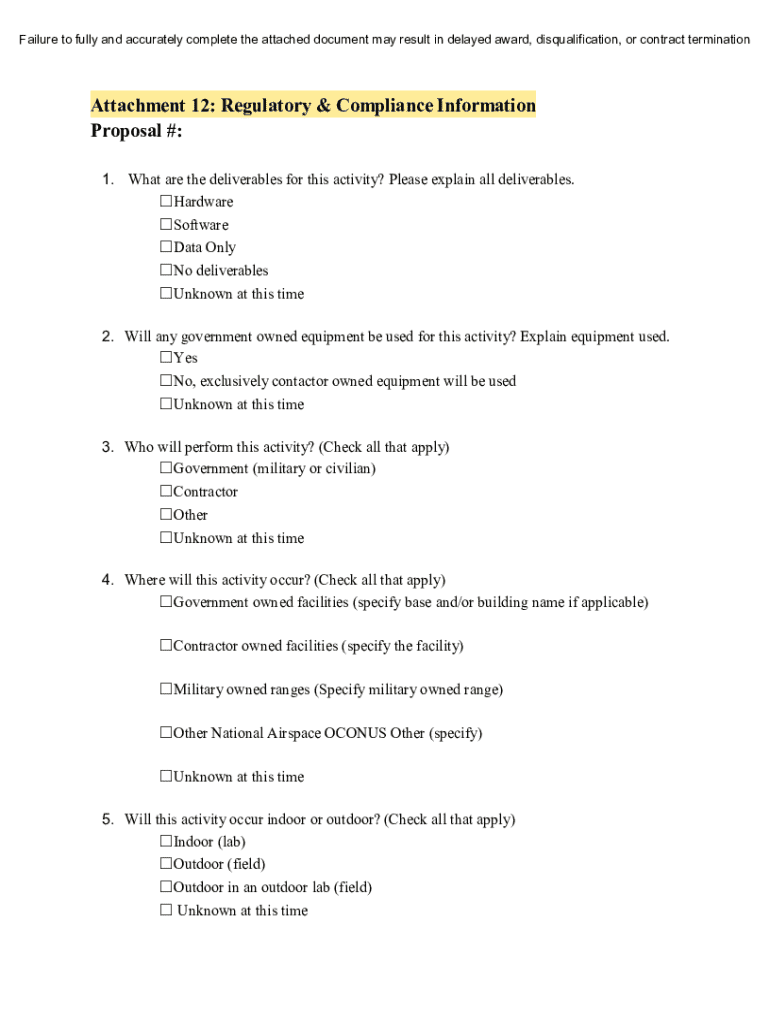
Ing fashion: 1. Deletes Attachment 4, Security Program Questionnaire in its entirety. 2. Deletes Attachment 5, Senior/Key Person Profile in its entirety. All other terms and provisions remain unchanged as a result of this Amendment. AMENDMENT 1 The purpose of this Amendment is to modify the CSO in the following fashion: 1. The attachment number of the SBIR/STTR Funding Agreement Certification is modified in Section 2(a) from 13 to 11. 2. Additional language regarding Performance Ben.
Loading

Open form follow the instructions

Easily sign the form with your finger

Send filled & signed form or save
How to fill out and sign DOD Small Business Innovation Research Program Commercial Solutions Opening (CSO) online?
Get your online template and fill it in using progressive features. Enjoy smart fillable fields and interactivity.Follow the simple instructions below:
Feel all the benefits of submitting and completing forms online. With our solution submitting DOD Small Business Innovation Research Program Commercial Solutions Opening (CSO) requires just a couple of minutes. We make that achievable by offering you access to our full-fledged editor effective at changing/correcting a document?s initial text, adding unique fields, and e-signing.
Execute DOD Small Business Innovation Research Program Commercial Solutions Opening (CSO) within several minutes by simply following the guidelines listed below:
- Find the template you will need from the library of legal form samples.
- Select the Get form button to open the document and start editing.
- Fill in all the requested fields (these are yellowish).
- The Signature Wizard will allow you to add your e-signature right after you have finished imputing details.
- Insert the relevant date.
- Check the whole form to make sure you?ve filled out all the data and no corrections are needed.
- Click Done and save the resulting template to the computer.
Send the new DOD Small Business Innovation Research Program Commercial Solutions Opening (CSO) in a digital form right after you finish filling it out. Your information is securely protected, since we adhere to the newest security requirements. Become one of numerous happy customers that are already completing legal templates straight from their homes.
Tips on how to fill out, edit and sign DOD Small Business Innovation Research Program Commercial Solutions Opening (CSO) online
How to fill and sign DOD Small Business Innovation Research Program Commercial Solutions Opening (CSO)
Get your online template and fill it in using progressive features. Enjoy smart fillable fields and interactivity.Follow the simple instructions below:
Feel all the benefits of submitting and completing forms online. With our solution submitting DOD Small Business Innovation Research Program Commercial Solutions Opening (CSO) requires just a couple of minutes. We make that achievable by offering you access to our full-fledged editor effective at changing/correcting a document?s initial text, adding unique fields, and e-signing.
Execute DOD Small Business Innovation Research Program Commercial Solutions Opening (CSO) within several minutes by simply following the guidelines listed below:
- Find the template you will need from the library of legal form samples.
- Select the Get form button to open the document and start editing.
- Fill in all the requested fields (these are yellowish).
- The Signature Wizard will allow you to add your e-signature right after you have finished imputing details.
- Insert the relevant date.
- Check the whole form to make sure you?ve filled out all the data and no corrections are needed.
- Click Done and save the resulting template to the computer.
Send the new DOD Small Business Innovation Research Program Commercial Solutions Opening (CSO) in a digital form right after you finish filling it out. Your information is securely protected, since we adhere to the newest security requirements. Become one of numerous happy customers that are already completing legal templates straight from their homes.
How to edit DOD Small Business Innovation Research Program Commercial Solutions Opening (CSO)
Select a rock-solid file editing solution you can trust. Modify, execute, and certify DOD Small Business Innovation Research Program Commercial Solutions Opening (CSO) safely online.
Very often, editing forms, like DOD Small Business Innovation Research Program Commercial Solutions Opening (CSO), can be pain, especially if you received them in a digital format but don’t have access to specialized software. Of course, you can find some workarounds to get around it, but you risk getting a document that won't meet the submission requirements. Utilizing a printer and scanner isn’t a way out either because it's time- and resource-consuming.
We offer a smoother and more efficient way of modifying forms. A comprehensive catalog of document templates that are straightforward to customize and certify, and then make fillable for some individuals. Our platform extends way beyond a set of templates. One of the best parts of utilizing our services is that you can change DOD Small Business Innovation Research Program Commercial Solutions Opening (CSO) directly on our website.
Since it's a web-based service, it spares you from having to download any software program. Plus, not all corporate policies allow you to download it on your corporate computer. Here's the best way to effortlessly and safely execute your paperwork with our solution.
- Click the Get Form > you’ll be instantly taken to our editor.
- As soon as opened, you can kick off the customization process.
- Choose checkmark or circle, line, arrow and cross and other choices to annotate your document.
- Pick the date field to include a specific date to your template.
- Add text boxes, images and notes and more to enrich the content.
- Use the fillable fields option on the right to create fillable {fields.
- Choose Sign from the top toolbar to generate and create your legally-binding signature.
- Click DONE and save, print, and share or download the document.
Say goodbye to paper and other inefficient methods for completing your DOD Small Business Innovation Research Program Commercial Solutions Opening (CSO) or other files. Use our solution instead that combines one of the richest libraries of ready-to-customize forms and a robust file editing services. It's easy and secure, and can save you lots of time! Don’t take our word for it, give it a try yourself!
How to fill and sign DOD Small Business Innovation Research Program Commercial Solutions Opening (CSO)
Get your online template and fill it in using progressive features. Enjoy smart fillable fields and interactivity.Follow the simple instructions below:
Feel all the benefits of submitting and completing forms online. With our solution submitting DOD Small Business Innovation Research Program Commercial Solutions Opening (CSO) requires just a couple of minutes. We make that achievable by offering you access to our full-fledged editor effective at changing/correcting a document?s initial text, adding unique fields, and e-signing.
Execute DOD Small Business Innovation Research Program Commercial Solutions Opening (CSO) within several minutes by simply following the guidelines listed below:
- Find the template you will need from the library of legal form samples.
- Select the Get form button to open the document and start editing.
- Fill in all the requested fields (these are yellowish).
- The Signature Wizard will allow you to add your e-signature right after you have finished imputing details.
- Insert the relevant date.
- Check the whole form to make sure you?ve filled out all the data and no corrections are needed.
- Click Done and save the resulting template to the computer.
Send the new DOD Small Business Innovation Research Program Commercial Solutions Opening (CSO) in a digital form right after you finish filling it out. Your information is securely protected, since we adhere to the newest security requirements. Become one of numerous happy customers that are already completing legal templates straight from their homes.
Experience a faster way to fill out and sign forms on the web. Access the most extensive library of templates available.
Related content
(1) What are DoD SBIR/STTR solicitations called? (a) Broad Agency Announcements, or BAAs...
A Commercial Solutions Opening (CSO) is a long-duration (typically one or more years)...
The Spread of the Commercial Solutions Opening. In 2016, DIU pioneered and launched the...
Get answers to your most pressing questions about US Legal Forms API.
What is the DoD CSO process?
The DOD Small Business Innovation Research Program Commercial Solutions Opening (CSO) process involves several key steps, starting with a call for proposals from the Department of Defense. Once you submit your proposal, it undergoes evaluation based on criteria like innovation, technical merit, and potential impact. If selected, you will enter into negotiations regarding funding and milestones. Always stay informed about the specific timelines and requirements to align your application effectively.
What does a company need to qualify for a small business innovative research SBIR grant?
To qualify for an SBIR grant, your company must meet specific criteria, including being a for-profit business with fewer than 500 employees and at least 51% U.S. owned. Additionally, your project should involve innovative research with the potential for commercialization. Engaging with the DOD Small Business Innovation Research Program Commercial Solutions Opening (CSO) can be an excellent avenue if your company is structured to meet these requirements. Make sure to review all eligibility criteria before applying.
What is the success rate of SBIR grants?
The success rate for SBIR grants can vary, but generally, it ranges between 15% and 20% for initial submissions. This statistic indicates a competitive landscape, highlighting the importance of preparing a strong proposal for the DOD Small Business Innovation Research Program Commercial Solutions Opening (CSO). Investing time in strategic planning and crafting a detailed application increases your chances of success. The right resources and guidance can significantly enhance your submission.
What is the NIH SBIR limit?
The National Institutes of Health (NIH) has set specific funding limits for their SBIR phase, which can influence the opportunities available through the DOD Small Business Innovation Research Program Commercial Solutions Opening (CSO). Typically, the limit can reach up to $1.5 million for Phase II funding, while Phase I is generally capped at $275,000. Understanding these limits allows you to prepare your proposals accordingly and helps ensure they align with the funding expectations.
Is it worth applying for an SBIR?
Applying for the DOD Small Business Innovation Research Program Commercial Solutions Opening (CSO) can indeed be worthwhile. The program provides critical funding, which allows businesses to innovate without the immediate pressures of ensuring a return on investment. Additionally, successful applicants gain credibility and visibility in their respective fields, enhancing their growth potential. Therefore, if your business has innovative ideas, this program is a significant opportunity.
What is the profit rate for SBIR?
The profit rate for the DOD Small Business Innovation Research Program Commercial Solutions Opening (CSO) is generally between 7% and 15%. This rate can vary depending on the specific project and its requirements. Understanding this profit potential can help you assess whether engaging with the program meets your business objectives. Remember to factor in potential risks and returns when evaluating this opportunity.
What is the purpose of the SBIR program?
The purpose of the SBIR program, including the DOD Small Business Innovation Research Program Commercial Solutions Opening (CSO), is to stimulate technological innovation and foster small business growth. This initiative aims to bridge the gap between private-sector innovation and the public sector's needs. By funding small businesses, the program helps bring new technologies to market that can benefit both the DOD and the economy.
What is small business innovation research?
Small Business Innovation Research is a program that provides funds for research and development in small businesses. It aims to promote technological innovation and enable small firms to engage in federal research and development efforts. The DOD Small Business Innovation Research Program Commercial Solutions Opening (CSO) is a crucial segment of this initiative, focusing on defense-related innovations.
What is a Dod SBIR?
A DOD SBIR refers to initiatives under the DOD Small Business Innovation Research Program Commercial Solutions Opening (CSO). This program empowers small businesses to conduct research and develop solutions that align with DOD interests. It creates a framework for funding innovative ideas that can enhance defense capabilities and foster small business growth.
What is the Dod SBIR program?
The DOD Small Business Innovation Research Program Commercial Solutions Opening (CSO) is a federal initiative designed to support small businesses in developing innovative technologies for defense applications. The program encourages collaboration between small businesses and the DOD to promote innovation. Through funding and resources, the DOD aims to enhance national security while providing opportunities for small businesses.
Use professional pre-built templates to fill in and sign documents online faster. Get access to thousands of forms.
If you believe that this page should be taken down, please follow our DMCA take down process here.