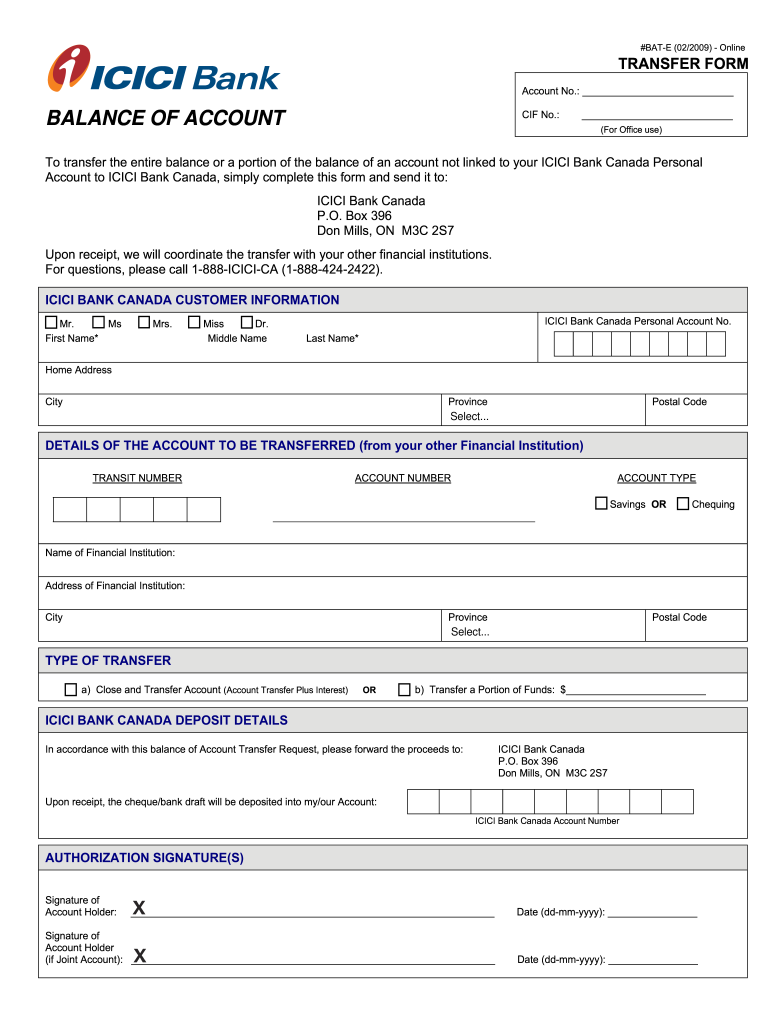
#BATE (02/2009) Online TRANSFER FORM Account No.: CIF No.: BALANCE OF ACCOUNT (For Office use) To transfer the entire balance or a portion of the balance of an account not linked to your ICICI Bank.
Loading

Open form follow the instructions

Easily sign the form with your finger

Send filled & signed form or save
How to fill out the Canada ICICI Bank BAT-E online
Filling out the Canada ICICI Bank BAT-E form is an essential step for users looking to transfer their account balance to ICICI Bank Canada. This guide provides step-by-step instructions to help users navigate the form efficiently and effectively.
Follow the steps to complete the transfer form accurately.
- Click ‘Get Form’ button to obtain the form and open it in the editor.
- Begin by entering your account number in the designated field. This information identifies your account from which funds will be transferred.
- Next, provide your CIF number if applicable. This number may help streamline the transfer process by linking your account.
- In the section titled 'ICICI Bank Canada Customer Information,' select the appropriate title (e.g., Mr., Ms., Mrs., Miss, Dr.) and fill in your first name, middle name (if any), and last name. Make sure to complete all required fields marked with an asterisk (*).
- Enter your home address, including city, province, and postal code. Accurate details will facilitate smooth communication regarding the transfer.
- Proceed to the 'Details of the Account to be Transferred' section. Enter the transit number and account number from your other financial institution.
- Select the account type from the options provided (savings or chequing) that applies to your other financial institution account.
- Provide the name and address of your other financial institution, including city, province, and postal code for accurate processing.
- Choose the type of transfer you wish to execute: either 'Close and Transfer Account' which transfers the entire balance plus interest, or specify a portion of the funds you want to transfer.
- In the 'ICICI Bank Canada Deposit Details' section, ensure that the proceeds will be sent to the correct ICICI Bank Canada address and indicate the intended account number for deposit.
- Finally, complete the authorization signature section, signing and dating where prompted. Joint account holders must provide their signature and date as well.
- After completing the form, take a moment to review all entered information for accuracy. Once confirmed, you may save changes, download, print, or share the completed form as needed.
Complete your Canada ICICI Bank BAT-E transfer form online today for a smooth account balance transfer.
Experience a faster way to fill out and sign forms on the web. Access the most extensive library of templates available.
Related content
May 29, 2012 — ... E-mail investor@icicibank.com. Queries relating to the operational...
Explore the ICICI stock performance and its potential for investors. This analysis...
Motilal Oswal's selection of ICICI Bank highlights its confidence in the bank's potential...
Get answers to your most pressing questions about US Legal Forms API.
How to e-verify return through Axis net banking?
If you wish to e-verify your return through Axis net banking, start by logging into your Axis account. Navigate to the income tax services section, and choose the e-verification option. Complete the process by following the detailed steps provided to ensure everything is correctly submitted.
How to e-verify ITR ICICI net banking?
To e-verify your ITR using ICICI net banking, start by logging into your Canada ICICI Bank BAT-E account. Locate the section for income tax services and select the e-verification option for your filed ITR. Follow the clear instructions to complete the process effectively.
How to activate a gIC account in ICICI Bank Canada online?
Activating a GIC account with ICICI Bank Canada online is straightforward. Log into your Canada ICICI Bank BAT-E account, and select the option for GIC account activation. Follow the on-screen instructions to finalize the activation process effortlessly.
How to e-verify income tax return using ICICI net banking?
To e-verify your income tax return through ICICI net banking, log into your Canada ICICI Bank BAT-E account. Navigate to the e-filing section where you can find the option for e-verification. Complete the required fields and confirm to secure your verification.
How can I submit my ICICI bill of entry online?
To submit your ICICI bill of entry online, access the Canada ICICI Bank BAT-E platform. Locate the bill of entry submission section and upload the necessary documents. Ensure you follow the guidelines for a smooth submission.
Why is my ICICI debit card not working internationally?
If your ICICI debit card is not working internationally, check if it is enabled for international transactions from your Canada ICICI Bank BAT-E profile. Sometimes, there might be restrictions or issues with the card settings that prevent international usage, which you can resolve by adjusting your preferences.
How to e-verify an income tax return?
You can easily e-verify your income tax return through the Canada ICICI Bank BAT-E portal. After filing your return, choose the e-verification option on the platform. Enter the required details and follow the instructions to complete the e-verification smoothly.
How can I verify my ITR through net banking?
To verify your Income Tax Return (ITR) through net banking, first log in to your Canada ICICI Bank BAT-E account. Navigate to the Income Tax section and select the option for ITR verification. Follow the prompts to complete the verification process using your net banking credentials.
How do I email ICICI Bank Canada?
To email ICICI Bank Canada, visit their official website and navigate to the contact section for the correct email address. Provide all necessary details about your inquiry to get a timely response. Utilizing features like the Canada ICICI Bank BAT-E can enhance your banking experience while you communicate with the bank.
How to contact ICICI Bank customer care from outside India?
If you are outside India and need to contact ICICI Bank customer care, you can call their international helpline. The numbers are listed on their website, and you may also send them an email for assistance. Be sure to refer to the Canada ICICI Bank BAT-E in your queries to get targeted support.
Use professional pre-built templates to fill in and sign documents online faster. Get access to thousands of forms.
If you believe that this page should be taken down, please follow our DMCA take down process here.