We use cookies to improve security, personalize the user experience, enhance our marketing activities (including cooperating with our marketing partners) and for other business use.
Click "here" to read our Cookie Policy. By clicking "Accept" you agree to the use of cookies. Read less
Read more
Accept
Loading
Form preview
  • US Legal Forms
  • Form Library
  • More Forms
  • More Multi-State Forms
  • Ride Along Guidelines

Get Ride Along Guidelines

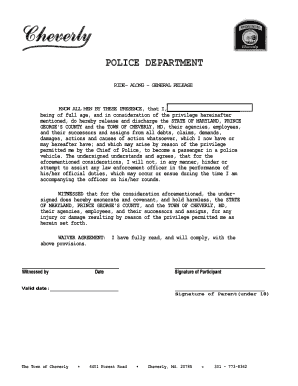
Attired, in such a manner that will not reflect a negative image on you, the program, or the department. Not acceptable: mini-skirts, halter-tops, tank tops, etc... 2. Please arrange for transportation to and from the Police Dept. 3. You are encouraged to ask questions about police work, but please bear in mind that your police partner cannot know about every event that has occurred in the police district. DO NOT INTERFERE in any way, with the officer's handling of a situation. You may ask.

How it works

  1. Open form

    Open form follow the instructions

  2. Easily sign form

    Easily sign the form with your finger

  3. Share form

    Send filled & signed form or save

How to fill out and sign Ride Along Guidelines online?

Get your online template and fill it in using progressive features. Enjoy smart fillable fields and interactivity.Follow the simple instructions below:

Feel all the benefits of completing and submitting documents on the internet. With our service completing Ride Along Guidelines requires just a couple of minutes. We make that possible through giving you access to our feature-rich editor capable of altering/correcting a document?s original text, inserting special boxes, and e-signing.

Execute Ride Along Guidelines in just a couple of clicks following the recommendations listed below:

  1. Pick the template you need from our library of legal forms.
  2. Select the Get form key to open the document and start editing.
  3. Fill in all of the required fields (these are yellowish).
  4. The Signature Wizard will help you add your e-autograph as soon as you?ve finished imputing info.
  5. Put the relevant date.
  6. Look through the entire form to be certain you have completed all the data and no corrections are needed.
  7. Press Done and save the resulting form to your computer.

Send the new Ride Along Guidelines in a digital form when you are done with filling it out. Your data is well-protected, because we adhere to the newest security standards. Join numerous happy users that are already filling in legal forms from their apartments.

Tips on how to fill out, edit and sign Ride Along Guidelines online

How to fill out and sign Ride Along Guidelines online?

Get your online template and fill it in using progressive features. Enjoy smart fillable fields and interactivity.Follow the simple instructions below:

Feel all the benefits of completing and submitting documents on the internet. With our service completing Ride Along Guidelines requires just a couple of minutes. We make that possible through giving you access to our feature-rich editor capable of altering/correcting a document?s original text, inserting special boxes, and e-signing.

Execute Ride Along Guidelines in just a couple of clicks following the recommendations listed below:

  1. Pick the template you need from our library of legal forms.
  2. Select the Get form key to open the document and start editing.
  3. Fill in all of the required fields (these are yellowish).
  4. The Signature Wizard will help you add your e-autograph as soon as you?ve finished imputing info.
  5. Put the relevant date.
  6. Look through the entire form to be certain you have completed all the data and no corrections are needed.
  7. Press Done and save the resulting form to your computer.

Send the new Ride Along Guidelines in a digital form when you are done with filling it out. Your data is well-protected, because we adhere to the newest security standards. Join numerous happy users that are already filling in legal forms from their apartments.

How to edit Ride Along Guidelines: customize forms online

Fill out and sign your Ride Along Guidelines quickly and error-free. Get and edit, and sign customizable form samples in a comfort of a single tab.

Your document workflow can be a lot more efficient if all you need for modifying and handling the flow is organized in one place. If you are looking for a Ride Along Guidelines form sample, this is a place to get it and fill it out without looking for third-party solutions. With this intelligent search engine and editing tool, you won’t need to look any further.

Just type the name of the Ride Along Guidelines or any other form and find the right template. If the sample seems relevant, you can start modifying it right on the spot by clicking Get form. No need to print out or even download it. Hover and click on the interactive fillable fields to insert your information and sign the form in a single editor.

Use more modifying tools to customize your template:

  • Check interactive checkboxes in forms by clicking on them. Check other areas of the Ride Along Guidelines form text with the help of the Cross, Check, and Circle tools
  • If you need to insert more textual content into the file, use the Text tool or add fillable fields with the respective button. You can also specify the content of each fillable field.
  • Add images to forms with the Image button. Add images from your device or capture them with your computer camera.
  • Add custom graphic components to the document. Use Draw, Line, and Arrow tools to draw on the document.
  • Draw over the text in the document if you wish to hide it or stress it. Cover text fragments using theErase and Highlight, or Blackout instrument.
  • Add custom components like Initials or Date using the respective tools. They will be generated automatically.
  • Save the form on your computer or convert its format to the one you require.

When equipped with a smart forms catalog and a powerful document modifying solution, working with documentation is easier. Find the form look for, fill it out instantly, and sign it on the spot without downloading it. Get your paperwork routine simplified with a solution tailored for modifying forms.

Get form

Experience a faster way to fill out and sign forms on the web. Access the most extensive library of templates available.
Get form

Related content

RIDE-ALONG PROGRAM
Because of the popularity of this program, we must limit the number of times one can ride...
Learn more
Ride-Along Rules - University Police Department
Participants will be limited to two ride-alongs per six-month period. Ride-alongs are not...
Learn more
Instructions - Thule RideAlong Mini 100103...
Instructions. Thule RideAlong Mini. 100103, 100104, 100105. Page 2. EN. Child...
Learn more

Related links form

Mayo Clinic Pediatric Days Program Of The Day Ad Specifications Quality Phlebotomy: Back To The Basics Cardiology And Cancer Care For The Primary Care Physician

Questions & Answers

Get answers to your most pressing questions about US Legal Forms API.

Contact support

Whether you wear a bulletproof vest during a ride along depends on the department's policies and the specific situation. Some agencies may provide vests, while others might not require them at all if the circumstances are safe. Always check the Ride Along Guidelines provided by the law enforcement agency to understand their recommendations and ensure your safety during the ride along.

Yes, potential participants in a ride along may be subject to a background check, which could include drug testing. This process helps ensure the safety of both the officer and the public during the ride. The Ride Along Guidelines often outline these requirements, ensuring clarity for interested individuals. You can find specific information and forms on US Legal Forms to understand what's needed.

Ride along 2/9 typically refers to a specific code or department policy that outlines the structure and limitations of ride along experiences. This may include the number of participants allowed or specific times for participation. Check with your local agency for clarity on their unique ride along 2/9 guidelines.

A typical ride along lasts anywhere from two to eight hours, depending on the agency’s schedule and your arrangement. Longer shifts often provide a comprehensive view of a patrol officer's duties and responsibilities. Be sure to verify the expected duration with the agency’s ride along guidelines prior to your experience.

The frequency of participating in ride alongs varies by law enforcement agency, as each has its own guidelines. Some departments may allow ride alongs weekly, while others may limit participation to once a month or even less frequently. Contact your local agency or review the ride along guidelines for precise information regarding their policies.

During a ride along, you can expect to witness various law enforcement activities, including traffic stops, community interactions, and emergency responses. Each ride will differ based on the shift and call volume, but staying engaged and asking questions will enhance your understanding. Familiarize yourself with ride along guidelines to prepare for a rewarding experience.

Typically, getting out of the patrol vehicle during a ride along depends on departmental policies and specific circumstances. Most law enforcement agencies have ride along guidelines that outline when it's appropriate to step out, often requiring you to remain in the vehicle unless instructed otherwise. Always familiarize yourself with these guidelines to ensure a safe and informative experience.

Proper etiquette during a fire department ride along is crucial for ensuring a respectful and safe environment. Participants should wear appropriate attire, follow all instructions from personnel, and remain quiet during critical situations. Familiarizing yourself with the Ride Along Guidelines will help you understand the expectations and ensure that you contribute positively to the team dynamics.

A ride along involves accompanying a law enforcement officer or fire department personnel during their regular duties. This experience allows observers to gain insight into daily operations, understand protocols, and appreciate the challenges first responders face. As part of the Ride Along Guidelines, participants often receive briefings on the law enforcement and fire safety procedures, which enhances their learning experience.

Get This Form Now!

Use professional pre-built templates to fill in and sign documents online faster. Get access to thousands of forms.
Get form
If you believe that this page should be taken down, please follow our DMCA take down processhere.

Industry-leading security and compliance

US Legal Forms protects your data by complying with industry-specific security standards.
  • In businnes since 1997
    25+ years providing professional legal documents.
  • Accredited business
    Guarantees that a business meets BBB accreditation standards in the US and Canada.
  • Secured by Braintree
    Validated Level 1 PCI DSS compliant payment gateway that accepts most major credit and debit card brands from across the globe.
Get Ride Along Guidelines
Get form
Form Packages
Adoption
Bankruptcy
Contractors
Divorce
Home Sales
Employment
Identity Theft
Incorporation
Landlord Tenant
Living Trust
Name Change
Personal Planning
Small Business
Wills & Estates
Packages A-Z
Form Categories
Affidavits
Bankruptcy
Bill of Sale
Corporate - LLC
Divorce
Employment
Identity Theft
Internet Technology
Landlord Tenant
Living Wills
Name Change
Power of Attorney
Real Estate
Small Estates
Wills
All Forms
Forms A-Z
Form Library
Customer Service
Terms of Service
Privacy Notice
Legal Hub
Content Takedown Policy
Bug Bounty Program
About Us
Blog
Affiliates
Contact Us
Delete My Account
Site Map
Industries
Forms in Spanish
Localized Forms
State-specific Forms
Forms Kit
Legal Guides
Real Estate Handbook
All Guides
Prepared for You
Notarize
Incorporation services
Our Customers
For Consumers
For Small Business
For Attorneys
Our Sites
US Legal Forms
USLegal
FormsPass
pdfFiller
signNow
airSlate WorkFlow
DocHub
Instapage
Social Media
Call us now toll free:
+1 833 426 79 33
As seen in:
  • USA Today logo picture
  • CBC News logo picture
  • LA Times logo picture
  • The Washington Post logo picture
  • AP logo picture
  • Forbes logo picture
© Copyright 1997-2025
airSlate Legal Forms, Inc.
3720 Flowood Dr, Flowood, Mississippi 39232
Form Packages
Adoption
Bankruptcy
Contractors
Divorce
Home Sales
Employment
Identity Theft
Incorporation
Landlord Tenant
Living Trust
Name Change
Personal Planning
Small Business
Wills & Estates
Packages A-Z
Form Categories
Affidavits
Bankruptcy
Bill of Sale
Corporate - LLC
Divorce
Employment
Identity Theft
Internet Technology
Landlord Tenant
Living Wills
Name Change
Power of Attorney
Real Estate
Small Estates
Wills
All Forms
Forms A-Z
Form Library
Customer Service
Terms of Service
Privacy Notice
Legal Hub
Content Takedown Policy
Bug Bounty Program
About Us
Blog
Affiliates
Contact Us
Delete My Account
Site Map
Industries
Forms in Spanish
Localized Forms
State-specific Forms
Forms Kit
Legal Guides
Real Estate Handbook
All Guides
Prepared for You
Notarize
Incorporation services
Our Customers
For Consumers
For Small Business
For Attorneys
Our Sites
US Legal Forms
USLegal
FormsPass
pdfFiller
signNow
airSlate WorkFlow
DocHub
Instapage
Social Media
Call us now toll free:
+1 833 426 79 33
As seen in:
  • USA Today logo picture
  • CBC News logo picture
  • LA Times logo picture
  • The Washington Post logo picture
  • AP logo picture
  • Forbes logo picture
© Copyright 1997-2025
airSlate Legal Forms, Inc.
3720 Flowood Dr, Flowood, Mississippi 39232