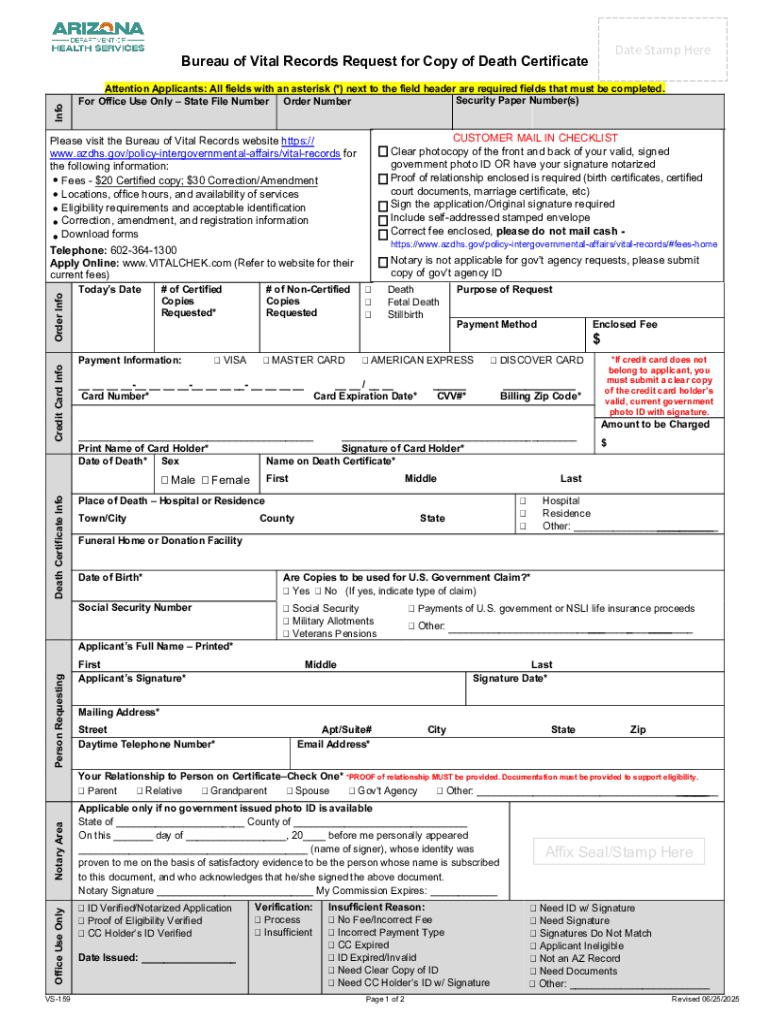
Equired fields that must be completed. Security Paper Number(s) For Office Use Only State File Number Order Number CUSTOMER MAIL IN CHECKLIST Clear photocopy of the front and back of your valid, signed government photo ID OR have your signature notarized Proof of relationship enclosed is required (birth certificates, certified court documents, marriage certificate, etc) Sign the application/Original signature required Include self-addressed stamped envelope Correct fee enclosed, please do n.

Open form follow the instructions

Easily sign the form with your finger

Send filled & signed form or save
How to fill out and sign AZ VS-159 online?
Get your online template and fill it in using progressive features. Enjoy smart fillable fields and interactivity.Follow the simple instructions below:
Feel all the benefits of submitting and completing documents on the internet. With our service filling out AZ VS-159 will take a few minutes. We make that achievable by giving you access to our feature-rich editor capable of transforming/fixing a document?s initial textual content, inserting special boxes, and putting your signature on.
Fill out AZ VS-159 in just several moments by following the guidelines below:
- Find the template you require from our library of legal form samples.
- Select the Get form button to open it and move to editing.
- Fill in the requested fields (they will be marked in yellow).
- The Signature Wizard will enable you to put your electronic autograph after you?ve finished imputing info.
- Put the relevant date.
- Double-check the entire template to make sure you have completed all the data and no changes are required.
- Hit Done and download the filled out document to your device.
Send your AZ VS-159 in a digital form when you are done with filling it out. Your data is securely protected, since we adhere to the latest security criteria. Become one of numerous satisfied users that are already submitting legal forms right from their apartments.
Tips on how to fill out, edit and sign AZ VS-159 online
How to fill and sign AZ VS-159
Get your online template and fill it in using progressive features. Enjoy smart fillable fields and interactivity.Follow the simple instructions below:
Feel all the benefits of submitting and completing documents on the internet. With our service filling out AZ VS-159 will take a few minutes. We make that achievable by giving you access to our feature-rich editor capable of transforming/fixing a document?s initial textual content, inserting special boxes, and putting your signature on.
Fill out AZ VS-159 in just several moments by following the guidelines below:
- Find the template you require from our library of legal form samples.
- Select the Get form button to open it and move to editing.
- Fill in the requested fields (they will be marked in yellow).
- The Signature Wizard will enable you to put your electronic autograph after you?ve finished imputing info.
- Put the relevant date.
- Double-check the entire template to make sure you have completed all the data and no changes are required.
- Hit Done and download the filled out document to your device.
Send your AZ VS-159 in a digital form when you are done with filling it out. Your data is securely protected, since we adhere to the latest security criteria. Become one of numerous satisfied users that are already submitting legal forms right from their apartments.
How to edit AZ VS-159
Eliminate the mess from your paperwork routine. Discover the simplest way to find and edit, and file a AZ VS-159
The process of preparing AZ VS-159 needs precision and attention, especially from people who are not well familiar with this sort of job. It is essential to find a suitable template and fill it in with the correct information. With the proper solution for handling documents, you can get all the instruments at hand. It is simple to streamline your editing process without learning new skills. Find the right sample of AZ VS-159 and fill it out instantly without switching between your browser tabs. Discover more tools to customize your AZ VS-159 form in the editing mode.
While on the AZ VS-159 page, just click the Get form button to start editing it. Add your information to the form on the spot, as all the needed instruments are at hand right here. The sample is pre-designed, so the work required from the user is minimal. Simply use the interactive fillable fields in the editor to easily complete your paperwork. Simply click on the form and proceed to the editor mode straight away. Fill in the interactive field, and your file is good to go.
Try more tools to customize your form:
- Place more textual content around the document if needed. Use the Text and Text Box tools to insert text in a separate box.
- Add pre-designed visual elements like Circle, Cross, and Check with respective tools.
- If needed, capture or upload images to the document with the Image tool.
- If you need to draw something in the document, use Line, Arrow, and Draw tools.
- Try the Highlight, Erase, and Blackout tools to change the text in the document.
- If you need to add comments to specific document sections, click on the Sticky tool and place a note where you want.
Sometimes, a small error can wreck the whole form when someone fills it by hand. Forget about inaccuracies in your paperwork. Find the samples you require in moments and finish them electronically using a smart editing solution.
How to fill and sign AZ VS-159
Get your online template and fill it in using progressive features. Enjoy smart fillable fields and interactivity.Follow the simple instructions below:
Feel all the benefits of submitting and completing documents on the internet. With our service filling out AZ VS-159 will take a few minutes. We make that achievable by giving you access to our feature-rich editor capable of transforming/fixing a document?s initial textual content, inserting special boxes, and putting your signature on.
Fill out AZ VS-159 in just several moments by following the guidelines below:
- Find the template you require from our library of legal form samples.
- Select the Get form button to open it and move to editing.
- Fill in the requested fields (they will be marked in yellow).
- The Signature Wizard will enable you to put your electronic autograph after you?ve finished imputing info.
- Put the relevant date.
- Double-check the entire template to make sure you have completed all the data and no changes are required.
- Hit Done and download the filled out document to your device.
Send your AZ VS-159 in a digital form when you are done with filling it out. Your data is securely protected, since we adhere to the latest security criteria. Become one of numerous satisfied users that are already submitting legal forms right from their apartments.
Experience a faster way to fill out and sign forms on the web. Access the most extensive library of templates available.
Related content
VS-159. Page 1 of 2. Revised 06/25/2025. Bureau of Vital Records Request for Copy of Death...
Motion on behalf of the California defendants for leave to file an amended answer to the...
Arizona Heart Institute, (2000), 400. Qp/Qs = local VS Qp/local VS Qs. Os locais de VS...
Get answers to your most pressing questions about US Legal Forms API.
What is the spec of AJ159 apex?
The AZ VS-159 provides a detailed overview of the AJ159 apex specifications. This model features a robust design, ensuring durability and performance in various applications. It includes advanced technology for enhanced functionality and user experience. With the AZ VS-159, you can expect efficiency and reliability tailored to meet your needs.
How to az cli?
To use the AZ CLI, first ensure you have it installed on your system. You can use the command line to run various Azure commands efficiently. The AZ CLI complements PowerShell in managing resources, and understanding its integration with options like AZ VS-159 can improve your workflow. Thoroughly explore the commands available in the AZ CLI documentation to maximize its potential.
How to use connect AzAccount?
To use the connect AzAccount, start by running the command 'Connect-AzAccount' in your PowerShell terminal. This command prompts you to log in using your Azure credentials, establishing a connection to manage your Azure resources. Accessing features like AZ VS-159 becomes seamless once you're logged in. Remember to ensure that your account has the necessary permissions for the tasks you plan to execute.
What is get AzVM?
Get AzVM is a PowerShell cmdlet that retrieves information about your Azure virtual machines. With this command, you can view the status, configurations, and resources associated with each VM. Using Get AzVM effectively assists in managing your cloud infrastructure and enhances your operations, particularly when utilizing features like AZ VS-159. It helps streamline resource monitoring.
How to az commands in PowerShell?
To execute az commands in PowerShell, start by importing the module with the command 'Import-Module Az'. Once imported, you can run commands such as 'Az VM List' or 'Az Resource Group Create' directly in your console. Understanding how to efficiently use these commands can significantly harness the power of the AZ VS-159. Documentation is available to help guide you through any command.
How to get a module in PowerShell?
To get any module in PowerShell, you use the Install-Module command followed by the module name. This action connects to the PowerShell Gallery, where you can find and install the modules you need. If you're looking for Azure-related features, the AZ module, particularly the AZ VS-159, is essential. Make sure your PowerShell version supports the modules you want to install.
How to get az module in PowerShell?
You can get the az module in PowerShell by running the command 'Install-Module -Name Az'. This action installs the module directly from the PowerShell Gallery. Once installed, you can access various commands for Azure management, enabling you to utilize features like AZ VS-159. Always verify your installation with 'Get-Module -ListAvailable' after completing the installation.
How to get az PowerShell?
To install the az PowerShell, first ensure that you have PowerShell installed on your machine. Then, you can simply use the command 'Install-Module -Name Az -AllowClobber -Scope CurrentUser'. This process gives you access to the latest features, including the AZ VS-159 capabilities. Remember to check for updates regularly to stay current.
What is the AZ module in PowerShell?
The AZ module in PowerShell is a set of cmdlets that allow you to manage Azure resources. It simplifies the management process by providing a unified interface for cloud computing tasks. Using the AZ module enhances productivity by streamlining commands and functions. Understanding the AZ VS-159 feature helps you leverage cloud management efficiently.
How do you get a death certificate in AZ?
To obtain a death certificate in Arizona, you need to contact the Arizona Department of Health Services. You can apply online, via mail, or in person at their office. Make sure you have valid identification and the required details, such as the deceased's name and date of death. For a streamlined process, consider using resources like USLegalForms, which can guide you through the necessary steps for completing the AZ VS-159.
Use professional pre-built templates to fill in and sign documents online faster. Get access to thousands of forms.
If you believe that this page should be taken down, please follow our DMCA take down process here.