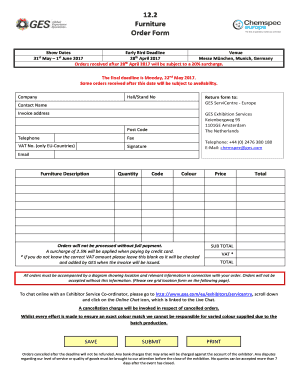
Get Ges Exhibition Services Furniture Order Form 2017-2026
How it works
-

Open form follow the instructions
-

Easily sign the form with your finger
-

Send filled & signed form or save
How to fill out and sign GES Exhibition Services Furniture Order Form online?
Get your online template and fill it in using progressive features. Enjoy smart fillable fields and interactivity.Follow the simple instructions below:Feel all the benefits of completing and submitting legal forms online. Using our service completing GES Exhibition Services Furniture Order Form usually takes a couple of minutes. We make that possible through giving you access to our full-fledged editor effective at altering/fixing a document?s initial textual content, adding special boxes, and putting your signature on.
Fill out GES Exhibition Services Furniture Order Form in several moments by following the guidelines listed below:
- Choose the document template you need from the library of legal forms.
- Choose the Get form key to open it and move to editing.
- Fill out all of the requested boxes (these are marked in yellow).
- The Signature Wizard will allow you to put your electronic autograph as soon as you?ve finished imputing details.
- Add the date.
- Look through the whole template to make certain you have filled in all the information and no corrections are needed.
- Click Done and download the filled out template to your computer.
Send your GES Exhibition Services Furniture Order Form in a digital form as soon as you are done with filling it out. Your information is well-protected, as we adhere to the newest security requirements. Join millions of happy clients that are already filling out legal documents right from their homes.
Tips on how to fill out, edit and sign GES Exhibition Services Furniture Order Form online
How to fill out and sign GES Exhibition Services Furniture Order Form online?
Get your online template and fill it in using progressive features. Enjoy smart fillable fields and interactivity.Follow the simple instructions below:
Feel all the benefits of completing and submitting legal forms online. Using our service completing GES Exhibition Services Furniture Order Form usually takes a couple of minutes. We make that possible through giving you access to our full-fledged editor effective at altering/fixing a document?s initial textual content, adding special boxes, and putting your signature on.
Fill out GES Exhibition Services Furniture Order Form in several moments by following the guidelines listed below:
- Choose the document template you need from the library of legal forms.
- Choose the Get form key to open it and move to editing.
- Fill out all of the requested boxes (these are marked in yellow).
- The Signature Wizard will allow you to put your electronic autograph as soon as you?ve finished imputing details.
- Add the date.
- Look through the whole template to make certain you have filled in all the information and no corrections are needed.
- Click Done and download the filled out template to your computer.
Send your GES Exhibition Services Furniture Order Form in a digital form as soon as you are done with filling it out. Your information is well-protected, as we adhere to the newest security requirements. Join millions of happy clients that are already filling out legal documents right from their homes.
How to edit GES Exhibition Services Furniture Order Form: customize forms online
Make the most of our extensive online document editor while preparing your paperwork. Fill out the GES Exhibition Services Furniture Order Form, emphasize on the most significant details, and effortlessly make any other necessary adjustments to its content.
Preparing documents electronically is not only time-saving but also comes with a possibility to modify the sample in accordance with your demands. If you’re about to manage the GES Exhibition Services Furniture Order Form, consider completing it with our extensive online editing solutions. Whether you make a typo or enter the requested information into the wrong area, you can rapidly make changes to the document without the need to restart it from the beginning as during manual fill-out. In addition to that, you can stress on the critical data in your paperwork by highlighting specific pieces of content with colors, underlining them, or circling them.
Adhere to these quick and simple actions to fill out and adjust your GES Exhibition Services Furniture Order Form online:
- Open the file in the editor.
- Type in the necessary information in the empty areas using Text, Check, and Cross tools.
- Adhere to the form navigation to avoid missing any essential areas in the sample.
- Circle some of the important details and add a URL to it if necessary.
- Use the Highlight or Line tools to emphasize the most significant facts.
- Choose colors and thickness for these lines to make your form look professional.
- Erase or blackout the details you don’t want to be visible to others.
- Substitute pieces of content that contain errors and type in text that you need.
- Finish modifcations with the Done key after you make sure everything is correct in the form.
Our powerful online solutions are the most effective way to complete and modify GES Exhibition Services Furniture Order Form in accordance with your needs. Use it to prepare personal or professional documents from anyplace. Open it in a browser, make any alterations in your forms, and get back to them at any moment in the future - they all will be securely kept in the cloud.
GES is a well-respected company in the event industry, providing a wide range of services for exhibitions, conventions, and other events. They offer innovative solutions, including the GES Exhibition Services Furniture Order Form, which simplifies the ordering process for essential event furnishings. As a part of the Viad Corp family, GES exemplifies high standards in service quality and customer satisfaction. Trust GES for all your event needs to create unforgettable experiences.