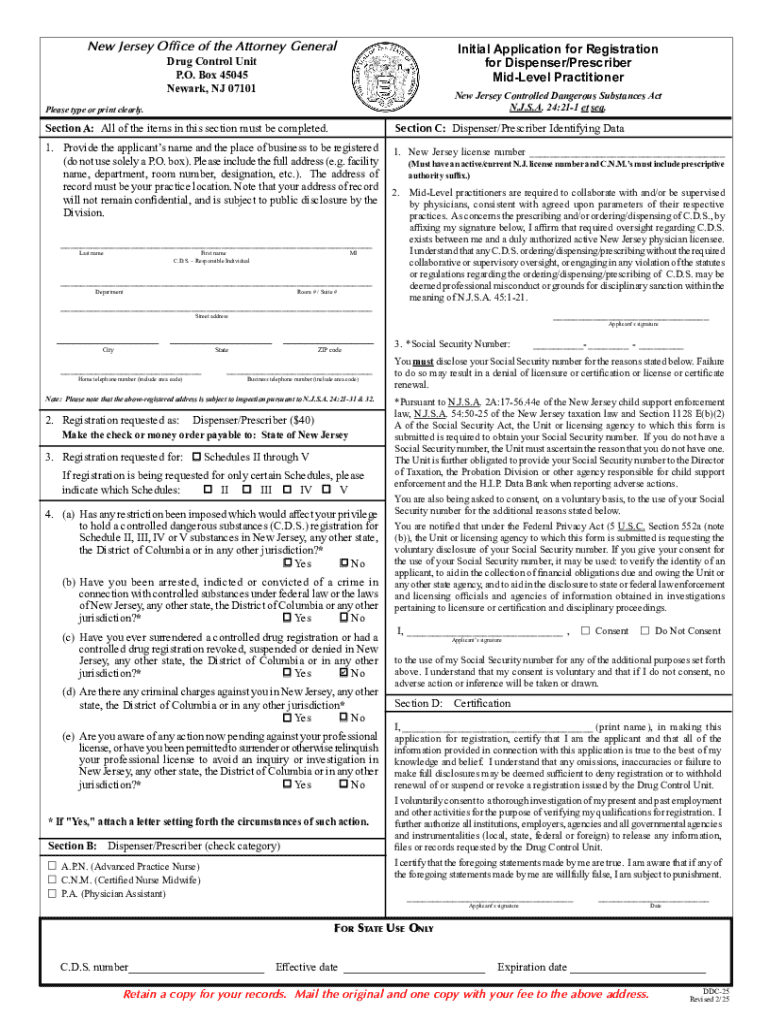
Gistration Initial Application Instruction sheet i. New Jersey Controlled Dangerous Substance (CDS) Registration Requirements: Enclosed is a CDS application, which you are required to submit pursuant to N.J.S.A. 24:21-1 et seq. Registration is required for every person who or firm that prescribes, manufactures, distributes, conducts research or analysis, or dispenses controlled dangerous substances within this State. A New Jersey CDS registration is issued to an actual location where controlle.

Open form follow the instructions

Easily sign the form with your finger

Send filled & signed form or save
How to fill out and sign Controlled Dangerous Substance Registration Initial Application online?
Get your online template and fill it in using progressive features. Enjoy smart fillable fields and interactivity.Follow the simple instructions below:
Are you seeking a fast and practical tool to fill in Controlled Dangerous Substance Registration Initial Application at a reasonable cost? Our platform gives you an extensive collection of forms that are available for filling out on the internet. It only takes a couple of minutes.
Follow these simple instructions to get Controlled Dangerous Substance Registration Initial Application completely ready for submitting:
- Get the form you will need in our library of legal templates.
- Open the form in our online editing tool.
- Read the recommendations to discover which data you will need to give.
- Select the fillable fields and add the requested details.
- Put the relevant date and place your electronic autograph once you complete all other boxes.
- Check the completed document for misprints along with other errors. If there?s a necessity to change some information, the online editor as well as its wide range of tools are available for you.
- Download the completed template to your computer by clicking Done.
- Send the e-document to the intended recipient.
Filling out Controlled Dangerous Substance Registration Initial Application doesn?t need to be stressful anymore. From now on simply get through it from your home or at the business office straight from your mobile or personal computer.
Tips on how to fill out, edit and sign Controlled Dangerous Substance Registration Initial Application online
How to fill and sign Controlled Dangerous Substance Registration Initial Application
Get your online template and fill it in using progressive features. Enjoy smart fillable fields and interactivity.Follow the simple instructions below:
Are you seeking a fast and practical tool to fill in Controlled Dangerous Substance Registration Initial Application at a reasonable cost? Our platform gives you an extensive collection of forms that are available for filling out on the internet. It only takes a couple of minutes.
Follow these simple instructions to get Controlled Dangerous Substance Registration Initial Application completely ready for submitting:
- Get the form you will need in our library of legal templates.
- Open the form in our online editing tool.
- Read the recommendations to discover which data you will need to give.
- Select the fillable fields and add the requested details.
- Put the relevant date and place your electronic autograph once you complete all other boxes.
- Check the completed document for misprints along with other errors. If there?s a necessity to change some information, the online editor as well as its wide range of tools are available for you.
- Download the completed template to your computer by clicking Done.
- Send the e-document to the intended recipient.
Filling out Controlled Dangerous Substance Registration Initial Application doesn?t need to be stressful anymore. From now on simply get through it from your home or at the business office straight from your mobile or personal computer.
How to edit Controlled Dangerous Substance Registration Initial Application
Check out a single service to deal with all of your paperwork with ease. Find, modify, and complete your Controlled Dangerous Substance Registration Initial Application in a single interface with the help of smart tools.
The times when people had to print forms or even write them by hand are long gone. Right now, all it takes to find and complete any form, like Controlled Dangerous Substance Registration Initial Application, is opening a single browser tab. Here, you can find the Controlled Dangerous Substance Registration Initial Application form and customize it any way you need, from inserting the text straight in the document to drawing it on a digital sticky note and attaching it to the record. Discover tools that will simplify your paperwork without additional effort.
Click on the Get form button to prepare your Controlled Dangerous Substance Registration Initial Application paperwork easily and start editing it instantly. In the editing mode, you can easily fill in the template with your details for submission. Just click on the field you need to alter and enter the data right away. The editor's interface does not need any specific skills to use it. When finished with the edits, check the information's accuracy once again and sign the document. Click on the signature field and follow the instructions to eSign the form in a moment.
Use More tools to customize your form:
- Use Cross, Check, or Circle tools to pinpoint the document's data.
- Add text or fillable text fields with text customization tools.
- Erase, Highlight, or Blackout text blocks in the document using corresponding tools.
- Add a date, initials, or even an image to the document if necessary.
- Use the Sticky note tool to annotate the form.
- Use the Arrow and Line, or Draw tool to add graphic elements to your file.
Preparing Controlled Dangerous Substance Registration Initial Application forms will never be perplexing again if you know where to look for the suitable template and prepare it effortlessly. Do not hesitate to try it yourself.
How to fill and sign Controlled Dangerous Substance Registration Initial Application
Get your online template and fill it in using progressive features. Enjoy smart fillable fields and interactivity.Follow the simple instructions below:
Are you seeking a fast and practical tool to fill in Controlled Dangerous Substance Registration Initial Application at a reasonable cost? Our platform gives you an extensive collection of forms that are available for filling out on the internet. It only takes a couple of minutes.
Follow these simple instructions to get Controlled Dangerous Substance Registration Initial Application completely ready for submitting:
- Get the form you will need in our library of legal templates.
- Open the form in our online editing tool.
- Read the recommendations to discover which data you will need to give.
- Select the fillable fields and add the requested details.
- Put the relevant date and place your electronic autograph once you complete all other boxes.
- Check the completed document for misprints along with other errors. If there?s a necessity to change some information, the online editor as well as its wide range of tools are available for you.
- Download the completed template to your computer by clicking Done.
- Send the e-document to the intended recipient.
Filling out Controlled Dangerous Substance Registration Initial Application doesn?t need to be stressful anymore. From now on simply get through it from your home or at the business office straight from your mobile or personal computer.
Experience a faster way to fill out and sign forms on the web. Access the most extensive library of templates available.
Related content
Registration Applications, Tools and Resources · Renewal Applications · New Applications...
For Schedule 1 drugs, there must be a separate DEA and NJ CDS registration for each...
7-1 PURPOSE. This chapter provides definitions, responsibilities, and procedures for...
Get answers to your most pressing questions about US Legal Forms API.
How to get a controlled dangerous substance certificate?
To get a controlled dangerous substance certificate, you will need to complete the Controlled Dangerous Substance Registration Initial Application specific to your state. This involves filling out the application form, providing the required supporting documents, and paying any associated fees. Once your application is submitted and approved, you will be issued a certificate that allows you to legally handle controlled substances.
What are DEA registration requirements?
The Drug Enforcement Administration (DEA) has specific requirements for individuals and businesses aiming to obtain a DEA registration to handle controlled substances. The basic requirements typically include submitting a Controlled Dangerous Substance Registration Initial Application, demonstrating your qualifications, and paying the necessary fees. It’s crucial to follow these guidelines closely to secure your DEA registration successfully.
What is a controlled substance registration?
A controlled substance registration is a legal approval that allows individuals or entities to handle, produce, or distribute controlled substances. This registration is vital for compliance with both federal and state laws. To obtain this registration, you must fill out and submit a Controlled Dangerous Substance Registration Initial Application, which evaluates your ability to safely and responsibly manage controlled substances.
Does Arkansas require a controlled substance license?
Yes, Arkansas requires a controlled substance license for businesses and professionals who wish to handle controlled substances. You must complete the Controlled Dangerous Substance Registration Initial Application to acquire this license. This process ensures that you adhere to the applicable laws and maintain the necessary safety and security standards.
What is a state controlled dangerous substance certificate?
A state controlled dangerous substance certificate is an official document that allows individuals or businesses to legally manufacture, distribute, or dispense controlled substances within that state. Obtaining a Controlled Dangerous Substance Registration Initial Application is essential to receive this certification. This certificate ensures that you comply with all regulations governing controlled substances, helping to maintain safe practices.
Does New York require a CDS license?
Yes, New York requires a Controlled Dangerous Substance (CDS) license for individuals and entities that plan to handle controlled substances. This includes obtaining a Controlled Dangerous Substance Registration Initial Application to ensure compliance with state and federal laws. Make sure to review the specific requirements as they can vary based on the type of service or business you operate.
How long does it take to get a controlled substance license?
The time it takes to receive your controlled substance license can vary based on your state's processing times and the complexity of your application. Generally, after submitting your Controlled Dangerous Substance Registration Initial Application, you can expect a timeline of several weeks to a few months for approval. It's best to plan accordingly and check with your state's regulatory agency for specific details.
How to obtain a CDS certificate?
To obtain a Controlled Dangerous Substance (CDS) certificate, you need to complete the Controlled Dangerous Substance Registration Initial Application. This process involves gathering necessary documentation, paying associated fees, and submitting your application to the appropriate state regulatory authority. Once your application is reviewed and approved, you will receive your CDS certificate.
How to enroll in DEA?
To enroll in the Drug Enforcement Administration (DEA), you must complete the DEA registration process, which includes filling out the appropriate forms and paying the applicable fees. This registration is essential for anyone handling controlled substances in the United States. Our platform can assist you in managing the Controlled Dangerous Substance Registration Initial Application, including DEA enrollment.
How long does it take for a DEA application to process?
The processing time for a DEA application can vary significantly, usually taking several weeks to a few months. Delays may occur due to background checks or if additional information is required. To expedite the process, ensure your Controlled Dangerous Substance Registration Initial Application is thoroughly completed and consider using USLegalForms for assistance.
Use professional pre-built templates to fill in and sign documents online faster. Get access to thousands of forms.
If you believe that this page should be taken down, please follow our DMCA take down process here.