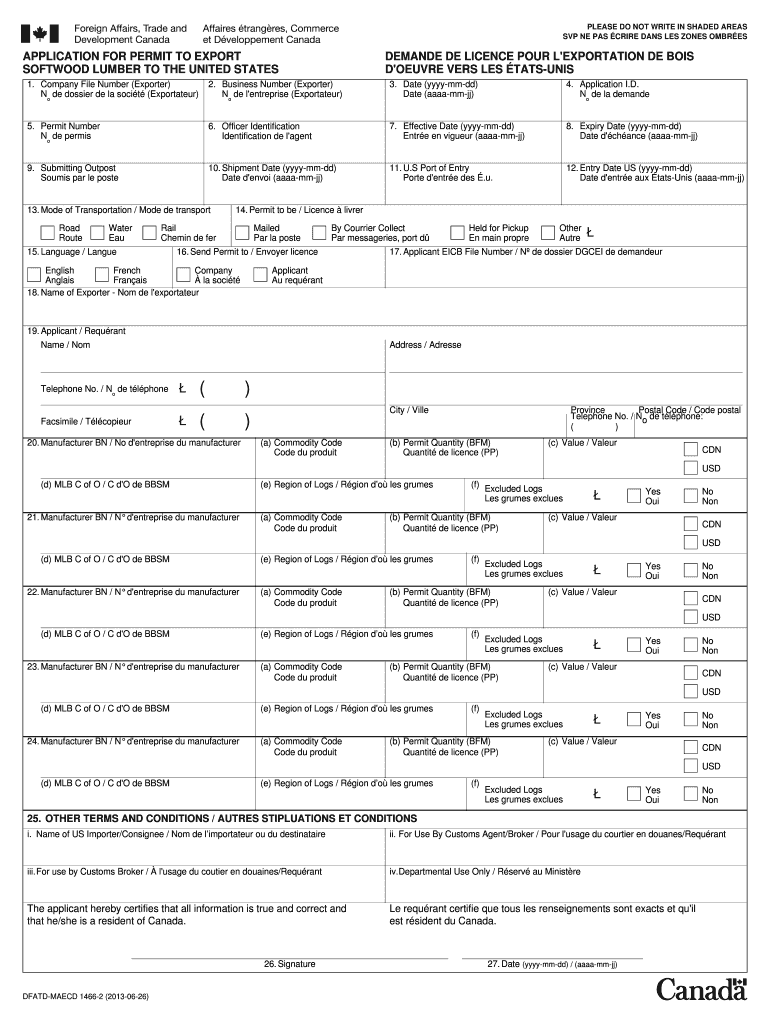
UVRE VERS LES ÉTATS-UNIS 1. Company File Number (Exporter) No de dossier de la société (Exportateur) 2. Business Number (Exporter) No de l'entreprise (Exportateur) 3. Date (yyyy-mm-dd) Date (aaaa-mm-jj) 4. Application I.D. No de la demande 5. Permit Number No de permis 6. Officer Identification Identification de l'agent 7. Effective Date (yyyy-mm-dd) Entrée en vigueur (aaaa-mm-jj) 8. Expiry Date (yyyy-mm-dd) Date d'échéance (aaaa-mm-jj) 9. Submitting Outpost Soumis par le poste 1.

Open form follow the instructions

Easily sign the form with your finger

Send filled & signed form or save
How to fill out the Canada DFATD-MAECD 1466-2 online
Filling out the Canada DFATD-MAECD 1466-2 form is essential for anyone looking to export softwood lumber to the United States. This guide will provide you with clear, step-by-step instructions to ensure a smooth and efficient application process.
Follow the steps to complete your permit application accurately.
- Use the ‘Get Form’ button to access the application and open it for editing.
- Enter your company file number in the designated field. This number is uniquely assigned to your business by Foreign Affairs, Trade and Development Canada.
- Input your business number or GST number as provided by Revenue Canada.
- Fill in the date of the application using the format yyyy-mm-dd.
- If applicable, provide the permit number assigned to your previous applications.
- Include the officer identification number as needed for verification.
- Specify the effective date for the permit in the format required (yyyy-mm-dd).
- Indicate the expiry date of the permit using the same date format (yyyy-mm-dd).
- List the outpost through which you are submitting the application.
- Fill in the shipment date when the goods will leave Canada using the format yyyy-mm-dd.
- Enter the U.S. port of entry for your shipment.
- Provide the date of entry into the U.S.A. in the specified format (yyyy-mm-dd).
- Select the mode of transportation for your shipment: Road, Rail, or Water.
- Specify how the permit will be delivered (e.g., Mailed, Held for Pickup).
- Choose the language in which the permit should be issued: English or French.
- Provide details on where to send the permit, confirming it will be a Canadian address.
- Enter the name of the exporter exactly as it appears on customs documents.
- Complete the applicant’s contact details, including address, telephone number, and facsimile number.
- For each manufacturer, enter their business number along with the commodity code, permit quantity, and value.
- Use the designated fields for any excluded logs and repeat for each item if necessary.
- In the section for other terms and conditions, provide the name of the U.S. importer.
- Finalize your application by signing and dating the form, certifying that all information is accurate and that you reside in Canada.
- Save your completed form, and use the options available to download, print, or share your application.
Start filling out your application for the Canada DFATD-MAECD 1466-2 online today!
Experience a faster way to fill out and sign forms on the web. Access the most extensive library of templates available.
Get answers to your most pressing questions about US Legal Forms API.
Do US citizens need to fill out ArriveCAN?
Yes, US citizens are required to fill out the ArriveCAN app if they plan to enter Canada, particularly during health crisis periods. This form collects crucial information related to health and travel history, which is especially important in the current climate. Make sure to review the requirements and associated documents, including the Canada DFATD-MAECD 1466-2 form, to ensure a smooth entry.
What do you need to declare when coming back to Canada?
When returning to Canada, you must declare any goods you purchased abroad, gifts, and items you expect to bring into the country. Additionally, if you are carrying more than your personal exemption limit, you need to report this on the Canada DFATD-MAECD 1466-2 form. Understanding what to declare can help streamline your customs experience.
What form do I need to fill out when returning to Canada?
When returning to Canada, you need to complete a declaration form at the border. This form helps Canadian authorities assess what you are bringing back and ensure compliance with customs regulations. The Canada DFATD-MAECD 1466-2 form is vital, as it may also capture additional information you need to declare.
How do I fill out a Canada Customs invoice?
Filling out a Canada Customs invoice requires providing detailed information about the goods you are importing. Include descriptions, value, and the country of origin for each item. For assistance with the Canada DFATD-MAECD 1466-2 form, you can utilize the resources available on platforms like uslegalforms to simplify the process.
What forms do I need to fill out to enter Canada?
To enter Canada, you typically need to complete a declaration form, along with any additional documents depending on your purpose of travel. Commonly required forms include the Canada DFATD-MAECD 1466-2 form, especially if you are carrying specific goods. It is advisable to double-check the current requirements before your trip to ensure compliance.
How to fill out a declaration form for Canada?
Filling out the declaration form for Canada involves providing accurate personal information, such as your name, address, and contact details. You will also need to include specifics about your travel plans and any items you are bringing into the country. Make sure to refer to the guidelines for the Canada DFATD-MAECD 1466-2 form, as they will help you navigate the process smoothly.
What documents do I need to import to Canada?
When importing to Canada, essential documents include a bill of lading, commercial invoice, and any applicable import permits. Depending on your item, additional documents may be required, such as certificates of origin or health certificates. Using the Canada DFATD-MAECD 1466-2 can equip you with necessary insights on required documentation to facilitate a smooth import process.
Do U.S. citizens need an export license?
Yes, U.S. citizens may need an export license depending on the nature of the goods they plan to export from Canada. Certain items, particularly those related to military or dual-use technologies, often require permits under Canada’s export regulations. To ensure compliance, refer to the Canada DFATD-MAECD 1466-2 for detailed requirements and application processes.
What is the transaction number for Canada customs?
The transaction number for Canada customs refers to a unique identifier linked to your customs declaration. This number is crucial for tracking shipments and is assigned by the Canada Border Services Agency during the import or export process. For guidance on customs procedures and using the Canada DFATD-MAECD 1466-2, you can access resources available on our platform.
How do I get an export license in Canada?
To obtain an export license in Canada, you need to submit an application through the Canada Border Services Agency (CBSA). The process may involve providing details about your goods and their intended destination. Utilizing the Canada DFATD-MAECD 1466-2 can help you understand the specific documents and procedures required for a successful application.
Use professional pre-built templates to fill in and sign documents online faster. Get access to thousands of forms.
If you believe that this page should be taken down, please follow our DMCA take down process here.