Loading
Form preview
  • US Legal Forms
  • Other Templates
  • More Forms
  • More Multi-State Forms
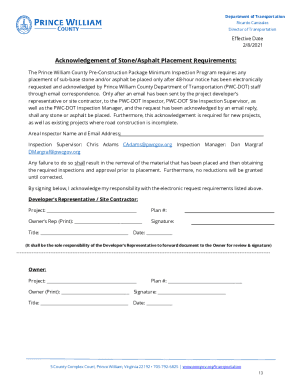
  • Va Site Development Inspection Requirements Pre-construction Package - Prince William County 2025

Get Va Site Development Inspection Requirements Pre-construction Package - Prince William County 2025-2026

How it works

  1. Open form

    Open form follow the instructions

  2. Easily sign form

    Easily sign the form with your finger

  3. Share form

    Send filled & signed form or save

How to fill out and sign VA Site Development Inspection Requirements Pre-Construction Package - Prince William County online?

Get your online template and fill it in using progressive features. Enjoy smart fillable fields and interactivity.Follow the simple instructions below:

The days of terrifying complicated tax and legal forms have ended. With US Legal Forms the process of completing legal documents is anxiety-free. The leading editor is right close at hand offering you a wide range of advantageous instruments for completing a VA Site Development Inspection Requirements Pre-Construction Package - Prince William County. These tips, in addition to the editor will assist you through the whole procedure.

  1. Click the Get Form option to begin modifying.
  2. Switch on the Wizard mode on the top toolbar to get additional tips.
  3. Fill out every fillable area.
  4. Ensure that the information you add to the VA Site Development Inspection Requirements Pre-Construction Package - Prince William County is updated and accurate.
  5. Indicate the date to the sample with the Date tool.
  6. Click on the Sign button and create an e-signature. You can use three available options; typing, drawing, or capturing one.
  7. Re-check every area has been filled in properly.
  8. Select Done in the top right corne to save or send the form. There are several alternatives for receiving the doc. An attachment in an email or through the mail as a hard copy, as an instant download.

We make completing any VA Site Development Inspection Requirements Pre-Construction Package - Prince William County simpler. Get started now!

Tips on how to fill out, edit and sign VA Site Development Inspection Requirements Pre-Construction Package - Prince William County online

How to fill out and sign VA Site Development Inspection Requirements Pre-Construction Package - Prince William County online?

Get your online template and fill it in using progressive features. Enjoy smart fillable fields and interactivity.Follow the simple instructions below:

The days of terrifying complicated tax and legal forms have ended. With US Legal Forms the process of completing legal documents is anxiety-free. The leading editor is right close at hand offering you a wide range of advantageous instruments for completing a VA Site Development Inspection Requirements Pre-Construction Package - Prince William County. These tips, in addition to the editor will assist you through the whole procedure.

  1. Click the Get Form option to begin modifying.
  2. Switch on the Wizard mode on the top toolbar to get additional tips.
  3. Fill out every fillable area.
  4. Ensure that the information you add to the VA Site Development Inspection Requirements Pre-Construction Package - Prince William County is updated and accurate.
  5. Indicate the date to the sample with the Date tool.
  6. Click on the Sign button and create an e-signature. You can use three available options; typing, drawing, or capturing one.
  7. Re-check every area has been filled in properly.
  8. Select Done in the top right corne to save or send the form. There are several alternatives for receiving the doc. An attachment in an email or through the mail as a hard copy, as an instant download.

We make completing any VA Site Development Inspection Requirements Pre-Construction Package - Prince William County simpler. Get started now!

How to edit VA Site Development Inspection Requirements Pre-Construction Package - Prince William County: customize forms online

Approve and share VA Site Development Inspection Requirements Pre-Construction Package - Prince William County together with any other business and personal documentation online without wasting time and resources on printing and postal delivery. Get the most out of our online form editor using a built-in compliant eSignature option.

Approving and submitting VA Site Development Inspection Requirements Pre-Construction Package - Prince William County templates electronically is quicker and more efficient than managing them on paper. However, it requires using online solutions that guarantee a high level of data protection and provide you with a certified tool for creating electronic signatures. Our powerful online editor is just the one you need to prepare your VA Site Development Inspection Requirements Pre-Construction Package - Prince William County and other personal and business or tax templates in a precise and suitable way in accordance with all the requirements. It features all the necessary tools to quickly and easily complete, adjust, and sign paperwork online and add Signature fields for other parties, specifying who and where should sign.

It takes just a few simple actions to fill out and sign VA Site Development Inspection Requirements Pre-Construction Package - Prince William County online:

  1. Open the chosen file for further managing.
  2. Utilize the upper toolbar to add Text, Initials, Image, Check, and Cross marks to your sample.
  3. Underline the most significant details and blackout or erase the sensitive ones if needed.
  4. Click on the Sign option above and decide on how you prefer to eSign your document.
  5. Draw your signature, type it, upload its image, or use another option that suits you.
  6. Switch to the Edit Fillable Fileds panel and place Signature fields for others.
  7. Click on Add Signer and type in your recipient’s email to assign this field to them.
  8. Check that all information provided is complete and accurate before you click Done.
  9. Share your documentation with others using one of the available options.

When signing VA Site Development Inspection Requirements Pre-Construction Package - Prince William County with our powerful online solution, you can always be sure to get it legally binding and court-admissible. Prepare and submit documents in the most efficient way possible!

Get form

Experience a faster way to fill out and sign forms on the web. Access the most extensive library of templates available.
Get form

Related content

Site Development Inspection Requirements
Jul 1, 2025 — General Site Inspection Overview/Requirements: 1. Pre-Construction Meeting...
Learn more
Standards and Specifications - Erosion & Sediment...
Site inspections during the land disturbance activity performed by the VCCS or designee...
Learn more
REQUEST FOR PROPOSAL
Sep 14, 2016 — The Purpose and Intent of this Request for Proposal (RFP) is to establish...
Learn more

Related links form

IS-70826 2005 MD MDH 4500 2018 HP Development Company Sample Thank You Letter To Volunteer 2011 CA APPENDIX K - Preparation Guidelines For Project Report 2021

Questions & Answers

Get answers to your most pressing questions about US Legal Forms API.

Contact support

Section 13-327 of the Prince William County Code outlines specific regulations related to property maintenance and safety. This section helps ensure that properties remain safe and enhance community standards. As you prepare your VA Site Development Inspection Requirements Pre-Construction Package - Prince William County, familiarizing yourself with this code can help you prevent issues down the line.

Code Red in Prince William County refers to an alert system used to notify residents about various emergency situations, including severe weather or safety threats. It ensures that community members are informed quickly and effectively. Knowing how emergency codes work can be beneficial while planning your VA Site Development Inspection Requirements Pre-Construction Package - Prince William County.

To dispose of fireworks in Prince William County, you should follow specific local regulations for hazardous materials. It is important not to simply throw them away with regular trash. For further guidance, exploring the VA Site Development Inspection Requirements Pre-Construction Package - Prince William County can provide additional insights on proper disposal methods when dealing with safety issues.

Yes, you generally need a permit to build a fence in Prince William County. The permit process ensures that the fence complies with local codes and does not encroach on property lines. To understand how your plans fit within the VA Site Development Inspection Requirements Pre-Construction Package - Prince William County, it's advisable to consult with local authorities.

B1 zoning refers to a type of commercial zoning in Prince William County that allows for various business activities. This zoning is designed to promote local businesses while ensuring that developments align with community goals. When considering your VA Site Development Inspection Requirements Pre-Construction Package - Prince William County, it is essential to check if your development meets the B1 zoning criteria.

The resource protection area (RPA) in Prince William County is a designated zone aimed at protecting water resources. This area includes streams, wetlands, and adjacent lands that are vital for maintaining ecological health. Understanding the VA Site Development Inspection Requirements Pre-Construction Package - Prince William County can help you identify these zones before moving forward with development.

Setback requirements for sheds in Prince William County stipulate the minimum distance between the shed and your property boundary. Usually, these requirements ensure adequate space for drainage and maintenance. To ensure compliance, familiarize yourself with the VA Site Development Inspection Requirements Pre-Construction Package - Prince William County, which will guide you through this process.

To determine how close you can place a shed to your property line, you should consult the local zoning regulations in Prince William County. Setback requirements typically dictate the minimum distance for structures, affecting where your shed can go. Adhering to the VA Site Development Inspection Requirements Pre-Construction Package - Prince William County will keep your project on the right path.

In Virginia, the distance you can build from your property line varies by locality. For Prince William County, it is essential to review the specific setback requirements in the zoning ordinance. Following the VA Site Development Inspection Requirements Pre-Construction Package - Prince William County will help keep you compliant and avoid fines.

Building a shed too close to your neighbor's property line may lead to complications. In Prince William County, you need to observe the established setbacks which ensure adequate distance from adjacent properties. When planning your shed, always consider the VA Site Development Inspection Requirements Pre-Construction Package - Prince William County to avoid potential issues.

Get This Form Now!

Use professional pre-built templates to fill in and sign documents online faster. Get access to thousands of forms.
Get form
If you believe that this page should be taken down, please follow our DMCA take down processhere.
Get VA Site Development Inspection Requirements Pre-Construction Package - Prince William County
Get form
  • Adoption
  • Bankruptcy
  • Contractors
  • Divorce
  • Home Sales
  • Employment
  • Identity Theft
  • Incorporation
  • Landlord Tenant
  • Living Trust
  • Name Change
  • Personal Planning
  • Small Business
  • Wills & Estates
  • Packages A-Z
  • Affidavits
  • Bankruptcy
  • Bill of Sale
  • Corporate - LLC
  • Divorce
  • Employment
  • Identity Theft
  • Internet Technology
  • Landlord Tenant
  • Living Wills
  • Name Change
  • Power of Attorney
  • Real Estate
  • Small Estates
  • Wills
  • All Forms
  • Forms A-Z
  • Other Templates
  • Legal Hub
  • About Us
  • Help Portal
  • Legal Resources
  • Blog
  • Affiliates
  • Contact Us
  • Delete My Account
  • Site Map
  • Industries
  • Forms in Spanish
  • Localized Forms
  • State-specific Forms
  • Forms Kit
  • Real Estate Handbook
  • All Guides
  • Notarize
  • Incorporation services
  • For Consumers
  • For Small Business
  • For Attorneys
  • USLegal
  • FormsPass
  • pdfFiller
  • signNow
  • altaFlow
  • DocHub
  • Instapage
Form Packages
  • Adoption
  • Bankruptcy
  • Contractors
  • Divorce
  • Home Sales
  • Employment
  • Identity Theft
  • Incorporation
  • Landlord Tenant
  • Living Trust
  • Name Change
  • Personal Planning
  • Small Business
  • Wills & Estates
  • Packages A-Z
Form Categories
  • Affidavits
  • Bankruptcy
  • Bill of Sale
  • Corporate - LLC
  • Divorce
  • Employment
  • Identity Theft
  • Internet Technology
  • Landlord Tenant
  • Living Wills
  • Name Change
  • Power of Attorney
  • Real Estate
  • Small Estates
  • Wills
  • All Forms
  • Forms A-Z
  • Other Templates
Customer Service
  • Legal Hub
  • About Us
  • Help Portal
  • Legal Resources
  • Blog
  • Affiliates
  • Contact Us
  • Delete My Account
  • Site Map
  • Industries
  • Forms in Spanish
  • Localized Forms
  • State-specific Forms
  • Forms Kit
Legal Guides
  • Real Estate Handbook
  • All Guides
Prepared for you
  • Notarize
  • Incorporation services
Our Customers
  • For Consumers
  • For Small Business
  • For Attorneys
Our Sites
  • USLegal
  • FormsPass
  • pdfFiller
  • signNow
  • altaFlow
  • DocHub
  • Instapage
Social Media
Call us now toll free:
+1 833 426 79 33
As seen in:
© Copyright 1999-2026 airSlate Legal Forms, Inc. 17 Station Street, Ste. 203, Brookline, MA 02445
  • Your Privacy Choices
  • Terms of Service
  • Privacy Notice
  • Content Takedown Policy
  • Bug Bounty Program