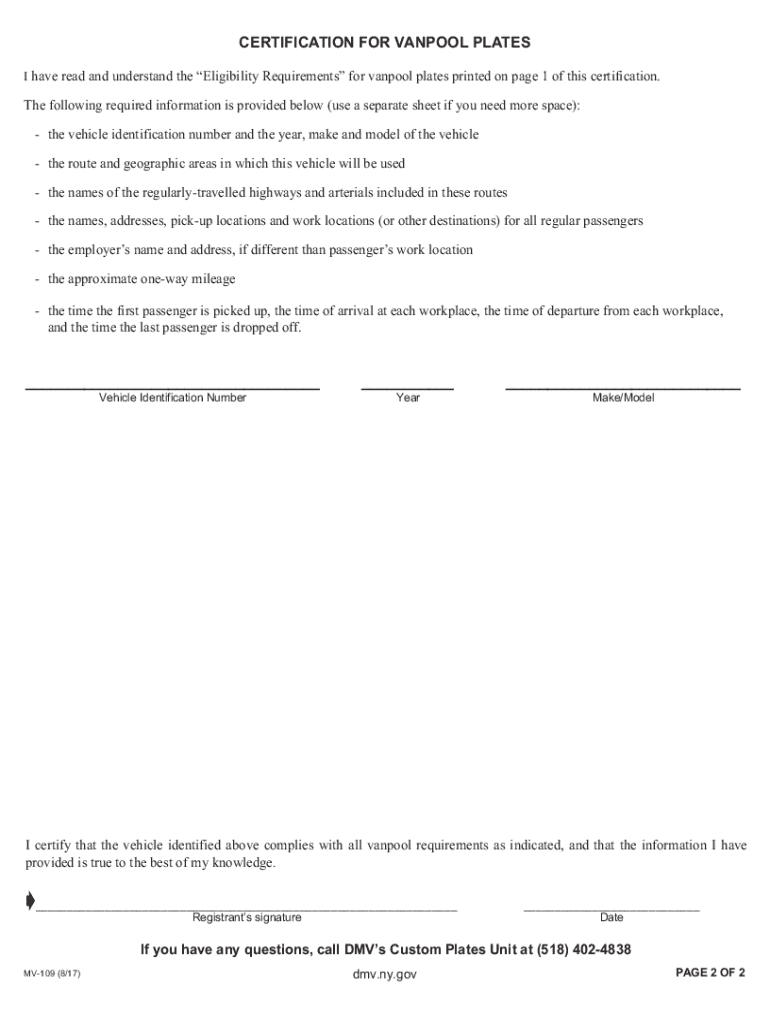
Is made by the branch of government that offers the privilege, but vanpool plates are often a requirement to qualify for these privileges. Eligibility Requirements (based on sections 158-b, 401(7) and 509-a(1) of the Vehicle and Traffic Law) - A vehicle must be used in a vanpool operation to be eligible for vanpool plates. Vanpool transportation is the prearranged transportation of persons on a regular basis to and from their place of employment or other destination. Any payment made by pa.
Loading

Open form follow the instructions

Easily sign the form with your finger

Send filled & signed form or save
How to fill out and sign NY MV-109 online?
Get your online template and fill it in using progressive features. Enjoy smart fillable fields and interactivity.Follow the simple instructions below:
Tax, business, legal and other e-documents need an advanced level of protection and compliance with the law. Our documents are updated on a regular basis according to the latest amendments in legislation. Plus, with our service, all the data you include in your NY MV-109 is protected against loss or damage through cutting-edge file encryption.
The tips below will help you fill out NY MV-109 quickly and easily:
- Open the document in the full-fledged online editor by clicking Get form.
- Fill out the requested boxes that are marked in yellow.
- Click the arrow with the inscription Next to jump from one field to another.
- Use the e-autograph tool to add an electronic signature to the template.
- Insert the date.
- Look through the entire template to make sure you haven?t skipped anything important.
- Click Done and save the new document.
Our platform enables you to take the whole process of executing legal documents online. Due to this, you save hours (if not days or weeks) and eliminate extra expenses. From now on, complete NY MV-109 from the comfort of your home, office, or even while on the go.
Tips on how to fill out, edit and sign NY MV-109 online
How to fill and sign NY MV-109
Get your online template and fill it in using progressive features. Enjoy smart fillable fields and interactivity.Follow the simple instructions below:
Tax, business, legal and other e-documents need an advanced level of protection and compliance with the law. Our documents are updated on a regular basis according to the latest amendments in legislation. Plus, with our service, all the data you include in your NY MV-109 is protected against loss or damage through cutting-edge file encryption.
The tips below will help you fill out NY MV-109 quickly and easily:
- Open the document in the full-fledged online editor by clicking Get form.
- Fill out the requested boxes that are marked in yellow.
- Click the arrow with the inscription Next to jump from one field to another.
- Use the e-autograph tool to add an electronic signature to the template.
- Insert the date.
- Look through the entire template to make sure you haven?t skipped anything important.
- Click Done and save the new document.
Our platform enables you to take the whole process of executing legal documents online. Due to this, you save hours (if not days or weeks) and eliminate extra expenses. From now on, complete NY MV-109 from the comfort of your home, office, or even while on the go.
How to edit NY MV-109
Fill out and sign your NY MV-109 quickly and error-free. Get and edit, and sign customizable form templates in a comfort of a single tab.
Your document workflow can be far more efficient if everything required for modifying and managing the flow is organized in one place. If you are looking for a NY MV-109 form sample, this is a place to get it and fill it out without looking for third-party solutions. With this intelligent search engine and editing tool, you won’t need to look any further.
Simply type the name of the NY MV-109 or any other form and find the right template. If the sample seems relevant, you can start modifying it right on the spot by clicking Get form. No need to print out or even download it. Hover and click on the interactive fillable fields to place your information and sign the form in a single editor.
Use more modifying tools to customize your form:
- Check interactive checkboxes in forms by clicking on them. Check other parts of the NY MV-109 form text by using the Cross, Check, and Circle tools
- If you need to insert more textual content into the document, utilize the Text tool or add fillable fields with the respective button. You can even specify the content of each fillable field.
- Add pictures to forms with the Image button. Add pictures from your device or capture them with your computer camera.
- Add custom visual components to the document. Use Draw, Line, and Arrow tools to draw on the form.
- Draw over the text in the document if you wish to hide it or stress it. Cover text fragments with theErase and Highlight, or Blackout instrument.
- Add custom components such as Initials or Date with the respective tools. They will be generated automatically.
- Save the form on your device or convert its format to the one you want.
When equipped with a smart forms catalog and a powerful document modifying solution, working with documentation is easier. Find the form you require, fill it out right away, and sign it on the spot without downloading it. Get your paperwork routine simplified with a solution tailored for modifying forms.
How to fill and sign NY MV-109
Get your online template and fill it in using progressive features. Enjoy smart fillable fields and interactivity.Follow the simple instructions below:
Tax, business, legal and other e-documents need an advanced level of protection and compliance with the law. Our documents are updated on a regular basis according to the latest amendments in legislation. Plus, with our service, all the data you include in your NY MV-109 is protected against loss or damage through cutting-edge file encryption.
The tips below will help you fill out NY MV-109 quickly and easily:
- Open the document in the full-fledged online editor by clicking Get form.
- Fill out the requested boxes that are marked in yellow.
- Click the arrow with the inscription Next to jump from one field to another.
- Use the e-autograph tool to add an electronic signature to the template.
- Insert the date.
- Look through the entire template to make sure you haven?t skipped anything important.
- Click Done and save the new document.
Our platform enables you to take the whole process of executing legal documents online. Due to this, you save hours (if not days or weeks) and eliminate extra expenses. From now on, complete NY MV-109 from the comfort of your home, office, or even while on the go.
Experience a faster way to fill out and sign forms on the web. Access the most extensive library of templates available.
Related content
To RENEW your vanpool registration plates: - Follow the instructions provided with your...
To apply for a learner permit or driver license you must complete an Application for...
by TH Wiedemeier · Cited by 358 — This report is a work prepared for the United States...
Get answers to your most pressing questions about US Legal Forms API.
How to fill out a New York vehicle title?
To fill out a New York vehicle title, you'll need to provide basic information such as the names of the seller and buyer, vehicle description, and payment details. Sign the title in the appropriate sections to transfer ownership. This step is crucial for anyone looking to register the vehicle using the NY MV-109 form.
What form do I need to fill out to register a car in NY?
To register your car in New York, you must complete the NY MV-109 form. This form collects essential information about your vehicle, including its make, model, and vehicle identification number (VIN). Ensure you have all required documentation ready while filling out this form.
What documents do I need to register my car in NY?
To register your car in New York, you need several key documents. First, provide proof of identity, such as a driver's license and your vehicle title. Additionally, you’ll need proof of insurance and the completed NY MV-109 form to finalize the registration process.
How do I file a complaint with the NYS DMV?
To file a complaint with the NYS DMV, you should provide a detailed description of your issue and any relevant documentation. You can file your complaint online, by mail, or by visiting a DMV office. If you would like assistance in crafting your complaint or need to access forms like the NY MV-109, uslegalforms can guide you through each step.
How to surrender plates in NY?
To surrender plates in NY, visit your local DMV office and bring your license plates and the completed application for surrender. Additionally, you can surrender plates by mailing them to the DMV. If you are unsure about the process, uslegalforms offers resources to help you navigate the required steps effectively.
How to file accident report in NYC?
To file an accident report in NYC, you should complete the NY MV-109 form. You can obtain the form online or at any DMV office. After filling it out, submit the report to the DMV within 10 days of the accident. If you need assistance, consider using the uslegalforms platform to access guides and services that simplify this process.
How to get a NY temp plate?
To obtain a NY temporary plate, visit your local DMV office with the necessary documents, such as proof of identity and vehicle information. You may also need to fill out specific forms, which could include reference to the NY MV-109 for verification purposes. A temporary plate allows you to legally drive your vehicle while you wait for your permanent registration.
How to get a NY driving record?
You can request a NY driving record through the New York State Department of Motor Vehicles (DMV) website or visit a local DMV office. Make sure to have your identification ready, as the NY MV-109 may be needed for certain records. This record can help you understand your driving history or confirm your eligibility for various purposes.
How to get NY unemployment 1099?
To obtain your NY unemployment 1099, start by visiting the New York State Department of Labor’s website. You can log into your account to access your tax documents, including the NY MV-109. If you cannot find it online, contact their customer service for assistance in retrieving this important tax form.
What do I need to sell a car in NY?
Selling a car in New York involves a few key steps and documents. You will need the NY MV-109 form as part of transferring the title to the new owner. Additionally, provide a bill of sale and the car's title, which must be signed over to the buyer. By preparing these documents in advance, you can successfully complete the sale without unnecessary delays.
Use professional pre-built templates to fill in and sign documents online faster. Get access to thousands of forms.
If you believe that this page should be taken down, please follow our DMCA take down process here.