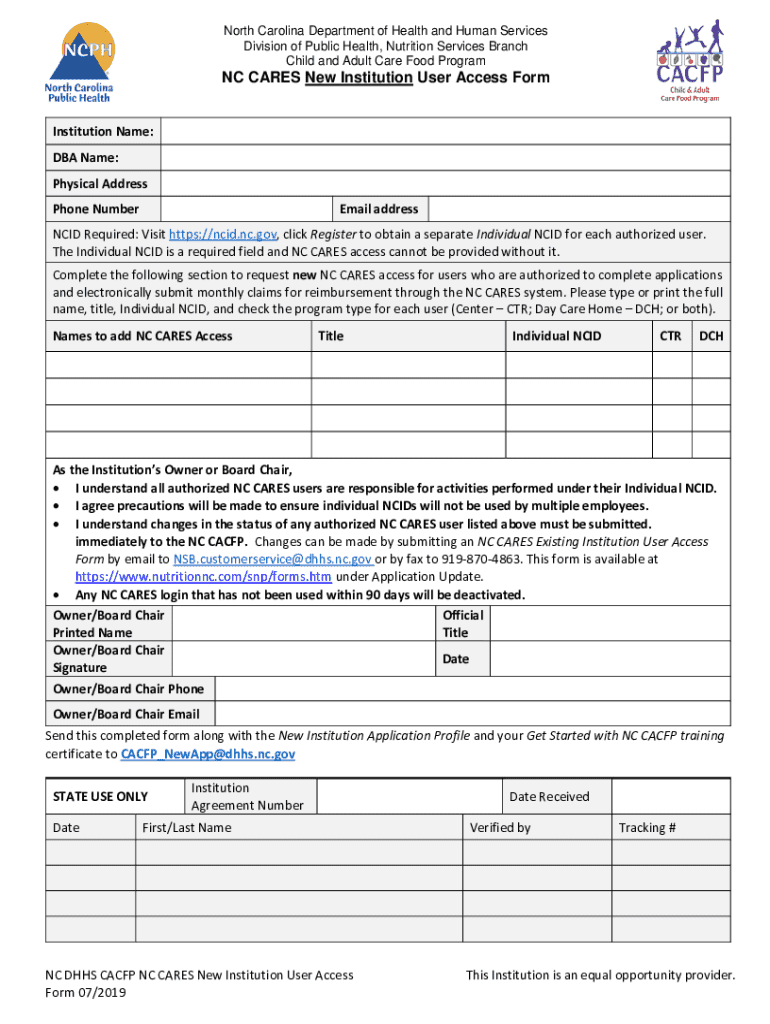
: DBA Name: Physical Address Phone Number Email address NCID Required: Visit https://ncid.nc.gov, click Register to obtain a separate Individual NCID for each authorized user. The Individual NCID is a required field and NC CARES access cannot be provided without it. Complete the following section to request new NC CARES access for users who are authorized to complete applications and electronically submit monthly claims for reimbursement through the NC CARES system. Please type or print the fu.
Loading

Open form follow the instructions

Easily sign the form with your finger

Send filled & signed form or save
How to fill out and sign NC CARES New Institution User Access Form online?
Get your online template and fill it in using progressive features. Enjoy smart fillable fields and interactivity.Follow the simple instructions below:
Business, legal, tax and other documents demand an advanced level of compliance with the law and protection. Our templates are regularly updated according to the latest legislative changes. Plus, with us, all of the info you provide in the NC CARES New Institution User Access Form is well-protected against loss or damage via cutting-edge encryption.
The tips below will help you fill out NC CARES New Institution User Access Form easily and quickly:
- Open the document in the feature-rich online editor by clicking Get form.
- Complete the necessary boxes that are marked in yellow.
- Hit the arrow with the inscription Next to jump from box to box.
- Use the e-signature tool to add an electronic signature to the form.
- Put the date.
- Check the whole e-document to ensure that you have not skipped anything important.
- Press Done and download the resulting form.
Our platform enables you to take the whole procedure of executing legal documents online. Due to this, you save hours (if not days or weeks) and eliminate additional costs. From now on, submit NC CARES New Institution User Access Form from your home, office, or even while on the move.
Tips on how to fill out, edit and sign NC CARES New Institution User Access Form online
How to fill and sign NC CARES New Institution User Access Form
Get your online template and fill it in using progressive features. Enjoy smart fillable fields and interactivity.Follow the simple instructions below:
Business, legal, tax and other documents demand an advanced level of compliance with the law and protection. Our templates are regularly updated according to the latest legislative changes. Plus, with us, all of the info you provide in the NC CARES New Institution User Access Form is well-protected against loss or damage via cutting-edge encryption.
The tips below will help you fill out NC CARES New Institution User Access Form easily and quickly:
- Open the document in the feature-rich online editor by clicking Get form.
- Complete the necessary boxes that are marked in yellow.
- Hit the arrow with the inscription Next to jump from box to box.
- Use the e-signature tool to add an electronic signature to the form.
- Put the date.
- Check the whole e-document to ensure that you have not skipped anything important.
- Press Done and download the resulting form.
Our platform enables you to take the whole procedure of executing legal documents online. Due to this, you save hours (if not days or weeks) and eliminate additional costs. From now on, submit NC CARES New Institution User Access Form from your home, office, or even while on the move.
How to edit NC CARES New Institution User Access Form
Make the most of our comprehensive online document editor while completing your forms. Complete the NC CARES New Institution User Access Form, point out the most important details, and effortlessly make any other essential alterations to its content.
Completing documents electronically is not only time-saving but also comes with a possibility to alter the template according to your demands. If you’re about to manage the NC CARES New Institution User Access Form, consider completing it with our extensive online editing tools. Whether you make a typo or enter the requested details into the wrong field, you can quickly make changes to the form without the need to restart it from the beginning as during manual fill-out. Apart from that, you can stress on the vital information in your paperwork by highlighting certain pieces of content with colors, underlining them, or circling them.
Follow these simple and quick steps to fill out and modify your NC CARES New Institution User Access Form online:
- Open the file in the editor.
- Type in the required information in the empty areas using Text, Check, and Cross tools.
- Adhere to the document navigation to avoid missing any essential areas in the template.
- Circle some of the significant details and add a URL to it if needed.
- Use the Highlight or Line tools to emphasize the most important pieces of content.
- Choose colors and thickness for these lines to make your form look professional.
- Erase or blackout the data you don’t want to be visible to others.
- Substitute pieces of content that contain mistakes and type in text that you need.
- Finish modifcations with the Done key when you make sure everything is correct in the document.
Our powerful online solutions are the simplest way to complete and customize NC CARES New Institution User Access Form according to your requirements. Use it to manage personal or professional documents from anywhere. Open it in a browser, make any adjustments to your forms, and return to them anytime in the future - they all will be safely kept in the cloud.
How to fill and sign NC CARES New Institution User Access Form
Get your online template and fill it in using progressive features. Enjoy smart fillable fields and interactivity.Follow the simple instructions below:
Business, legal, tax and other documents demand an advanced level of compliance with the law and protection. Our templates are regularly updated according to the latest legislative changes. Plus, with us, all of the info you provide in the NC CARES New Institution User Access Form is well-protected against loss or damage via cutting-edge encryption.
The tips below will help you fill out NC CARES New Institution User Access Form easily and quickly:
- Open the document in the feature-rich online editor by clicking Get form.
- Complete the necessary boxes that are marked in yellow.
- Hit the arrow with the inscription Next to jump from box to box.
- Use the e-signature tool to add an electronic signature to the form.
- Put the date.
- Check the whole e-document to ensure that you have not skipped anything important.
- Press Done and download the resulting form.
Our platform enables you to take the whole procedure of executing legal documents online. Due to this, you save hours (if not days or weeks) and eliminate additional costs. From now on, submit NC CARES New Institution User Access Form from your home, office, or even while on the move.
Experience a faster way to fill out and sign forms on the web. Access the most extensive library of templates available.
Related content
Please type or print the full name, title, Individual NCID, and check the program type for...
Oct 3, 2023 — The guide outlines hundreds of charities that employees can choose to...
Feb 19, 2020 — This manual assumes that you are familiar with the concepts of measuring...
Get answers to your most pressing questions about US Legal Forms API.
What is the CCNC CA enrollment form?
The CCNC CA enrollment form is a document that facilitates enrollment in the Community Care of North Carolina program. This form allows healthcare providers and institutions to access comprehensive care coordination services. By completing this form, users can ensure streamlined access to programs like the NC CARES New Institution User Access Form, which assists in managing healthcare needs effectively. This enrollment process ultimately enhances care delivery for patients across the state.
What does the NC Department of Health and Human Services do?
The NC Department of Health and Human Services oversees a wide range of programs aimed at promoting health and well-being in North Carolina. It manages services related to public health, mental health, and child welfare. Furthermore, the department facilitates access to essential resources, including the NC CARES New Institution User Access Form, which supports institutions in accessing various health services efficiently. Through these efforts, the department aims to improve health outcomes for all residents.
Use professional pre-built templates to fill in and sign documents online faster. Get access to thousands of forms.
If you believe that this page should be taken down, please follow our DMCA take down process here.