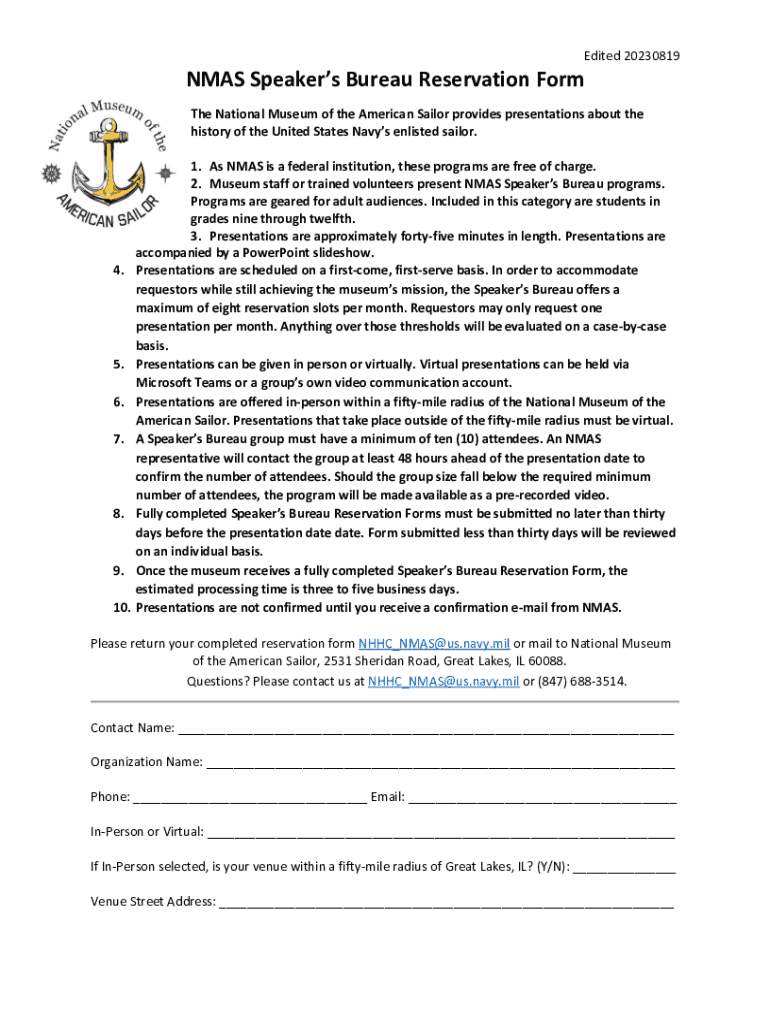
7. 8. 9. 10. 1. As NMAS is a federal institution, these programs are free of charge. 2. Museum staff or trained volunteers present NMAS Speaker s Bureau programs. Programs are geared for adult audiences. Included in this category are students in grades nine through twelfth. 3. Presentations are approximately forty-five minutes in length. Presentations are accompanied by a PowerPoint slideshow. Presentations are scheduled on a first-come, first-serve basis. In order to accommodate requestors.
Loading

Open form follow the instructions

Easily sign the form with your finger

Send filled & signed form or save
How to fill out and sign NMAS Speakers Bureau Reservation Form online?
Get your online template and fill it in using progressive features. Enjoy smart fillable fields and interactivity.Follow the simple instructions below:
Experience all the benefits of completing and submitting legal forms online. With our solution submitting NMAS Speakers Bureau Reservation Form only takes a few minutes. We make that achievable by giving you access to our feature-rich editor capable of transforming/correcting a document?s original text, adding special fields, and e-signing.
Complete NMAS Speakers Bureau Reservation Form in a few moments by simply following the recommendations below:
- Pick the document template you will need from the collection of legal form samples.
- Choose the Get form button to open the document and start editing.
- Submit all the requested fields (they are marked in yellow).
- The Signature Wizard will help you put your e-signature after you have finished imputing data.
- Add the date.
- Double-check the whole form to be certain you have completed all the data and no corrections are required.
- Hit Done and save the ecompleted document to the gadget.
Send your NMAS Speakers Bureau Reservation Form in an electronic form right after you are done with completing it. Your data is securely protected, because we adhere to the newest security requirements. Join millions of happy customers that are already filling out legal templates right from their homes.
Tips on how to fill out, edit and sign NMAS Speakers Bureau Reservation Form online
How to fill and sign NMAS Speakers Bureau Reservation Form
Get your online template and fill it in using progressive features. Enjoy smart fillable fields and interactivity.Follow the simple instructions below:
Experience all the benefits of completing and submitting legal forms online. With our solution submitting NMAS Speakers Bureau Reservation Form only takes a few minutes. We make that achievable by giving you access to our feature-rich editor capable of transforming/correcting a document?s original text, adding special fields, and e-signing.
Complete NMAS Speakers Bureau Reservation Form in a few moments by simply following the recommendations below:
- Pick the document template you will need from the collection of legal form samples.
- Choose the Get form button to open the document and start editing.
- Submit all the requested fields (they are marked in yellow).
- The Signature Wizard will help you put your e-signature after you have finished imputing data.
- Add the date.
- Double-check the whole form to be certain you have completed all the data and no corrections are required.
- Hit Done and save the ecompleted document to the gadget.
Send your NMAS Speakers Bureau Reservation Form in an electronic form right after you are done with completing it. Your data is securely protected, because we adhere to the newest security requirements. Join millions of happy customers that are already filling out legal templates right from their homes.
How to edit NMAS Speakers Bureau Reservation Form
Sign and share NMAS Speakers Bureau Reservation Form along with any other business and personal documents online without wasting time and resources on printing and postal delivery. Take the most out of our online form editor with a built-in compliant eSignature tool.
Approving and submitting NMAS Speakers Bureau Reservation Form documents electronically is quicker and more effective than managing them on paper. However, it requires making use of online solutions that guarantee a high level of data safety and provide you with a compliant tool for generating electronic signatures. Our powerful online editor is just the one you need to complete your NMAS Speakers Bureau Reservation Form and other individual and business or tax templates in an accurate and proper way in line with all the requirements. It features all the essential tools to quickly and easily complete, edit, and sign paperwork online and add Signature fields for other parties, specifying who and where should sign.
It takes only a few simple actions to fill out and sign NMAS Speakers Bureau Reservation Form online:
- Open the selected file for further managing.
- Utilize the upper toolkit to add Text, Initials, Image, Check, and Cross marks to your template.
- Underline the most significant details and blackout or remove the sensitive ones if necessary.
- Click on the Sign tool above and select how you want to eSign your sample.
- Draw your signature, type it, upload its image, or use another option that suits you.
- Move to the Edit Fillable Fileds panel and place Signature fields for other parties.
- Click on Add Signer and type in your recipient’s email to assign this field to them.
- Check that all information provided is complete and accurate before you click Done.
- Share your documentation with others using one of the available options.
When signing NMAS Speakers Bureau Reservation Form with our comprehensive online editor, you can always be sure to get it legally binding and court-admissible. Prepare and submit paperwork in the most effective way possible!
How to fill and sign NMAS Speakers Bureau Reservation Form
Get your online template and fill it in using progressive features. Enjoy smart fillable fields and interactivity.Follow the simple instructions below:
Experience all the benefits of completing and submitting legal forms online. With our solution submitting NMAS Speakers Bureau Reservation Form only takes a few minutes. We make that achievable by giving you access to our feature-rich editor capable of transforming/correcting a document?s original text, adding special fields, and e-signing.
Complete NMAS Speakers Bureau Reservation Form in a few moments by simply following the recommendations below:
- Pick the document template you will need from the collection of legal form samples.
- Choose the Get form button to open the document and start editing.
- Submit all the requested fields (they are marked in yellow).
- The Signature Wizard will help you put your e-signature after you have finished imputing data.
- Add the date.
- Double-check the whole form to be certain you have completed all the data and no corrections are required.
- Hit Done and save the ecompleted document to the gadget.
Send your NMAS Speakers Bureau Reservation Form in an electronic form right after you are done with completing it. Your data is securely protected, because we adhere to the newest security requirements. Join millions of happy customers that are already filling out legal templates right from their homes.
Experience a faster way to fill out and sign forms on the web. Access the most extensive library of templates available.
Related content
Aug 4, 2025 — The system allows users to reserve workstations up to 7 days in advance...
ALMA is an international partnership of the European Southern Observatory (ESO), the U.S...
7 [Registration of User Registration. Information]. • Introduza o nome, o nome da...
Get answers to your most pressing questions about US Legal Forms API.
How do I get into a speaker bureau?
To get into a speaker bureau, you typically need to demonstrate your expertise and experience. Start by preparing a compelling portfolio that highlights your speaking engagements, testimonials, and areas of knowledge. You can then fill out the NMAS Speakers Bureau Reservation Form to express your interest, and the bureau will review your qualifications for potential inclusion in their roster.
Should you join a speakers bureau?
Joining a speakers bureau can offer numerous benefits, including increased exposure and access to professional opportunities. A bureau can handle the administrative tasks related to booking and contracts, allowing you to focus on your speaking engagements. The NMAS Speakers Bureau Reservation Form is a great starting point if you're considering this path, as it can streamline the process and help you get noticed.
How to get invited to be a speaker?
Getting invited to speak often involves networking and demonstrating your expertise in your field. Attend industry events, engage with potential clients, and share your knowledge online. Utilizing the NMAS Speakers Bureau Reservation Form can help you connect with event planners who are actively seeking speakers, thereby increasing your chances of being invited.
How to get booked as a public speaker?
To get booked as a public speaker, you should showcase your expertise and market yourself effectively. Start by building your online presence through a professional website or social media. Joining the NMAS Speakers Bureau allows you to submit your details via the Reservation Form, which increases your visibility to event organizers looking for speakers with your background and skills.
How does a speaker bureau work?
A speaker bureau acts as a liaison between speakers and organizations seeking to hire them. They maintain a roster of speakers and their expertise, making it easy for clients to find the right fit. Through the NMAS Speakers Bureau Reservation Form, organizations can submit their requests, and the bureau facilitates the booking process, ensuring a smooth experience for both parties.
Use professional pre-built templates to fill in and sign documents online faster. Get access to thousands of forms.
If you believe that this page should be taken down, please follow our DMCA take down process here.