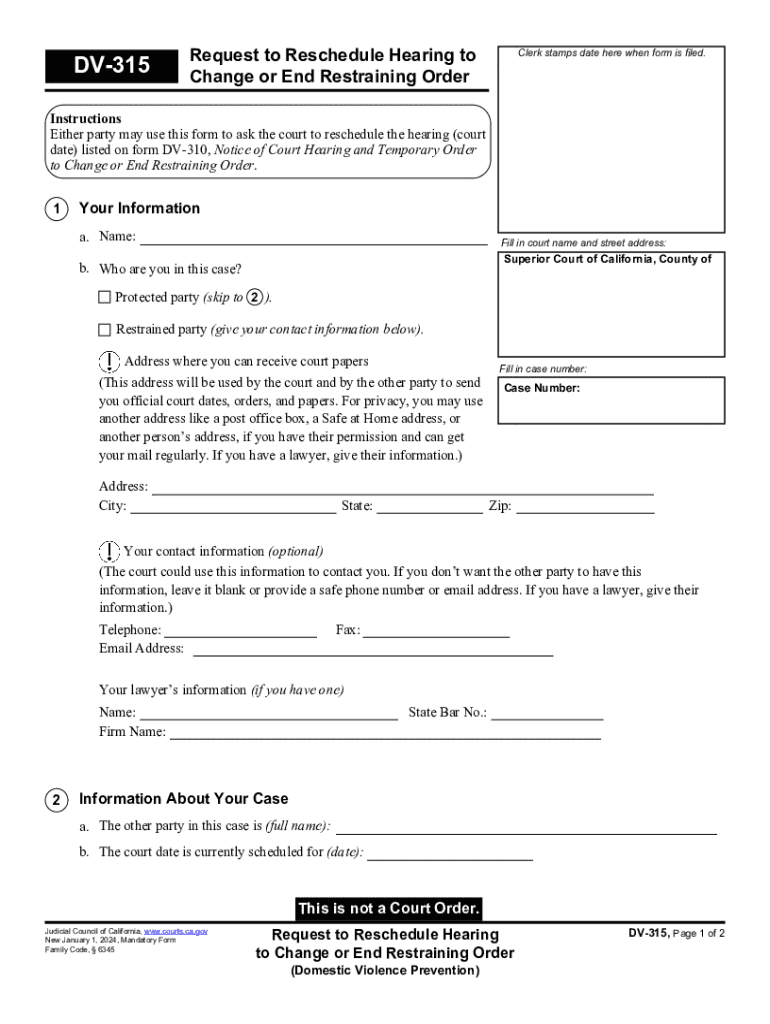
E hearing (court date) listed on form DV-310, Notice of Court Hearing and Temporary Order to Change or End Restraining Order. 1 Your Information a. Name: Fill in court name and street address: Superior Court of California, County of b. Who are you in this case? Protected party (skip to 2 ). Restrained party (give your contact information below). Address where you can receive court papers (This address will be used by the court and by the other party to send you official court dates, orders,.
Loading

Open form follow the instructions

Easily sign the form with your finger

Send filled & signed form or save
How to fill out and sign CA DV-315 online?
Get your online template and fill it in using progressive features. Enjoy smart fillable fields and interactivity.Follow the simple instructions below:
Getting a legal professional, making a scheduled appointment and coming to the office for a private meeting makes completing a CA DV-315 from start to finish exhausting. US Legal Forms allows you to rapidly generate legally valid papers based on pre-built browser-based templates.
Execute your docs in minutes using our simple step-by-step guide:
- Get the CA DV-315 you want.
- Open it with cloud-based editor and start altering.
- Fill the blank areas; involved parties names, addresses and phone numbers etc.
- Customize the template with exclusive fillable areas.
- Put the particular date and place your electronic signature.
- Simply click Done after double-examining everything.
- Download the ready-made document to your gadget or print it as a hard copy.
Quickly produce a CA DV-315 without having to involve professionals. There are already more than 3 million users making the most of our rich library of legal documents. Join us today and get access to the #1 catalogue of online blanks. Give it a try yourself!
Tips on how to fill out, edit and sign CA DV-315 online
How to fill and sign CA DV-315
Get your online template and fill it in using progressive features. Enjoy smart fillable fields and interactivity.Follow the simple instructions below:
Getting a legal professional, making a scheduled appointment and coming to the office for a private meeting makes completing a CA DV-315 from start to finish exhausting. US Legal Forms allows you to rapidly generate legally valid papers based on pre-built browser-based templates.
Execute your docs in minutes using our simple step-by-step guide:
- Get the CA DV-315 you want.
- Open it with cloud-based editor and start altering.
- Fill the blank areas; involved parties names, addresses and phone numbers etc.
- Customize the template with exclusive fillable areas.
- Put the particular date and place your electronic signature.
- Simply click Done after double-examining everything.
- Download the ready-made document to your gadget or print it as a hard copy.
Quickly produce a CA DV-315 without having to involve professionals. There are already more than 3 million users making the most of our rich library of legal documents. Join us today and get access to the #1 catalogue of online blanks. Give it a try yourself!
How to edit CA DV-315
Forget a traditional paper-based way of completing CA DV-315. Get the form completed and certified in minutes with our top-notch online editor.
Are you challenged to modify and fill out CA DV-315? With a robust editor like ours, you can perform this in mere minutes without having to print and scan papers back and forth. We offer completely editable and straightforward form templates that will become a start and help you fill out the necessary form online.
All forms, automatically, include fillable fields you can complete once you open the template. However, if you need to polish the existing content of the form or add a new one, you can select from a number of editing and annotation options. Highlight, blackout, and comment on the text; add checkmarks, lines, text boxes, images and notes, and comments. Additionally, you can swiftly certify the template with a legally-binding signature. The completed form can be shared with other people, stored, imported to external apps, or converted into any popular format.
You’ll never go wrong by using our web-based tool to complete CA DV-315 because it's:
- Effortless to set up and utilize, even for those who haven’t completed the paperwork electronically in the past.
- Powerful enough to accommodate multiple editing needs and form types.
- Safe and secure, making your editing experience protected every time.
- Available for different devices, making it stress-free to complete the form from anywhere.
- Capable of creating forms based on ready-drafted templates.
- Compatible with various document formats: PDF, DOC, DOCX, PPT and JPEG etc.
Don't waste time completing your CA DV-315 obsolete way - with pen and paper. Use our full-featured solution instead. It offers you a comprehensive set of editing options, built-in eSignature capabilities, and ease of use. What makes it differ from similar alternatives is the team collaboration options - you can collaborate on documents with anyone, build a well-organized document approval flow from the ground up, and a lot more. Try our online solution and get the best value for your money!
How to fill and sign CA DV-315
Get your online template and fill it in using progressive features. Enjoy smart fillable fields and interactivity.Follow the simple instructions below:
Getting a legal professional, making a scheduled appointment and coming to the office for a private meeting makes completing a CA DV-315 from start to finish exhausting. US Legal Forms allows you to rapidly generate legally valid papers based on pre-built browser-based templates.
Execute your docs in minutes using our simple step-by-step guide:
- Get the CA DV-315 you want.
- Open it with cloud-based editor and start altering.
- Fill the blank areas; involved parties names, addresses and phone numbers etc.
- Customize the template with exclusive fillable areas.
- Put the particular date and place your electronic signature.
- Simply click Done after double-examining everything.
- Download the ready-made document to your gadget or print it as a hard copy.
Quickly produce a CA DV-315 without having to involve professionals. There are already more than 3 million users making the most of our rich library of legal documents. Join us today and get access to the #1 catalogue of online blanks. Give it a try yourself!
Experience a faster way to fill out and sign forms on the web. Access the most extensive library of templates available.
Related content
Jan 1, 2025 — If the judge denies your request to reschedule, you must attend your court...
Program Description. The Department of Child and Adolescent Development offers an...
Apr 12, 2012 — verificador DV = 11 - (resto da divisão), portando 11 - 6 = 5. Neste...
Use professional pre-built templates to fill in and sign documents online faster. Get access to thousands of forms.
If you believe that this page should be taken down, please follow our DMCA take down process here.