Loading
Form preview
  • US Legal Forms
  • Other Templates
  • More Forms
  • More Multi-State Forms
  • Service Delivery Contract Template

Get Service Delivery Contract Template

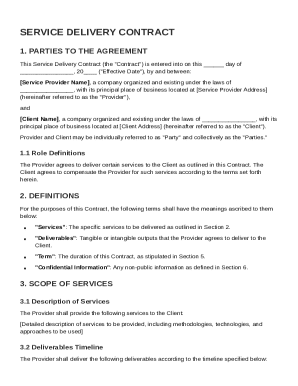
"Effective Date"), by and between: Service Provider Name , a company organized and existing under the laws of , with its principal place of business located at Service Provider Address (hereinafter referred to as the "Provider"), and Client Name , a company organized and existing under the laws of , with its principal place of business located at Client Address (hereinafter referred to as the "Client"). Provider and Client may be individually referred to as.

How it works

  1. Open form

    Open form follow the instructions

  2. Easily sign form

    Easily sign the form with your finger

  3. Share form

    Send filled & signed form or save

How to fill out and sign Service Delivery Contract Template online?

Get your online template and fill it in using progressive features. Enjoy smart fillable fields and interactivity.Follow the simple instructions below:

Have you been searching for a fast and efficient tool to fill in Service Delivery Contract Template at a reasonable price? Our service provides you with a wide variety of templates available for filling in on the internet. It only takes a few minutes.

Stick to these simple guidelines to get Service Delivery Contract Template completely ready for sending:

  1. Find the form you require in our collection of templates.
  2. Open the document in our online editing tool.
  3. Read through the recommendations to learn which data you must include.
  4. Click the fillable fields and add the requested details.
  5. Add the date and insert your electronic autograph when you fill in all other boxes.
  6. Look at the form for misprints as well as other mistakes. In case you necessity to change some information, the online editor as well as its wide range of instruments are at your disposal.
  7. Download the completed template to your device by clicking on Done.
  8. Send the e-document to the intended recipient.

Filling in Service Delivery Contract Template does not have to be perplexing any longer. From now on easily get through it from your apartment or at the place of work from your mobile or personal computer.

Tips on how to fill out, edit and sign Service Delivery Contract Template online

How to fill out and sign Service Delivery Contract Template online?

Get your online template and fill it in using progressive features. Enjoy smart fillable fields and interactivity.Follow the simple instructions below:

Have you been searching for a fast and efficient tool to fill in Service Delivery Contract Template at a reasonable price? Our service provides you with a wide variety of templates available for filling in on the internet. It only takes a few minutes.

Stick to these simple guidelines to get Service Delivery Contract Template completely ready for sending:

  1. Find the form you require in our collection of templates.
  2. Open the document in our online editing tool.
  3. Read through the recommendations to learn which data you must include.
  4. Click the fillable fields and add the requested details.
  5. Add the date and insert your electronic autograph when you fill in all other boxes.
  6. Look at the form for misprints as well as other mistakes. In case you necessity to change some information, the online editor as well as its wide range of instruments are at your disposal.
  7. Download the completed template to your device by clicking on Done.
  8. Send the e-document to the intended recipient.

Filling in Service Delivery Contract Template does not have to be perplexing any longer. From now on easily get through it from your apartment or at the place of work from your mobile or personal computer.

How to edit Service Delivery Contract Template: customize forms online

Approve and share Service Delivery Contract Template together with any other business and personal paperwork online without wasting time and resources on printing and postal delivery. Take the most out of our online document editor with a built-in compliant electronic signature option.

Signing and submitting Service Delivery Contract Template templates electronically is quicker and more productive than managing them on paper. However, it requires utilizing online solutions that ensure a high level of data safety and provide you with a certified tool for creating electronic signatures. Our robust online editor is just the one you need to complete your Service Delivery Contract Template and other personal and business or tax forms in a precise and appropriate manner in accordance with all the requirements. It features all the essential tools to easily and quickly fill out, modify, and sign paperwork online and add Signature fields for other people, specifying who and where should sign.

It takes just a few simple steps to complete and sign Service Delivery Contract Template online:

  1. Open the selected file for further managing.
  2. Utilize the upper toolbar to add Text, Initials, Image, Check, and Cross marks to your template.
  3. Underline the key details and blackout or remove the sensitive ones if required.
  4. Click on the Sign option above and choose how you want to eSign your sample.
  5. Draw your signature, type it, upload its picture, or use another option that suits you.
  6. Switch to the Edit Fillable Fileds panel and place Signature areas for other parties.
  7. Click on Add Signer and provide your recipient’s email to assign this field to them.
  8. Verify that all data provided is complete and correct before you click Done.
  9. Share your documentation with others using one of the available options.

When signing Service Delivery Contract Template with our extensive online solution, you can always be certain you get it legally binding and court-admissible. Prepare and submit paperwork in the most efficient way possible!

Get form

Experience a faster way to fill out and sign forms on the web. Access the most extensive library of templates available.
Get form

Related content

Service-Agreement-Template-031423.pdf
This Service Agreement ("Agreement") is effective as of the date of the last authorizing...
Learn more
Professional Services Agreement
General Purpose. The general purpose of this Agreement is to engage the services of...
Learn more
12 Essential Elements Of A Solid Consulting...
Mar 24, 2022 — Discover the essential components of a robust consulting agreement. Learn...
Learn more

Related links form

IN State Form 54092 2015 FL Non West Shore High School Homecoming Guest Participation Form 2019 IN State Form 54092 2024 CA Form VMA-118 - City Of Victorville 2019

Questions & Answers

Get answers to your most pressing questions about US Legal Forms API.

Contact support

A service delivery contract is a formal agreement that outlines the services to be provided by one party to another. It specifies important details like service timelines, payment terms, and responsibilities. Using a service delivery contract template can simplify the process, ensuring that all necessary components are included for clarity and mutual understanding.

Yes, you can write your own service contract. However, it is crucial to ensure that all necessary details are included to protect both parties involved. Using a service delivery contract template can provide a solid foundation, helping you cover all essential elements effectively.

Writing a simple service contract involves outlining the essential components such as the names of the involved parties and a clear description of the service. Be sure to specify payment terms, deadlines, and any additional clauses to protect the interests of both parties. If you need assistance, consider using a professional service delivery contract template for guidance.

To fill out a service contract effectively, start by inserting the necessary information about each party, followed by a detailed description of the services. Don't forget to specify payment terms and completion dates clearly. Finally, both parties should review the contract to ensure mutual agreement, and they should sign it to finalize the document.

When filling out a service agreement, begin by entering the names and details of the service provider and client. Clearly describe the services to be performed and the payment structure. Lastly, ensure that both parties read and understand the terms before signing to avoid misunderstandings down the line.

A service delivery contract template should include essential elements such as the names of the parties, descriptions of services, payment terms, and a timeline for completion. Additionally, consider incorporating terms about confidentiality, and liability, as well as procedures for dispute resolution. These details help to clarify expectations and protect both parties.

Filling out a contract agreement involves providing accurate information about all parties, including names and addresses. Additionally, you should specify the services being exchanged and any deadlines for completion. Make sure to read the contract thoroughly before signing it, as this ensures both parties understand their obligations.

To create a simple service delivery contract template, start by clearly stating the parties involved and the purpose of the contract. Next, outline the scope of services to be provided, including timelines and payment terms. Finally, include sections for signatures and dates to formalize the agreement, ensuring all crucial elements are covered.

To create a service contract, start by defining the services to be provided and then set clear terms regarding payment and timelines. Include clauses that address confidentiality, liability, and dispute resolution to protect both parties. Using a Service Delivery Contract Template can simplify this task, offering you a reliable format while ensuring that you don't overlook any important details.

Creating a service contract template involves outlining the essential elements of a contractual agreement, such as the parties involved, the services provided, and the agreed-upon payment structure. Then, incorporate provisions for modifications and any other relevant legal requirements. Utilizing a Service Delivery Contract Template can streamline this process by giving you a well-defined starting point.

Get This Form Now!

Use professional pre-built templates to fill in and sign documents online faster. Get access to thousands of forms.
Get form
If you believe that this page should be taken down, please follow our DMCA take down processhere.
Get Service Delivery Contract Template
Get form
  • Adoption
  • Bankruptcy
  • Contractors
  • Divorce
  • Home Sales
  • Employment
  • Identity Theft
  • Incorporation
  • Landlord Tenant
  • Living Trust
  • Name Change
  • Personal Planning
  • Small Business
  • Wills & Estates
  • Packages A-Z
  • Affidavits
  • Bankruptcy
  • Bill of Sale
  • Corporate - LLC
  • Divorce
  • Employment
  • Identity Theft
  • Internet Technology
  • Landlord Tenant
  • Living Wills
  • Name Change
  • Power of Attorney
  • Real Estate
  • Small Estates
  • Wills
  • All Forms
  • Forms A-Z
  • Other Templates
  • Legal Hub
  • About Us
  • Help Portal
  • Legal Resources
  • Blog
  • Affiliates
  • Contact Us
  • Delete My Account
  • Site Map
  • Industries
  • Forms in Spanish
  • Localized Forms
  • State-specific Forms
  • Forms Kit
  • Real Estate Handbook
  • All Guides
  • Notarize
  • Incorporation services
  • For Consumers
  • For Small Business
  • For Attorneys
  • USLegal
  • FormsPass
  • pdfFiller
  • signNow
  • altaFlow
  • DocHub
  • Instapage
Form Packages
  • Adoption
  • Bankruptcy
  • Contractors
  • Divorce
  • Home Sales
  • Employment
  • Identity Theft
  • Incorporation
  • Landlord Tenant
  • Living Trust
  • Name Change
  • Personal Planning
  • Small Business
  • Wills & Estates
  • Packages A-Z
Form Categories
  • Affidavits
  • Bankruptcy
  • Bill of Sale
  • Corporate - LLC
  • Divorce
  • Employment
  • Identity Theft
  • Internet Technology
  • Landlord Tenant
  • Living Wills
  • Name Change
  • Power of Attorney
  • Real Estate
  • Small Estates
  • Wills
  • All Forms
  • Forms A-Z
  • Other Templates
Customer Service
  • Legal Hub
  • About Us
  • Help Portal
  • Legal Resources
  • Blog
  • Affiliates
  • Contact Us
  • Delete My Account
  • Site Map
  • Industries
  • Forms in Spanish
  • Localized Forms
  • State-specific Forms
  • Forms Kit
Legal Guides
  • Real Estate Handbook
  • All Guides
Prepared for you
  • Notarize
  • Incorporation services
Our Customers
  • For Consumers
  • For Small Business
  • For Attorneys
Our Sites
  • USLegal
  • FormsPass
  • pdfFiller
  • signNow
  • altaFlow
  • DocHub
  • Instapage
Social Media
Call us now toll free:
+1 833 426 79 33
As seen in:
© Copyright 1999-2026 airSlate Legal Forms, Inc. 17 Station Street, Ste. 203, Brookline, MA 02445
  • Your Privacy Choices
  • Terms of Service
  • Privacy Notice
  • Content Takedown Policy
  • Bug Bounty Program