Loading
Form preview
  • US Legal Forms
  • Other Templates
  • More Forms
  • More Multi-State Forms
  • Record Label Sign Contract Template

Get Record Label Sign Contract Template

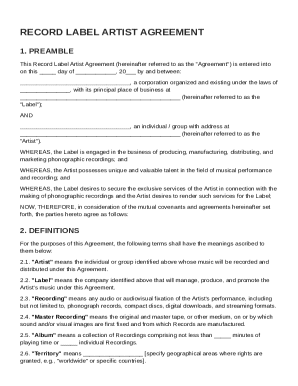
, a corporation organized and existing under the laws of , with its principal place of business at (hereinafter referred to as the "Label"); AND , an individual / group with address at (hereinafter referred to as the "Artist"). WHEREAS, the Label is engaged in the business of producing, manufacturing, distributing, and.

How it works

  1. Open form

    Open form follow the instructions

  2. Easily sign form

    Easily sign the form with your finger

  3. Share form

    Send filled & signed form or save

How to fill out and sign Record Label Sign Contract Template online?

Get your online template and fill it in using progressive features. Enjoy smart fillable fields and interactivity.Follow the simple instructions below:

The preparing of lawful papers can be costly and time-consuming. However, with our preconfigured web templates, things get simpler. Now, creating a Record Label Sign Contract Template takes a maximum of 5 minutes. Our state web-based samples and crystal-clear guidelines eradicate human-prone errors.

Follow our easy steps to get your Record Label Sign Contract Template well prepared quickly:

  1. Select the web sample in the library.
  2. Type all required information in the necessary fillable areas. The intuitive drag&drop interface makes it easy to add or relocate areas.
  3. Make sure everything is filled out properly, without any typos or lacking blocks.
  4. Place your electronic signature to the PDF page.
  5. Click Done to save the changes.
  6. Download the record or print your copy.
  7. Send instantly towards the receiver.

Make use of the fast search and advanced cloud editor to create a precise Record Label Sign Contract Template. Eliminate the routine and create papers online!

Tips on how to fill out, edit and sign Record Label Sign Contract Template online

How to fill out and sign Record Label Sign Contract Template online?

Get your online template and fill it in using progressive features. Enjoy smart fillable fields and interactivity.Follow the simple instructions below:

The preparing of lawful papers can be costly and time-consuming. However, with our preconfigured web templates, things get simpler. Now, creating a Record Label Sign Contract Template takes a maximum of 5 minutes. Our state web-based samples and crystal-clear guidelines eradicate human-prone errors.

Follow our easy steps to get your Record Label Sign Contract Template well prepared quickly:

  1. Select the web sample in the library.
  2. Type all required information in the necessary fillable areas. The intuitive drag&drop interface makes it easy to add or relocate areas.
  3. Make sure everything is filled out properly, without any typos or lacking blocks.
  4. Place your electronic signature to the PDF page.
  5. Click Done to save the changes.
  6. Download the record or print your copy.
  7. Send instantly towards the receiver.

Make use of the fast search and advanced cloud editor to create a precise Record Label Sign Contract Template. Eliminate the routine and create papers online!

How to edit Record Label Sign Contract Template: customize forms online

Simplify your paperwork preparation process and adapt it to your needs within clicks. Complete and sign Record Label Sign Contract Template using a powerful yet intuitive online editor.

Preparing documentation is always difficult, particularly when you cope with it occasionally. It demands you strictly adhere to all the formalities and accurately complete all areas with full and accurate information. Nevertheless, it often happens that you need to adjust the document or insert extra areas to fill out. If you need to optimize Record Label Sign Contract Template before submitting it, the easiest way to do it is by using our comprehensive yet easy-to-use online editing tools.

This comprehensive PDF editing solution allows you to easily and quickly complete legal paperwork from any internet-connected device, make simple edits to the form, and place additional fillable areas. The service allows you to pick a particular area for each data type, like Name, Signature, Currency and SSN etc. You can make them mandatory or conditional and choose who should complete each field by assigning them to a particular recipient.

Make the steps listed below to optimize your Record Label Sign Contract Template online:

  1. Open required sample from the catalog.
  2. Fill out the blanks with Text and drop Check and Cross tools to the tickboxes.
  3. Utilize the right-side panel to adjust the form with new fillable areas.
  4. Select the areas based on the type of information you want to be collected.
  5. Make these fields mandatory, optional, and conditional and customize their order.
  6. Assign each field to a particular party with the Add Signer option.
  7. Check if you’ve made all the necessary modifications and click Done.

Our editor is a universal multi-featured online solution that can help you quickly and effortlessly optimize Record Label Sign Contract Template and other templates according to your needs. Reduce document preparation and submission time and make your forms look perfect without hassle.

Get form

Experience a faster way to fill out and sign forms on the web. Access the most extensive library of templates available.
Get form

Related content

Artist Recording Agreement The Company will pay...
During the term of this Agreement, Artist will, at mutually convenient times, come to and...
Learn more
EXCLUSIVE ARTIST AGREEMENT
(i). The term hereof ("the Term") shall consist of an initial period. (the "First Contract...
Learn more
Resident Artist Agreement Unlisted Projects
By signing this Agreement, Artist agrees: to be responsible for all taxes pertaining to...
Learn more

Related links form

Water Agencies FEDERAL PLUS LOAN APPLICATION For A Parent Of A Dependent ... AUDIO REFORMATTING FORM Cornell College Department Of Poltics Cornell College About Cornell Department Academics Admissions

Questions & Answers

Get answers to your most pressing questions about US Legal Forms API.

Contact support

Getting a label contract involves submitting your music to record labels, attending auditions, and exploring potential partnerships. Building a strong online presence and engaging with your audience can enhance your appeal to labels. When offered a contract, always review it with a keen eye, and consider using a Record Label Sign Contract Template to guide you in understanding the specifics of your agreement.

To get a record label signing, start by building a strong portfolio that showcases your talent and unique sound. Network within the industry and promote your music on various platforms. When you're ready to enter into a formal agreement, refer to a Record Label Sign Contract Template to ensure you protect your rights and interests during this exciting phase of your career.

A 70/30 music deal typically refers to the revenue split between the record label and the artist, with the label receiving 70% and the artist receiving 30%. This model is common in the industry, but terms may vary based on negotiations and market conditions. Understanding this arrangement is crucial when reviewing your Record Label Sign Contract Template, as it can greatly affect your earnings.

Creating your own record label involves several steps, including defining your brand, assessing your target audience, and securing financing. You need to comply with legal requirements and establish agreements with artists using tools like a Record Label Sign Contract Template. This approach can simplify the process and position your label for success.

To create a record label contract, first determine the key terms you want to include, such as duration, royalties, and rights to distribution. Consider using a Record Label Sign Contract Template to streamline this process and ensure that all necessary components are comprehensively addressed. This template can help you avoid common pitfalls and establish a solid agreement.

Record label contracts are legally binding agreements that define the relationship between an artist and a label. The contract specifies how profits are shared and how rights to music are handled. By utilizing a Record Label Sign Contract Template, you can ensure that your contract covers all essential elements to protect your interests.

A typical record label contract includes several key components, such as terms for royalties, rights to the music, and obligations regarding marketing and promotion. It clearly outlines the responsibilities of both the artist and the label. If you are looking to understand these elements better, the Record Label Sign Contract Template can serve as a helpful guide in drafting or reviewing your agreement.

To get a record label to sign you, prioritize building a strong online presence and a fan base. Create high-quality music and showcase it through performances or social media. Additionally, having a polished Record Label Sign Contract Template ready can demonstrate professionalism when discussing terms with a label.

A 60/40 record deal means that the artist earns 60% of the revenue while the record label takes 40%. Generally, this split is considered decent, especially when the label provides substantial marketing and promotional support. Referencing a Record Label Sign Contract Template can help evaluate whether this arrangement meets your aspirations.

To write a legally sound contract, it is crucial to be clear, concise, and comprehensive. Specify duties, rights, and obligations in unambiguous language. A Record Label Sign Contract Template can provide a solid foundation to ensure you meet all legal requirements and effectively protect your rights.

Get This Form Now!

Use professional pre-built templates to fill in and sign documents online faster. Get access to thousands of forms.
Get form
If you believe that this page should be taken down, please follow our DMCA take down processhere.
Get Record Label Sign Contract Template
Get form
  • Adoption
  • Bankruptcy
  • Contractors
  • Divorce
  • Home Sales
  • Employment
  • Identity Theft
  • Incorporation
  • Landlord Tenant
  • Living Trust
  • Name Change
  • Personal Planning
  • Small Business
  • Wills & Estates
  • Packages A-Z
  • Affidavits
  • Bankruptcy
  • Bill of Sale
  • Corporate - LLC
  • Divorce
  • Employment
  • Identity Theft
  • Internet Technology
  • Landlord Tenant
  • Living Wills
  • Name Change
  • Power of Attorney
  • Real Estate
  • Small Estates
  • Wills
  • All Forms
  • Forms A-Z
  • Other Templates
  • Legal Hub
  • About Us
  • Help Portal
  • Legal Resources
  • Blog
  • Affiliates
  • Contact Us
  • Delete My Account
  • Site Map
  • Industries
  • Forms in Spanish
  • Localized Forms
  • State-specific Forms
  • Forms Kit
  • Real Estate Handbook
  • All Guides
  • Notarize
  • Incorporation services
  • For Consumers
  • For Small Business
  • For Attorneys
  • USLegal
  • FormsPass
  • pdfFiller
  • signNow
  • altaFlow
  • DocHub
  • Instapage
Form Packages
  • Adoption
  • Bankruptcy
  • Contractors
  • Divorce
  • Home Sales
  • Employment
  • Identity Theft
  • Incorporation
  • Landlord Tenant
  • Living Trust
  • Name Change
  • Personal Planning
  • Small Business
  • Wills & Estates
  • Packages A-Z
Form Categories
  • Affidavits
  • Bankruptcy
  • Bill of Sale
  • Corporate - LLC
  • Divorce
  • Employment
  • Identity Theft
  • Internet Technology
  • Landlord Tenant
  • Living Wills
  • Name Change
  • Power of Attorney
  • Real Estate
  • Small Estates
  • Wills
  • All Forms
  • Forms A-Z
  • Other Templates
Customer Service
  • Legal Hub
  • About Us
  • Help Portal
  • Legal Resources
  • Blog
  • Affiliates
  • Contact Us
  • Delete My Account
  • Site Map
  • Industries
  • Forms in Spanish
  • Localized Forms
  • State-specific Forms
  • Forms Kit
Legal Guides
  • Real Estate Handbook
  • All Guides
Prepared for you
  • Notarize
  • Incorporation services
Our Customers
  • For Consumers
  • For Small Business
  • For Attorneys
Our Sites
  • USLegal
  • FormsPass
  • pdfFiller
  • signNow
  • altaFlow
  • DocHub
  • Instapage
Social Media
Call us now toll free:
+1 833 426 79 33
As seen in:
© Copyright 1999-2026 airSlate Legal Forms, Inc. 17 Station Street, Ste. 203, Brookline, MA 02445
  • Your Privacy Choices
  • Terms of Service
  • Privacy Notice
  • Content Takedown Policy
  • Bug Bounty Program