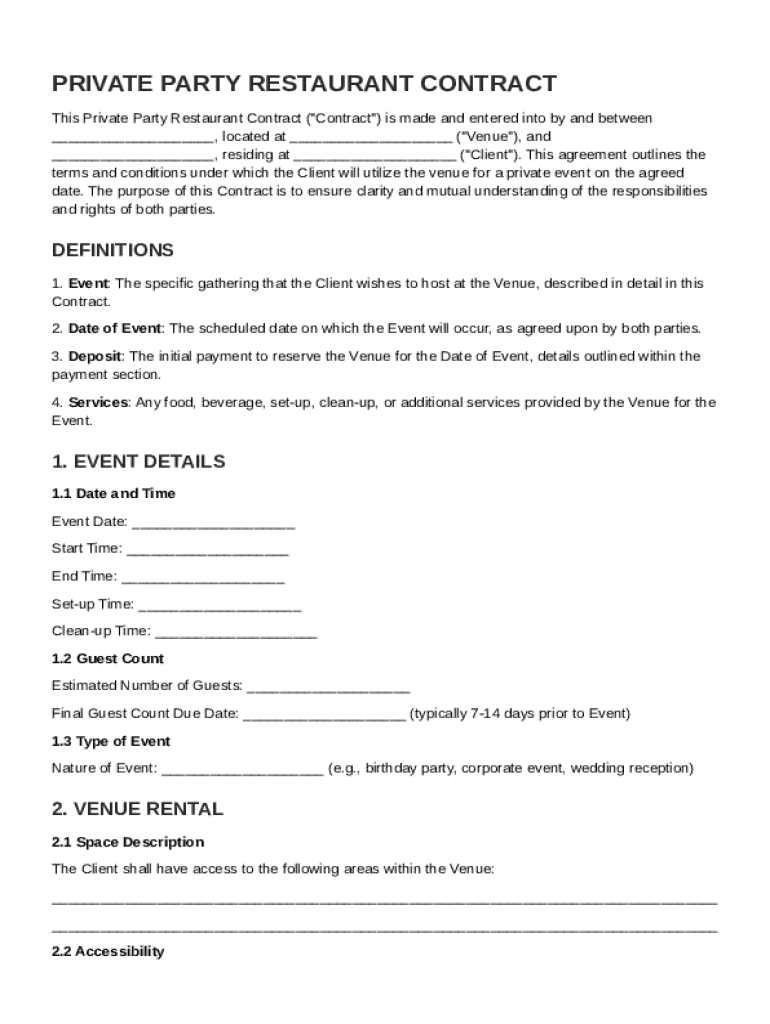
, residing at ("Client"). This agreement outlines the terms and conditions under which the Client will utilize the venue for a private event on the agreed date. The purpose of this Contract is to ensure clarity and mutual understanding of the responsibilities and rights of both parties. DEFINITIONS 1. Event: The specific gathering that the Client wishes to host at the Venue, described in detail in this Contract. 2. Date of Event: The scheduled date on which the.

Open form follow the instructions

Easily sign the form with your finger

Send filled & signed form or save
How to fill out and sign Private Party Restaurant Contract Template online?
Get your online template and fill it in using progressive features. Enjoy smart fillable fields and interactivity.Follow the simple instructions below:
Are you still seeking a quick and convenient solution to fill in Private Party Restaurant Contract Template at a reasonable cost? Our platform provides you with a wide selection of forms available for filling out on the internet. It only takes a few minutes.
Keep to these simple instructions to get Private Party Restaurant Contract Template completely ready for submitting:
- Find the document you will need in the collection of legal forms.
- Open the document in our online editing tool.
- Look through the recommendations to determine which information you must include.
- Choose the fillable fields and add the requested info.
- Add the date and insert your electronic signature when you fill in all of the fields.
- Examine the completed form for misprints and other mistakes. In case there?s a need to change something, the online editor along with its wide range of instruments are ready for your use.
- Save the resulting form to your computer by clicking Done.
- Send the electronic document to the intended recipient.
Filling in Private Party Restaurant Contract Template does not really have to be stressful any longer. From now on simply get through it from your home or at your business office from your mobile or desktop.
Tips on how to fill out, edit and sign Private Party Restaurant Contract Template online
How to fill and sign Private Party Restaurant Contract Template
Get your online template and fill it in using progressive features. Enjoy smart fillable fields and interactivity.Follow the simple instructions below:
Are you still seeking a quick and convenient solution to fill in Private Party Restaurant Contract Template at a reasonable cost? Our platform provides you with a wide selection of forms available for filling out on the internet. It only takes a few minutes.
Keep to these simple instructions to get Private Party Restaurant Contract Template completely ready for submitting:
- Find the document you will need in the collection of legal forms.
- Open the document in our online editing tool.
- Look through the recommendations to determine which information you must include.
- Choose the fillable fields and add the requested info.
- Add the date and insert your electronic signature when you fill in all of the fields.
- Examine the completed form for misprints and other mistakes. In case there?s a need to change something, the online editor along with its wide range of instruments are ready for your use.
- Save the resulting form to your computer by clicking Done.
- Send the electronic document to the intended recipient.
Filling in Private Party Restaurant Contract Template does not really have to be stressful any longer. From now on simply get through it from your home or at your business office from your mobile or desktop.
How to edit Private Party Restaurant Contract Template
Make the best use of our extensive online document editor while completing your forms. Complete the Private Party Restaurant Contract Template, emphasize on the most significant details, and easily make any other necessary adjustments to its content.
Completing documents electronically is not only time-saving but also comes with a possibility to modify the sample according to your requirements. If you’re about to work on Private Party Restaurant Contract Template, consider completing it with our robust online editing tools. Whether you make a typo or enter the requested details into the wrong field, you can quickly make changes to the document without the need to restart it from the beginning as during manual fill-out. Apart from that, you can point out the crucial data in your paperwork by highlighting particular pieces of content with colors, underlining them, or circling them.
Follow these quick and simple steps to complete and adjust your Private Party Restaurant Contract Template online:
- Open the form in the editor.
- Provide the required information in the empty areas using Text, Check, and Cross tools.
- Follow the document navigation to avoid missing any essential areas in the sample.
- Circle some of the significant details and add a URL to it if necessary.
- Use the Highlight or Line options to stress on the most significant facts.
- Decide on colors and thickness for these lines to make your sample look professional.
- Erase or blackout the data you don’t want to be visible to others.
- Replace pieces of content containing mistakes and type in text that you need.
- End up modifcations with the Done option as soon as you make certain everything is correct in the document.
Our powerful online solutions are the simplest way to fill out and modify Private Party Restaurant Contract Template in accordance with your requirements. Use it to prepare personal or business documents from anywhere. Open it in a browser, make any changes in your documents, and get back to them at any moment in the future - they all will be securely kept in the cloud.
How to fill and sign Private Party Restaurant Contract Template
Get your online template and fill it in using progressive features. Enjoy smart fillable fields and interactivity.Follow the simple instructions below:
Are you still seeking a quick and convenient solution to fill in Private Party Restaurant Contract Template at a reasonable cost? Our platform provides you with a wide selection of forms available for filling out on the internet. It only takes a few minutes.
Keep to these simple instructions to get Private Party Restaurant Contract Template completely ready for submitting:
- Find the document you will need in the collection of legal forms.
- Open the document in our online editing tool.
- Look through the recommendations to determine which information you must include.
- Choose the fillable fields and add the requested info.
- Add the date and insert your electronic signature when you fill in all of the fields.
- Examine the completed form for misprints and other mistakes. In case there?s a need to change something, the online editor along with its wide range of instruments are ready for your use.
- Save the resulting form to your computer by clicking Done.
- Send the electronic document to the intended recipient.
Filling in Private Party Restaurant Contract Template does not really have to be stressful any longer. From now on simply get through it from your home or at your business office from your mobile or desktop.
Experience a faster way to fill out and sign forms on the web. Access the most extensive library of templates available.
Related content
WHEREAS, Concessionaire wishes to operate all stages and aspects of the bar and restaurant...
Cause shall include, without limitation, a material violation of this Agreement by either...
Jul 19, 2019 — DARDEN RESTAURANTS, INC. (Exact name of Registrant as specified in its...
Get answers to your most pressing questions about US Legal Forms API.
How to write a private contract?
To write a private contract, start by identifying the parties involved and the specific terms of the agreement. A Private Party Restaurant Contract Template is an effective tool to help ensure you cover all necessary elements. Clearly outline rights and responsibilities, and verify that all parties understand the terms. Documenting everything accurately sets a solid foundation for a positive experience.
How do you write a private agreement?
Writing a private agreement requires clear communication of the terms agreed upon. Start by outlining the key points, then refer to a Private Party Restaurant Contract Template for guidance on structure and essential clauses. Ensure all parties sign the agreement and keep a copy for reference. This method helps eliminate any misunderstandings or disputes.
Can I draft a contract without a lawyer?
Yes, you can draft a contract without a lawyer. However, it’s advisable to use a Private Party Restaurant Contract Template, as it includes key legal language and provisions. This approach helps you create a robust contract that addresses various concerns, ensuring both parties understand their rights. However, if you're uncertain, seeking legal guidance can be beneficial.
How to write a party contract?
To write a party contract, first identify all necessary details, such as the event date, location, and services involved. Utilizing a Private Party Restaurant Contract Template simplifies this task by providing a well-organized format. Make sure to include specific terms that protect both parties, thus avoiding potential issues. Review the contract with all involved to ensure agreement on all aspects.
How to write a personal contract?
Writing a personal contract starts with clearly defining the agreement between parties. A Private Party Restaurant Contract Template serves as an excellent starting point, featuring essential elements tailored for private events. Ensure both parties understand their obligations and rights within the contract. It is also a good idea to review the completed contract together to address any final concerns.
How to fill out a contract agreement?
Filling out a contract agreement involves clearly writing the terms and obligations of both parties. Using a Private Party Restaurant Contract Template streamlines this process, as it includes specific sections to complete. Carefully read each section, ensuring you provide accurate information and definitions. Double-check for clarity to avoid misunderstandings.
Can I just make my own contract?
Yes, you can create your own contract. However, using a Private Party Restaurant Contract Template ensures you include all necessary legal elements. Templates provide guidance and ensure that you cover essential details, which reduces the risk of disputes later on. Relying on a template simplifies the contract process.
Can I write my own legal contract?
Yes, you can write your own legal contract, but it requires attention to detail and understanding of contract law. It’s essential to include all key components such as the parties involved, terms, conditions, and signatures. Using a Private Party Restaurant Contract Template can help ensure that you do not overlook any critical elements, making the process smoother.
How to get government contracts for catering?
To pursue government contracts for catering, start with research on local, state, and federal contracting opportunities. Register on government procurement websites and familiarize yourself with their requirements. A well-prepared Private Party Restaurant Contract Template can help you draft proposals that meet stringent guidelines effectively.
How can I get catering contracts?
To obtain catering contracts, focus on marketing to your target audience through social media, local events, and partnerships with venues. Offering promotions and samples can attract potential clients as well. With a Private Party Restaurant Contract Template, you can present a professional image that helps reassure clients about your services.
Use professional pre-built templates to fill in and sign documents online faster. Get access to thousands of forms.
If you believe that this page should be taken down, please follow our DMCA take down process here.