Loading
Form preview
  • US Legal Forms
  • Other Templates
  • More Forms
  • More Multi-State Forms
  • Private Lesson Contract Template

Get Private Lesson Contract Template

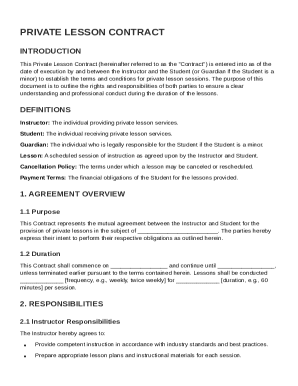
(or Guardian if the Student is a minor) to establish the terms and conditions for private lesson sessions. The purpose of this document is to outline the rights and responsibilities of both parties to ensure a clear understanding and professional conduct during the duration of the lessons. DEFINITIONS Instructor: The individual providing private lesson services. Student: The individual receiving private lesson services. Guardian: The individual who is legally responsible for the Student if the.

How it works

  1. Open form

    Open form follow the instructions

  2. Easily sign form

    Easily sign the form with your finger

  3. Share form

    Send filled & signed form or save

How to fill out and sign Private Lesson Contract Template online?

Get your online template and fill it in using progressive features. Enjoy smart fillable fields and interactivity.Follow the simple instructions below:

The preparing of legal documents can be costly and time-consuming. However, with our predesigned online templates, things get simpler. Now, creating a Private Lesson Contract Template takes no more than 5 minutes. Our state-specific web-based samples and simple guidelines eliminate human-prone faults.

Follow our simple actions to get your Private Lesson Contract Template prepared quickly:

  1. Select the web sample from the library.
  2. Enter all required information in the necessary fillable fields. The intuitive drag&drop interface makes it easy to add or relocate areas.
  3. Ensure everything is completed properly, without any typos or absent blocks.
  4. Use your e-signature to the page.
  5. Simply click Done to save the changes.
  6. Save the papers or print out your copy.
  7. Submit instantly to the recipient.

Make use of the fast search and powerful cloud editor to create a precise Private Lesson Contract Template. Get rid of the routine and make papers on the internet!

Tips on how to fill out, edit and sign Private Lesson Contract Template online

How to fill out and sign Private Lesson Contract Template online?

Get your online template and fill it in using progressive features. Enjoy smart fillable fields and interactivity.Follow the simple instructions below:

The preparing of legal documents can be costly and time-consuming. However, with our predesigned online templates, things get simpler. Now, creating a Private Lesson Contract Template takes no more than 5 minutes. Our state-specific web-based samples and simple guidelines eliminate human-prone faults.

Follow our simple actions to get your Private Lesson Contract Template prepared quickly:

  1. Select the web sample from the library.
  2. Enter all required information in the necessary fillable fields. The intuitive drag&drop interface makes it easy to add or relocate areas.
  3. Ensure everything is completed properly, without any typos or absent blocks.
  4. Use your e-signature to the page.
  5. Simply click Done to save the changes.
  6. Save the papers or print out your copy.
  7. Submit instantly to the recipient.

Make use of the fast search and powerful cloud editor to create a precise Private Lesson Contract Template. Get rid of the routine and make papers on the internet!

How to edit Private Lesson Contract Template: customize forms online

Have your stressless and paper-free way of working with Private Lesson Contract Template. Use our reliable online solution and save a lot of time.

Drafting every document, including Private Lesson Contract Template, from scratch takes too much time, so having a tried-and-tested solution of pre-drafted form templates can do wonders for your efficiency.

But working with them can be struggle, especially when it comes to the documents in PDF format. Luckily, our extensive library features a built-in editor that allows you to easily complete and edit Private Lesson Contract Template without leaving our website so that you don't need to lose hours executing your paperwork. Here's what to do with your document utilizing our solution:

  • Step 1. Find the needed form on our website.
  • Step 2. Hit Get Form to open it in the editor.
  • Step 3. Use our professional editing tools that let you insert, remove, annotate and highlight or blackout text.
  • Step 4. Generate and add a legally-binding signature to your document by using the sign option from the top toolbar.
  • Step 5. If the document layout doesn’t look the way you need it, use the tools on the right to remove, add more, and re-order pages.
  • step 6. Insert fillable fields so other parties can be invited to complete the document (if applicable).
  • Step 7. Pass around or send the document, print it out, or choose the format in which you’d like to get the document.

Whether you need to complete editable Private Lesson Contract Template or any other document available in our catalog, you’re well on your way with our online document editor. It's easy and secure and doesn’t require you to have particular tech background. Our web-based solution is designed to deal with virtually everything you can imagine when it comes to file editing and execution.

Forget about the outdated way of working with your forms. Go with a more efficient option to help you streamline your tasks and make them less dependent on paper.

Get form

Experience a faster way to fill out and sign forms on the web. Access the most extensive library of templates available.
Get form

Related content

INDEPENDENT CONTRACTOR AGREEMENT FOR ...
Aug 31, 2021 — 15.4 This Agreement and Contract Documents constitute the sole and entire...
Learn more
MUP Applied Lesson Policy and Agreement
MUP Applied Lesson Policy and Agreement. 1) Rate a. Private instructors will be paid at a...
Learn more
CURRICULUM FOR GRADES 6–8
Items Needed. • One copy of the MYPLATE OVERVIEW sheet for each student. • One copy of...
Learn more

Related links form

7 The Minor Parts Of Speech Key Concepts Minor Parts Of Speech Pronouns Articles Auxiliary Verbs Faculty Intellectual Property Release Form - Library Colostate-pueblo NICU Keeps Busy With Critically Ill Equine Neonates, Lots Of Happy Endings Pueblo Department Of Nursing - College Of Education, Engineering ... - Ceeps Colostate-pueblo

Questions & Answers

Get answers to your most pressing questions about US Legal Forms API.

Contact support

The five basic elements of a contract are offer, acceptance, consideration, capacity, and legality. Offer and acceptance establish mutual agreement, while consideration refers to what is exchanged. Understanding these elements is crucial, and a Private Lesson Contract Template can guide you in including all necessary components in your contracts.

Writing a simple contract agreement means being clear and straightforward with your terms. Begin by stating the parties involved, the purpose of the agreement, and any obligations or payments required. A Private Lesson Contract Template can make this process simpler by providing a framework for your agreement.

To write a basic contract agreement, start with a title that describes the agreement. Clearly state who is involved, outline the terms of engagement, and define payment arrangements. Incorporating a Private Lesson Contract Template can provide clarity and assist you in ensuring all key aspects are addressed.

A simple contract could involve an agreement between a tutor and a student for private lessons. It should specify the lesson details, including times, subjects, and payment terms. Utilizing a Private Lesson Contract Template can help you create such a straightforward contract with ease.

Yes, you can create your own contract, but it’s important to ensure it includes all necessary elements to be legally binding. Using a Private Lesson Contract Template can simplify this task, as it provides a framework that covers all essential points, ensuring that your contract is both effective and enforceable.

Writing a private agreement involves defining the purpose, outlining the roles of each party, and specifying the terms of the agreement. Include important elements like payment details, duration, and any special conditions. A Private Lesson Contract Template can provide a structured format to help you create a comprehensive agreement.

To write a short agreement, start by clearly stating the purpose of the contract. Next, identify the parties involved and outline the key terms, such as duration and payment. Using a Private Lesson Contract Template can streamline this process and ensure you cover essential elements in a concise manner.

Yes, private schools typically use contracts for their teachers. These contracts outline the responsibilities, compensation, and expectations for both the teacher and the school. A Private Lesson Contract Template can help ensure that all parties understand their commitments and protect their interests.

To write a private contract, start by identifying the type of agreement you need. Use clear and concise language to describe the terms, including obligations and penalties for breach. A Private Lesson Contract Template is useful, as it provides a ready-made structure that helps you focus on the key components of your agreement.

For a contract to be legally binding, it must have an offer, acceptance, consideration, and the intention to create legal relations. Each party must agree to the terms within the contract. A Private Lesson Contract Template can help ensure you include these essential elements, making your agreement valid and executable.

Get This Form Now!

Use professional pre-built templates to fill in and sign documents online faster. Get access to thousands of forms.
Get form
If you believe that this page should be taken down, please follow our DMCA take down processhere.
Get Private Lesson Contract Template
Get form
  • Adoption
  • Bankruptcy
  • Contractors
  • Divorce
  • Home Sales
  • Employment
  • Identity Theft
  • Incorporation
  • Landlord Tenant
  • Living Trust
  • Name Change
  • Personal Planning
  • Small Business
  • Wills & Estates
  • Packages A-Z
  • Affidavits
  • Bankruptcy
  • Bill of Sale
  • Corporate - LLC
  • Divorce
  • Employment
  • Identity Theft
  • Internet Technology
  • Landlord Tenant
  • Living Wills
  • Name Change
  • Power of Attorney
  • Real Estate
  • Small Estates
  • Wills
  • All Forms
  • Forms A-Z
  • Other Templates
  • Legal Hub
  • About Us
  • Help Portal
  • Legal Resources
  • Blog
  • Affiliates
  • Contact Us
  • Delete My Account
  • Site Map
  • Industries
  • Forms in Spanish
  • Localized Forms
  • State-specific Forms
  • Forms Kit
  • Real Estate Handbook
  • All Guides
  • Notarize
  • Incorporation services
  • For Consumers
  • For Small Business
  • For Attorneys
  • USLegal
  • FormsPass
  • pdfFiller
  • signNow
  • altaFlow
  • DocHub
  • Instapage
Form Packages
  • Adoption
  • Bankruptcy
  • Contractors
  • Divorce
  • Home Sales
  • Employment
  • Identity Theft
  • Incorporation
  • Landlord Tenant
  • Living Trust
  • Name Change
  • Personal Planning
  • Small Business
  • Wills & Estates
  • Packages A-Z
Form Categories
  • Affidavits
  • Bankruptcy
  • Bill of Sale
  • Corporate - LLC
  • Divorce
  • Employment
  • Identity Theft
  • Internet Technology
  • Landlord Tenant
  • Living Wills
  • Name Change
  • Power of Attorney
  • Real Estate
  • Small Estates
  • Wills
  • All Forms
  • Forms A-Z
  • Other Templates
Customer Service
  • Legal Hub
  • About Us
  • Help Portal
  • Legal Resources
  • Blog
  • Affiliates
  • Contact Us
  • Delete My Account
  • Site Map
  • Industries
  • Forms in Spanish
  • Localized Forms
  • State-specific Forms
  • Forms Kit
Legal Guides
  • Real Estate Handbook
  • All Guides
Prepared for you
  • Notarize
  • Incorporation services
Our Customers
  • For Consumers
  • For Small Business
  • For Attorneys
Our Sites
  • USLegal
  • FormsPass
  • pdfFiller
  • signNow
  • altaFlow
  • DocHub
  • Instapage
Social Media
Call us now toll free:
+1 833 426 79 33
As seen in:
© Copyright 1999-2026 airSlate Legal Forms, Inc. 17 Station Street, Ste. 203, Brookline, MA 02445
  • Your Privacy Choices
  • Terms of Service
  • Privacy Notice
  • Content Takedown Policy
  • Bug Bounty Program