Loading
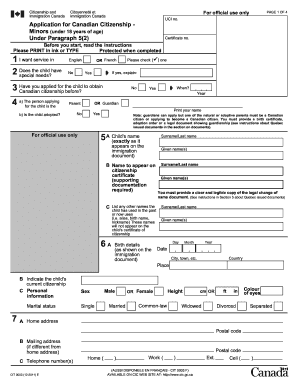
Get Canada Cit 0003 E 2011
How it works
-

Open form follow the instructions
-

Easily sign the form with your finger
-

Send filled & signed form or save
How to fill out the Canada CIT 0003 E online
Filling out the Canada CIT 0003 E form is an important step for individuals applying for Canadian citizenship on behalf of minors. This guide offers you a comprehensive and accessible approach to completing the application accurately and efficiently.
Follow the steps to successfully complete the Canada CIT 0003 E form.
- Click ‘Get Form’ button to obtain the form and open it in the editor.
- Begin by selecting your preferred language for service: English or French. Indicate if the child has special needs by selecting 'Yes' or 'No' and providing explanations if necessary.
- Provide details if you have previously applied for Canadian citizenship for the child. Indicate 'Yes' or 'No', and if yes, specify when.
- In Section 4, identify your relationship to the child—select 'Parent' or 'Guardian'. Furthermore, indicate if the child is adopted by checking 'Yes' or 'No'.
- Fill in the child’s name exactly as it appears on their immigration document, including surname and given name(s). Also, provide the name that should appear on the citizenship certificate.
- List any other names the child might currently use or have previously used.
- In Section 6, provide the child’s birth details exactly as per the immigration document, including surname, given name(s), date, place, and country of birth.
- Complete Section 7 with the child’s current citizenship status and personal information, including marital status and physical attributes.
- In Section 8, provide information about the child’s parents, including names, countries of birth, Canadian citizenship status, and any relevant details.
- For Section 9, indicate when the child became a permanent resident of Canada and details regarding their travel history outside Canada. If applicable, provide precise information.
- In Section 10, go through the prohibitions under the Citizenship Act. Confirm if any apply to the child by selecting 'Yes' or 'No' and provide any necessary details.
- Sign and date the application in Section 11. If the child is 14 years or older, they must also provide their signature.
- Finally, gather all required documents as outlined in the document checklist provided and ensure that everything is completed before submitting.
Submit your application online now for a smooth and successful process.
Get form
Experience a faster way to fill out and sign forms on the web. Access the most extensive library of templates available.
To obtain a biometric instruction letter in Canada, you must first apply for a specific visa or immigration program that requires biometrics. After submitting your application, you will receive the letter, detailing where and when to provide your biometric information. For assistance, the Canada CIT 0003 E can outline the necessary steps and provide relevant forms to streamline your experience.
Get This Form Now!
Use professional pre-built templates to fill in and sign documents online faster. Get access to thousands of forms.