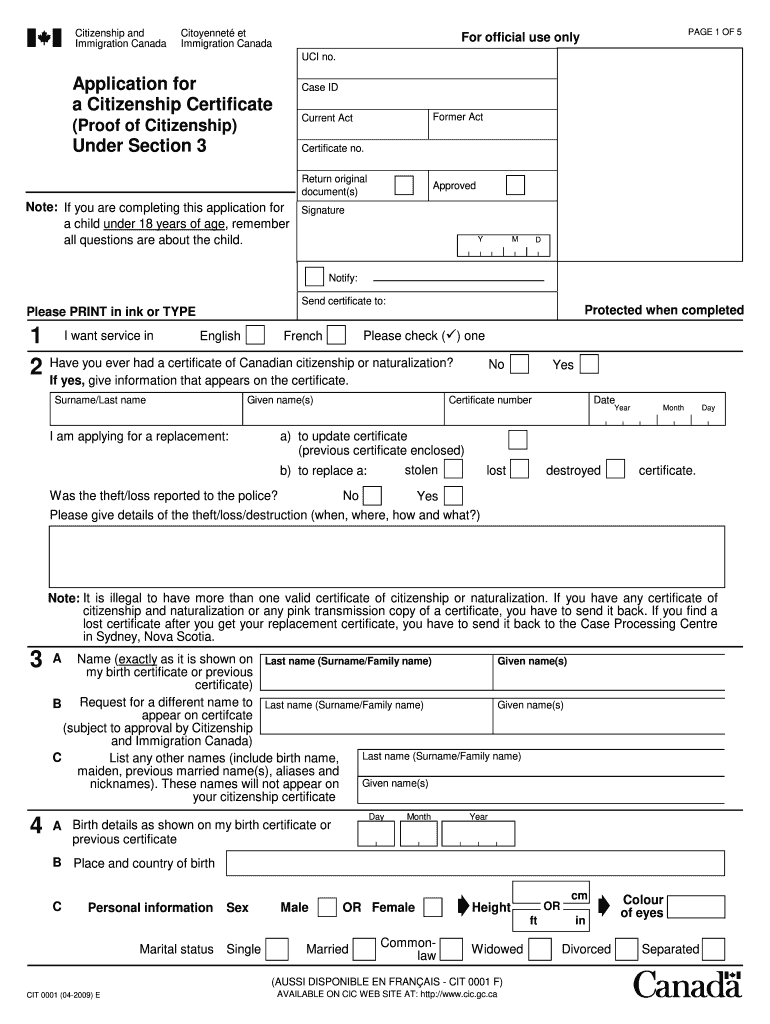
Fillable Form Citizenship and Immigration Canada Citoyennet et Immigration Canada PAGE 1 OF 5 For official use only UCI no. Application for a Citizenship Certificate Case ID Former Act Current Act.
Loading

Open form follow the instructions

Easily sign the form with your finger

Send filled & signed form or save
How to fill out the Canada CIT 0001 E online
Filling out the Canada CIT 0001 E form is a critical step in the application process for obtaining a citizenship certificate. This guide provides clear, step-by-step instructions tailored to assist users with varying levels of experience in completing the form accurately and effectively.
Follow the steps to fill out the Canada CIT 0001 E online.
- Click ‘Get Form’ button to obtain the form and open it in the editor.
- Begin by selecting your preferred language of service; check either the English or French box.
- Indicate if you have previously held a Canadian citizenship or naturalization certificate by selecting 'Yes' or 'No' and provide the required details if applicable.
- Complete the birth details section by providing your name, birth date, and place of birth exactly as they appear on your birth certificate or previous certificate.
- If requesting a different name to appear on your certificate, fill out the relevant section with your desired last name and given name(s).
- List any other names you have used in the past, such as aliases or maiden names, ensuring these will not appear on your citizenship certificate.
- Provide your personal information, including sex, marital status, height, and eye color.
- If applicable, answer questions regarding marriages before January 1, 1947, including your husband's information and citizenship status.
- Indicate any other nationalities you hold or have held and provide details of absences from Canada.
- Complete the section regarding your parents, answering questions about their citizenship status and any relevant historical information.
- If applicable, provide information regarding your grandparents' citizenship status at the time of your birth.
- State whether you have ever lived in Canada and provide the date you entered Canada if applicable.
- Read and sign the declaration at the end of the form to confirm the information is accurate. If under 14 years of age, a parent or guardian must sign.
- Finally, review the completed form and ensure all required information is included before saving changes, downloading, or sharing the form as needed.
Complete your Canada CIT 0001 E online for a smooth process and to efficiently submit your application.
Experience a faster way to fill out and sign forms on the web. Access the most extensive library of templates available.
Related content
Jul 12, 2024 — The regulation explains that units to which a cash deposit rate may be...
by IES por Descrição · Cited by 2 — Australia, Canada, Europe and the United States...
This manual explains the operation of this system. Please read this manual carefully to...
Get answers to your most pressing questions about US Legal Forms API.
What forms do I need to fill out to enter Canada?
To enter Canada, you need to complete specific forms, including the Canada Customs Declaration and any additional health-related forms. Depending on your situation, you may also need the Canada CIT 0001 E form. Seeking assistance from USLegalForms can help you navigate these requirements effectively.
Do US citizens need to fill out ArriveCAN?
Yes, US citizens are required to fill out ArriveCAN when entering Canada. This app collects information necessary for health screening and entry into the country. Be sure to complete this requirement alongside your Canada CIT 0001 E form to ensure a smooth entry process.
Can you fill out customs form online for Canada?
Yes, you can fill out the customs form online for Canada, making the process more convenient. This online option allows you to provide your information ahead of time, which can save you time upon arrival. Utilize platforms like USLegalForms for guidance on filling out the Canada CIT 0001 E and related forms.
What form do I need to fill out when returning to Canada?
When returning to Canada, you typically need to fill out the Canada Customs Declaration form. This form will ask about your travel details and any goods you are bringing back. It is essential to have this completed accurately to avoid delays at the border, and resources are available to assist you with the Canada CIT 0001 E form.
How to fill Canada Express Entry form?
Filling out the Canada Express Entry form involves providing detailed information about your skills, work experience, and education. You can simplify this process by using online resources or legal template services, such as USLegalForms, to ensure your information is complete and accurate. Completing the Canada CIT 0001 E form correctly is crucial for your immigration journey.
Can I become a Canadian citizen if my grandfather was born there?
Yes, you may be eligible for Canadian citizenship if your grandfather was born in Canada. This is possible under the Citizenship Act, which allows certain individuals to claim citizenship through their Canadian parents or grandparents. To explore this option, you will need to review the requirements and potentially apply using the Canada CIT 0001 E form.
How do I get a biometric instruction letter in Canada?
In Canada, to get a biometric instruction letter, you first need to submit an application for immigration or a visa. If your application requires biometrics, the relevant authorities will send you a letter with instructions on how to proceed. Utilizing services like USLegalForms can help you prepare your application correctly, reducing the chance of delays.
How do I get an electronic travel authorization for Canada?
To get an electronic travel authorization (eTA) for Canada, you must apply online through the official Government of Canada website. You will need a valid passport, an email address, and a credit card for payment. USLegalForms can guide you through the application and ensure you have all the necessary information to secure your eTA smoothly.
How do I get proof of single status in Canada?
In Canada, obtaining proof of single status involves requesting a single status declaration from your provincial vital statistics office. You will need to provide identification and complete any required application forms. Platforms like USLegalForms can help you navigate this process, making it easier to gather the necessary documentation.
How do I get proof that I am single?
To get proof that you are single, you generally need to obtain a single status certificate or declaration from the relevant authority in your area. This document serves as legal proof of your marital status and may be necessary for various situations. Consider visiting USLegalForms for comprehensive resources and assistance in acquiring the required forms.
Use professional pre-built templates to fill in and sign documents online faster. Get access to thousands of forms.
If you believe that this page should be taken down, please follow our DMCA take down process here.
This form is available in several versions. Select the version you need from the drop-down list below.