Loading
Form preview
  • US Legal Forms
  • Other Templates
  • More Forms
  • More Multi-State Forms
  • Motion Graphics Contract Template

Get Motion Graphics Contract Template

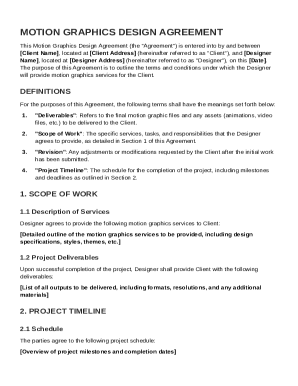
Ent"), and Designer Name , located at Designer Address (hereinafter referred to as "Designer"), on this Date . The purpose of this Agreement is to outline the terms and conditions under which the Designer will provide motion graphics services for the Client. DEFINITIONS For the purposes of this Agreement, the following terms shall have the meanings set forth below: 1. "Deliverables": Refers to the final motion graphic files and any assets (animations, video files, etc.) to be delivered to.

How it works

  1. Open form

    Open form follow the instructions

  2. Easily sign form

    Easily sign the form with your finger

  3. Share form

    Send filled & signed form or save

How to fill out and sign Motion Graphics Contract Template online?

Get your online template and fill it in using progressive features. Enjoy smart fillable fields and interactivity.Follow the simple instructions below:

The prep of lawful papers can be expensive and time-consuming. However, with our pre-built online templates, things get simpler. Now, creating a Motion Graphics Contract Template requires not more than 5 minutes. Our state browser-based blanks and complete guidelines eradicate human-prone faults.

Follow our easy steps to get your Motion Graphics Contract Template prepared quickly:

  1. Select the web sample in the library.
  2. Type all necessary information in the necessary fillable areas. The easy-to-use drag&drop interface allows you to add or relocate fields.
  3. Make sure everything is filled in properly, with no typos or absent blocks.
  4. Place your electronic signature to the PDF page.
  5. Simply click Done to confirm the alterations.
  6. Download the data file or print out your PDF version.
  7. Distribute immediately towards the recipient.

Use the quick search and innovative cloud editor to create a correct Motion Graphics Contract Template. Get rid of the routine and create papers online!

Tips on how to fill out, edit and sign Motion Graphics Contract Template online

How to fill out and sign Motion Graphics Contract Template online?

Get your online template and fill it in using progressive features. Enjoy smart fillable fields and interactivity.Follow the simple instructions below:

The prep of lawful papers can be expensive and time-consuming. However, with our pre-built online templates, things get simpler. Now, creating a Motion Graphics Contract Template requires not more than 5 minutes. Our state browser-based blanks and complete guidelines eradicate human-prone faults.

Follow our easy steps to get your Motion Graphics Contract Template prepared quickly:

  1. Select the web sample in the library.
  2. Type all necessary information in the necessary fillable areas. The easy-to-use drag&drop interface allows you to add or relocate fields.
  3. Make sure everything is filled in properly, with no typos or absent blocks.
  4. Place your electronic signature to the PDF page.
  5. Simply click Done to confirm the alterations.
  6. Download the data file or print out your PDF version.
  7. Distribute immediately towards the recipient.

Use the quick search and innovative cloud editor to create a correct Motion Graphics Contract Template. Get rid of the routine and create papers online!

How to edit Motion Graphics Contract Template: customize forms online

Approve and share Motion Graphics Contract Template together with any other business and personal documents online without wasting time and resources on printing and postal delivery. Get the most out of our online form editor using a built-in compliant eSignature option.

Signing and submitting Motion Graphics Contract Template documents electronically is quicker and more efficient than managing them on paper. However, it requires utilizing online solutions that ensure a high level of data security and provide you with a certified tool for creating electronic signatures. Our robust online editor is just the one you need to prepare your Motion Graphics Contract Template and other personal and business or tax templates in an accurate and proper way in line with all the requirements. It features all the necessary tools to easily and quickly complete, adjust, and sign paperwork online and add Signature fields for other people, specifying who and where should sign.

It takes only a few simple actions to fill out and sign Motion Graphics Contract Template online:

  1. Open the selected file for further managing.
  2. Utilize the upper toolbar to add Text, Initials, Image, Check, and Cross marks to your template.
  3. Underline the important details and blackout or remove the sensitive ones if required.
  4. Click on the Sign option above and decide on how you prefer to eSign your sample.
  5. Draw your signature, type it, upload its picture, or use another option that suits you.
  6. Move to the Edit Fillable Fileds panel and drop Signature areas for other parties.
  7. Click on Add Signer and provide your recipient’s email to assign this field to them.
  8. Make sure that all data provided is complete and correct before you click Done.
  9. Share your form with others using one of the available options.

When approving Motion Graphics Contract Template with our comprehensive online editor, you can always be sure to get it legally binding and court-admissible. Prepare and submit paperwork in the most beneficial way possible!

Get form

Experience a faster way to fill out and sign forms on the web. Access the most extensive library of templates available.
Get form

Related content

VIDEO PRODUCTION AGREEMENT
Producer agrees that the delivered videos (“Deliverables”) constitute audio and visual...
Learn more
PROFESSIONAL/CONSULTING SERVICES AGREEMENT
Use this template ... Contractor will coordinate with the SFASU Webmaster to ensure that...
Learn more
Motion 4 User Manual
... CONTRACT, STRICT LIABILITY, OR TORT (INCLUDING ... The tools commonly used for motion...
Learn more

Related links form

2004-2006 - California State University, Fresno - Fresnostate Ed D-EmployerSupport 12/13 Parent Additional Income Verification Bulk Mailing Service Request - California State University, East Bay

Questions & Answers

Get answers to your most pressing questions about US Legal Forms API.

Contact support

Creating a graphic design contract involves outlining the scope of the work, timelines, and payment details. Start by identifying the specific services you will provide, and ensure both parties agree on terms. Using a Motion Graphics Contract Template can simplify this process, as it includes essential clauses to protect both you and your client. Make sure to customize the template to suit the unique needs of your project.

Exporting a motion graphics template involves selecting the composition you wish to export in your software. Then, navigate to the export settings and choose 'Export as Motion Graphics Template' option. This process allows you to save your adaptations, making it easy to reuse the elements later. Be sure to reference your Motion Graphics Contract Template when sharing your work to clarify usage rights.

Yes, graphic designers typically use contracts to safeguard their work and outline the terms of their services. Contracts clarify expectations, timelines, and deliverables, ensuring all parties are aligned. By utilizing a Motion Graphics Contract Template, designers can streamline the process and focus on their creative work while feeling confident that their rights and interests are protected.

A simple contract agreement should cover the essential terms of the arrangement, including parties involved, services rendered, payment structure, and duration. Keep the language clear and concise to ensure both parties understand their responsibilities. You can benefit from a Motion Graphics Contract Template, which provides a ready-to-use format and helps you avoid overlooking important details.

Writing a graphic design contract involves detailing the project requirements, timelines, and payment terms. Ensure you include usage rights and ownership details to avoid disputes later. Utilizing a Motion Graphics Contract Template can streamline this process by providing a comprehensive structure and essential clauses. This helps in maintaining clarity and professionalism.

While not an absolute statistic, many graphic designers do operate as freelancers, enjoying the flexibility it offers. Freelancing allows designers to take on diverse projects, including motion graphics work. With a Motion Graphics Contract Template, freelancers protect their interests by clearly defining terms with clients. This approach leads to a more professional relationship.

To write a simple contract template, begin with essential sections such as the introduction, scope of work, payment details, and termination clauses. Use straightforward language to ensure that all parties understand their obligations. A Motion Graphics Contract Template is a great resource to reference, as it already includes these crucial elements, making the task easier.

When writing a contract for videography, start by outlining the scope of work and services to be provided. Clearly define deliverables, timelines, and payment terms. Including a Motion Graphics Contract Template can simplify this process by providing a framework for the necessary sections. This clarity minimizes misunderstandings and ensures satisfaction for both parties.

Get This Form Now!

Use professional pre-built templates to fill in and sign documents online faster. Get access to thousands of forms.
Get form
If you believe that this page should be taken down, please follow our DMCA take down processhere.
Get Motion Graphics Contract Template
Get form
  • Adoption
  • Bankruptcy
  • Contractors
  • Divorce
  • Home Sales
  • Employment
  • Identity Theft
  • Incorporation
  • Landlord Tenant
  • Living Trust
  • Name Change
  • Personal Planning
  • Small Business
  • Wills & Estates
  • Packages A-Z
  • Affidavits
  • Bankruptcy
  • Bill of Sale
  • Corporate - LLC
  • Divorce
  • Employment
  • Identity Theft
  • Internet Technology
  • Landlord Tenant
  • Living Wills
  • Name Change
  • Power of Attorney
  • Real Estate
  • Small Estates
  • Wills
  • All Forms
  • Forms A-Z
  • Other Templates
  • Legal Hub
  • About Us
  • Help Portal
  • Legal Resources
  • Blog
  • Affiliates
  • Contact Us
  • Delete My Account
  • Site Map
  • Industries
  • Forms in Spanish
  • Localized Forms
  • State-specific Forms
  • Forms Kit
  • Real Estate Handbook
  • All Guides
  • Notarize
  • Incorporation services
  • For Consumers
  • For Small Business
  • For Attorneys
  • USLegal
  • FormsPass
  • pdfFiller
  • signNow
  • altaFlow
  • DocHub
  • Instapage
Form Packages
  • Adoption
  • Bankruptcy
  • Contractors
  • Divorce
  • Home Sales
  • Employment
  • Identity Theft
  • Incorporation
  • Landlord Tenant
  • Living Trust
  • Name Change
  • Personal Planning
  • Small Business
  • Wills & Estates
  • Packages A-Z
Form Categories
  • Affidavits
  • Bankruptcy
  • Bill of Sale
  • Corporate - LLC
  • Divorce
  • Employment
  • Identity Theft
  • Internet Technology
  • Landlord Tenant
  • Living Wills
  • Name Change
  • Power of Attorney
  • Real Estate
  • Small Estates
  • Wills
  • All Forms
  • Forms A-Z
  • Other Templates
Customer Service
  • Legal Hub
  • About Us
  • Help Portal
  • Legal Resources
  • Blog
  • Affiliates
  • Contact Us
  • Delete My Account
  • Site Map
  • Industries
  • Forms in Spanish
  • Localized Forms
  • State-specific Forms
  • Forms Kit
Legal Guides
  • Real Estate Handbook
  • All Guides
Prepared for you
  • Notarize
  • Incorporation services
Our Customers
  • For Consumers
  • For Small Business
  • For Attorneys
Our Sites
  • USLegal
  • FormsPass
  • pdfFiller
  • signNow
  • altaFlow
  • DocHub
  • Instapage
Social Media
Call us now toll free:
+1 833 426 79 33
As seen in:
© Copyright 1999-2026 airSlate Legal Forms, Inc. 17 Station Street, Ste. 203, Brookline, MA 02445
  • Your Privacy Choices
  • Terms of Service
  • Privacy Notice
  • Content Takedown Policy
  • Bug Bounty Program