Loading
Form preview
  • US Legal Forms
  • Other Templates
  • More Forms
  • More Multi-State Forms
  • Paid In Full Contract Template

Get Paid In Full Contract Template

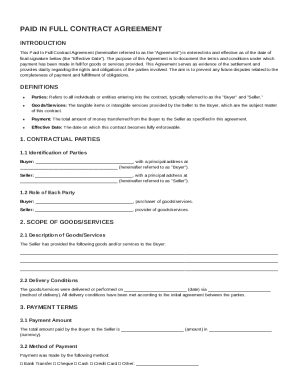
Signature below (the "Effective Date"). The purpose of this Agreement is to document the terms and conditions under which payment has been made in full for goods or services provided. This Agreement serves as evidence of the settlement and provides clarity regarding the rights and obligations of the parties involved. The aim is to prevent any future disputes related to the completeness of payment and fulfillment of obligations. DEFINITIONS Parties: Refers to all individuals or entities entering.

How it works

  1. Open form

    Open form follow the instructions

  2. Easily sign form

    Easily sign the form with your finger

  3. Share form

    Send filled & signed form or save

How to fill out and sign Paid In Full Contract Template online?

Get your online template and fill it in using progressive features. Enjoy smart fillable fields and interactivity.Follow the simple instructions below:

Experience all the benefits of completing and submitting documents on the internet. Using our solution filling out Paid In Full Contract Template usually takes a few minutes. We make that achievable by offering you access to our full-fledged editor capable of transforming/fixing a document?s initial textual content, adding special boxes, and putting your signature on.

Fill out Paid In Full Contract Template in several clicks by using the recommendations below:

  1. Choose the template you will need from our collection of legal forms.
  2. Select the Get form button to open it and start editing.
  3. Submit all of the necessary fields (these are yellow-colored).
  4. The Signature Wizard will enable you to add your electronic signature right after you?ve finished imputing information.
  5. Put the relevant date.
  6. Check the entire form to ensure you?ve completed everything and no changes are required.
  7. Hit Done and save the resulting form to your gadget.

Send the new Paid In Full Contract Template in an electronic form as soon as you finish filling it out. Your data is well-protected, as we keep to the latest security criteria. Join numerous satisfied users who are already filling in legal forms right from their homes.

Tips on how to fill out, edit and sign Paid In Full Contract Template online

How to fill out and sign Paid In Full Contract Template online?

Get your online template and fill it in using progressive features. Enjoy smart fillable fields and interactivity.Follow the simple instructions below:

Experience all the benefits of completing and submitting documents on the internet. Using our solution filling out Paid In Full Contract Template usually takes a few minutes. We make that achievable by offering you access to our full-fledged editor capable of transforming/fixing a document?s initial textual content, adding special boxes, and putting your signature on.

Fill out Paid In Full Contract Template in several clicks by using the recommendations below:

  1. Choose the template you will need from our collection of legal forms.
  2. Select the Get form button to open it and start editing.
  3. Submit all of the necessary fields (these are yellow-colored).
  4. The Signature Wizard will enable you to add your electronic signature right after you?ve finished imputing information.
  5. Put the relevant date.
  6. Check the entire form to ensure you?ve completed everything and no changes are required.
  7. Hit Done and save the resulting form to your gadget.

Send the new Paid In Full Contract Template in an electronic form as soon as you finish filling it out. Your data is well-protected, as we keep to the latest security criteria. Join numerous satisfied users who are already filling in legal forms right from their homes.

How to edit Paid In Full Contract Template: customize forms online

Make the most of our powerful online document editor while preparing your paperwork. Fill out the Paid In Full Contract Template, point out the most significant details, and easily make any other essential adjustments to its content.

Completing documents electronically is not only time-saving but also gives a possibility to alter the sample according to your requirements. If you’re about to work on Paid In Full Contract Template, consider completing it with our robust online editing solutions. Whether you make a typo or enter the requested details into the wrong area, you can instantly make adjustments to the form without the need to restart it from the beginning as during manual fill-out. Apart from that, you can point out the essential data in your paperwork by highlighting particular pieces of content with colors, underlining them, or circling them.

Adhere to these simple and quick steps to fill out and edit your Paid In Full Contract Template online:

  1. Open the file in the editor.
  2. Type in the required information in the empty fields using Text, Check, and Cross tools.
  3. Adhere to the document navigation not to miss any required fields in the sample.
  4. Circle some of the significant details and add a URL to it if necessary.
  5. Use the Highlight or Line tools to point out the most significant pieces of content.
  6. Choose colors and thickness for these lines to make your sample look professional.
  7. Erase or blackout the facts you don’t want to be visible to other people.
  8. Substitute pieces of content containing errors and type in text that you need.
  9. End up modifcations with the Done button when you make sure everything is correct in the document.

Our extensive online solutions are the most effective way to fill out and customize Paid In Full Contract Template in accordance with your needs. Use it to manage personal or business documents from anyplace. Open it in a browser, make any changes in your forms, and get back to them at any moment in the future - they all will be safely kept in the cloud.

Get form

Experience a faster way to fill out and sign forms on the web. Access the most extensive library of templates available.
Get form

Related content

Payment Plan Sample
This agreement between debtor name and the agency name is made for the purpose of paying...
Learn more
Sample Independent Contractor Agreement This...
In consideration for the services to be performed by Contractor, Client agrees to pay...
Learn more
12 Essential Elements Of A Solid Consulting...
Mar 24, 2022 — Discover the essential components of a robust consulting agreement. Learn...
Learn more

Related links form

Information And Printable Donation Form - Albertsons Library - Boise ... APPLICATION FOR ADMISSION - Biola University Release Form - Biola Youth - Biola University - Youth Biola WACJ Membership Form - New Member Or Renewal - Boise State ...

Questions & Answers

Get answers to your most pressing questions about US Legal Forms API.

Contact support

When writing a payment plan agreement template, begin by detailing the total amount owed and breaking it down into manageable installments. Specify payment due dates and acceptable methods of payment. A well-structured Paid In Full Contract Template can offer a clear framework for this agreement, enhancing understanding between parties.

To make a payment agreement, define the total amount due and outline the payment schedule, including any terms for late payments. Incorporate the parties' signatures to formalize the agreement. Utilizing a Paid In Full Contract Template can streamline this process, ensuring all critical elements are addressed.

For a simple payment contract, begin with the title and introduce the parties involved. Clearly state the payment amount, schedule, and terms, such as due dates and acceptable payment methods. This straightforward approach creates a clear Paid In Full Contract Template that both parties can easily follow.

When writing payment terms in a contract, emphasize clarity and precision. Specify the total amount, payment schedule, and options for payment methods. This ensures both parties understand their obligations, making your Paid In Full Contract Template both effective and user-friendly.

To write up a contract for payment, start by clearly stating the parties involved and the specific amount due. Next, outline the payment schedule, including due dates and acceptable payment methods. Lastly, include terms for late payments or breaches, ensuring you have a comprehensive Paid In Full Contract Template that protects everyone's interests.

To fill out an employment contract template, enter the details of the employer and employee, job title, and compensation. Clearly outline the duties, responsibilities, and any payment terms. A Paid In Full Contract Template can serve as a model for outlining compensation structures effectively.

To write a letter confirming proof of payment, start by including your name and address, followed by the recipient’s details. Clearly state the payment amount, date, and method used. Finally, mention that this letter serves as proof of payment for the specific transaction, linking it to your Paid In Full Contract Template if necessary.

Filling out a contract agreement begins with understanding the purpose of the contract. Enter all relevant details, including names, dates, and specific terms of the agreement. Be sure to review the clauses carefully before signing. Using a Paid In Full Contract Template can simplify this task, ensuring you include all essential elements.

To write a contract of payment, begin by clearly outlining the terms and conditions between the parties involved. Make sure to include relevant details such as payment amounts, due dates, and the total amount owed. A Paid In Full Contract Template can greatly simplify this process by providing a structured format that covers all essential elements, ensuring clarity and mutual understanding.

Get This Form Now!

Use professional pre-built templates to fill in and sign documents online faster. Get access to thousands of forms.
Get form
If you believe that this page should be taken down, please follow our DMCA take down processhere.
Get Paid In Full Contract Template
Get form
  • Adoption
  • Bankruptcy
  • Contractors
  • Divorce
  • Home Sales
  • Employment
  • Identity Theft
  • Incorporation
  • Landlord Tenant
  • Living Trust
  • Name Change
  • Personal Planning
  • Small Business
  • Wills & Estates
  • Packages A-Z
  • Affidavits
  • Bankruptcy
  • Bill of Sale
  • Corporate - LLC
  • Divorce
  • Employment
  • Identity Theft
  • Internet Technology
  • Landlord Tenant
  • Living Wills
  • Name Change
  • Power of Attorney
  • Real Estate
  • Small Estates
  • Wills
  • All Forms
  • Forms A-Z
  • Other Templates
  • Legal Hub
  • About Us
  • Help Portal
  • Legal Resources
  • Blog
  • Affiliates
  • Contact Us
  • Delete My Account
  • Site Map
  • Industries
  • Forms in Spanish
  • Localized Forms
  • State-specific Forms
  • Forms Kit
  • Real Estate Handbook
  • All Guides
  • Notarize
  • Incorporation services
  • For Consumers
  • For Small Business
  • For Attorneys
  • USLegal
  • FormsPass
  • pdfFiller
  • signNow
  • altaFlow
  • DocHub
  • Instapage
Form Packages
  • Adoption
  • Bankruptcy
  • Contractors
  • Divorce
  • Home Sales
  • Employment
  • Identity Theft
  • Incorporation
  • Landlord Tenant
  • Living Trust
  • Name Change
  • Personal Planning
  • Small Business
  • Wills & Estates
  • Packages A-Z
Form Categories
  • Affidavits
  • Bankruptcy
  • Bill of Sale
  • Corporate - LLC
  • Divorce
  • Employment
  • Identity Theft
  • Internet Technology
  • Landlord Tenant
  • Living Wills
  • Name Change
  • Power of Attorney
  • Real Estate
  • Small Estates
  • Wills
  • All Forms
  • Forms A-Z
  • Other Templates
Customer Service
  • Legal Hub
  • About Us
  • Help Portal
  • Legal Resources
  • Blog
  • Affiliates
  • Contact Us
  • Delete My Account
  • Site Map
  • Industries
  • Forms in Spanish
  • Localized Forms
  • State-specific Forms
  • Forms Kit
Legal Guides
  • Real Estate Handbook
  • All Guides
Prepared for you
  • Notarize
  • Incorporation services
Our Customers
  • For Consumers
  • For Small Business
  • For Attorneys
Our Sites
  • USLegal
  • FormsPass
  • pdfFiller
  • signNow
  • altaFlow
  • DocHub
  • Instapage
Social Media
Call us now toll free:
+1 833 426 79 33
As seen in:
© Copyright 1999-2026 airSlate Legal Forms, Inc. 17 Station Street, Ste. 203, Brookline, MA 02445
  • Your Privacy Choices
  • Terms of Service
  • Privacy Notice
  • Content Takedown Policy
  • Bug Bounty Program